Data Validation Testing: 10 Techniques With Practical Examples
Data Validation Testing: 10 Techniques With Practical Examples
Data Validation Testing: 10 Techniques With Practical Examples

Santiago Viquez
Santiago Viquez
DevRel at Soda
DevRel at Soda
Table of Contents
Data validation testing is the practice of checking whether your data matches expectations before it reaches dashboards, machine learning models, customer-facing apps, or downstream systems. It prevents “silent failures” like missing IDs, duplicate records, broken joins, or out-of-range values that can quietly distort reporting and decision-making.
In this guide, you’ll learn:
The 10 most important data validation techniques.
When to use each validation method.
What types of failures each technique catches.
How to implement automated validation using Data Contracts.
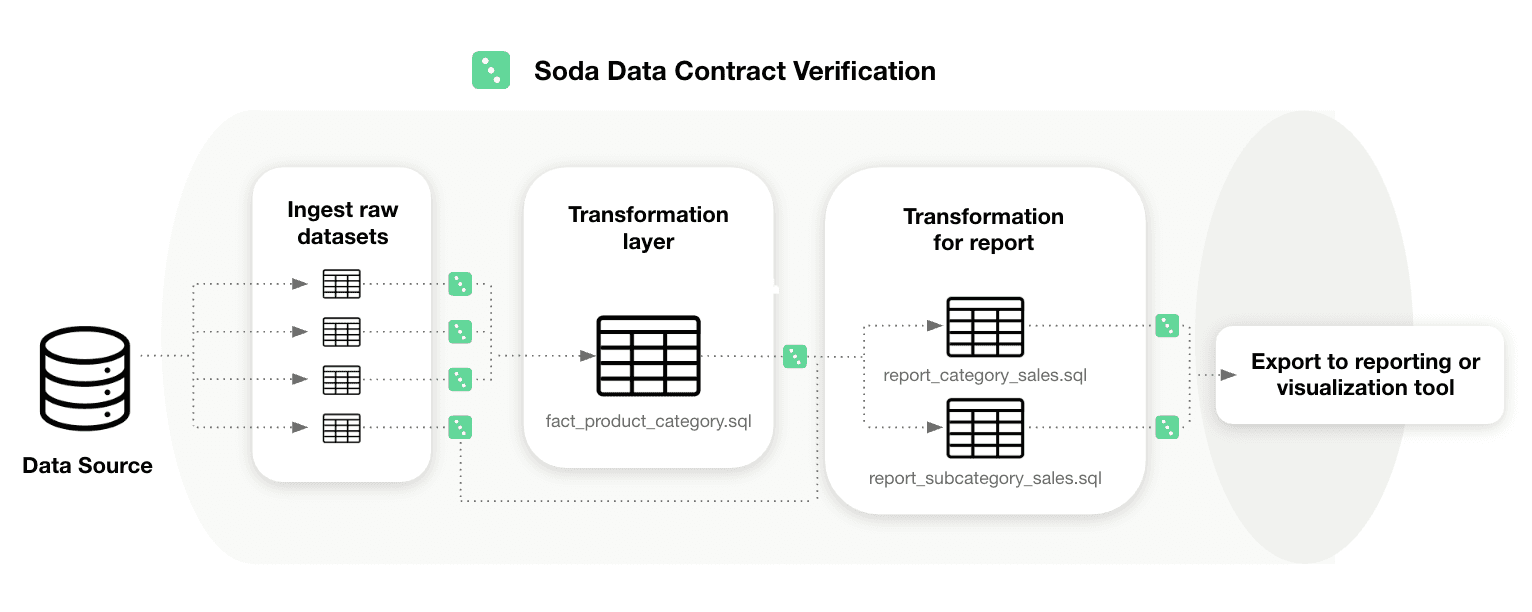
Data contracts at Soda work like unit tests for data: you define checks in a YAML contract and verify them against actual data. If verification fails, teams can be alerted or data releases can be stopped, depending on your process.
Introduction to Data Validation
Data validation (in the context of testing) means verifying that data is accurate, consistent, complete, and usable according to defined rules. You can think of it as enforcing “what good data looks like” before anyone relies on it.
Why data validation is essential:
Accuracy: prevents wrong values like negative revenue or impossible dates.
Consistency: ensures metrics and definitions don’t change across systems.
Completeness: flags missing critical fields like primary keys or timestamps.
Reliability: catches pipeline breakages early (row count drops, schema drift).
Data Contracts help encode these expectations as dataset-level checks (such as schema and row count) and column-level checks (such as missing, invalid, and duplicate values). You can also apply thresholds, filters, and metadata to standardize validation across teams.
10 Data Validation Testing Techniques
Before you put data into dashboards, models, or downstream systems, it’s crucial to make sure it meets expectations. The following 10 techniques cover the most common and effective ways to validate data, from basic checks like ranges and types to more advanced rules and cross-system consistency.
1. Schema and Type Validation
Schema and data type validation ensure the dataset schema matches expected data types (for example, timestamps stay timestamps and numeric IDs stay numeric). This is useful for detecting unannounced upstream changes before they affect downstream systems.
When to use it: Use schema validation for any dataset that receives data from an external producer, a third-party pipeline, or a team that may not always communicate changes. It’s especially useful at ingestion boundaries, where a silent upstream schema change, such as a renamed column, a widened type, or a dropped field, can trigger cascading failures downstream before anyone notices.
How to implement schema and type validation in Soda Data Contracts:
Use a schema check at the dataset level.
In the contract’s column list, specify the expected data type for each column.
Configure schema strictness: whether to allow extra columns and whether to allow re-ordered columns.
Example data contract:
dataset: postgres_ds/db/public/orders

checks:
  - schema:
      allow_other_column_order: false

columns:
  - name: order_id
    data_type: varchar
  - name: customer_id
    data_type: integer
  - name: created_at
    data_type: timestamp
  - name: order_total
    data_type
What schema and type validation catches:
Columns added, removed, or renamed by upstream changes
Data type changes (e.g., a numeric field silently cast to text)
Unexpected column reordering that breaks position-dependent consumers
2. Null Validation
Null checks identify missing values in required fields. This is one of the highest ROI validation types because missing keys and timestamps commonly break joins and create incorrect metrics.
When to use it: Apply null checks to every column that downstream queries, joins, or aggregations rely on. Primary keys, foreign keys, timestamps, and status fields are common problem areas. Even a small percentage of nulls in a join key can silently drop rows from reports and skew metrics without triggering a visible error.
How to implement null validation in Soda Data Contracts:
Add a missing check for each required column.
If the field must never be null, keep a strict expectation (no missing values).
If some missingness is acceptable, define a threshold:
Use a count threshold for fixed limits (for example, fewer than 10 missing rows).
Use a percent threshold for fluctuating volumes (for example, less than 5% missing).
Optionally, treat certain placeholders like “N/A”, “-”, or “None” as missing too.
Example data contract:
dataset: postgres_ds/db/public/orders

columns:
  - name: order_id
    checks:
      - missing:
          name: "Order ID must never be null"
  - name: customer_email
    checks:
      - missing:
          name: "Customer email missing rate must stay below 5%"
          threshold:
            metric: percent
            must_be_less_than: 5
  - name: referral_source
    checks:
      - missing:
          name: "Referral source — treat N/A, dash, and blank as missing"
          missing_values: ["N/A", "-", "None", ""]
          threshold:
            metric: percent
            must_be_less_than: 5
What null validation catches:
Null or blank primary keys that break downstream joins
Missing timestamps that disrupt time-based queries and partitioning
Empty required fields that cause incorrect aggregations or filtering
3. Uniqueness Validation
Uniqueness validation ensures identifiers that should be unique are unique. This includes primary keys and composite keys.
When to use it: Use uniqueness validation on any column or combination of columns that serves as an identifier. Duplicate primary keys corrupt aggregations and cause incorrect counts. Duplicate composite keys, such as (order_id, line_number), are particularly common after pipeline re-runs or failed idempotency logic and are often invisible until a downstream report produces inflated totals.
How to implement uniqueness validation in Soda Data Contracts:
For a single-column uniqueness rule, add a duplicate check on that column.
For multi-column uniqueness, add a dataset-level duplicate check listing the set of columns that must be unique together.
Optionally, allow a threshold (but most unique keys should be strict).
Example data contract
dataset: postgres_ds/db/public/orders

checks:
  - duplicate:
      name: "The combination of order_id and line_number must be unique"
      columns: [order_id, line_number]  # multi-column composite key

columns:
  - name: order_id
    checks:
      - duplicate:
          name: "Order ID must be unique across the dataset"
What uniqueness validation catches:
Duplicate primary keys that inflate row counts and distort metrics
Duplicate composite keys introduced by failed idempotency logic
Double-ingested records from overlapping or retried batch loads
4. Format Validation
Format validation checks that values match a required pattern, usually via a regular expression (regex). This is common for emails, UUIDs, phone numbers, postal codes, and product codes.
When to use it: Use format validation when a column holds structured strings that must conform to a known pattern for downstream processing to work correctly. If an email address, phone number, or product code is malformed, it will fail at the point of use (a send, a lookup, a join) rather than at ingestion. Catching it early, at the contract layer, is far cheaper than tracing the failure back through a pipeline.
How to Implement Format Validation in Soda Data Contracts:
Add an invalid check to the string column.
Define a valid format using a regex pattern.
Include a short, human-readable description for the regex so readers understand the intent.
Make sure the regex syntax matches your SQL engine.
Example data contract:
dataset: postgres_ds/db/public/customers

columns:
  - name: email
    checks:
      - invalid:
          name: "Email must match a standard email address format"
          valid_format:
            name: "email format"
            regex: "^[A-Za-z0-9._%+-]+@[A-Za-z0-9.-]+\\.[A-Za-z]{2,}$"
  - name: phone_number
    checks:
      - invalid:
          name: "Phone number must follow E.164 format (e.g. +12125551234)"
          valid_format:
            name: "phone format"
            regex: "^\\+[1-9][0-9]{7,14}$"
What format validation catches:
Values that do not match a required pattern (e.g., emails, phone numbers, UUIDs)
Malformed identifiers that fail downstream lookups or joins
Encoding or truncation errors that corrupt structured strings
5. Range Validation
Range validation ensures values fall within a plausible or allowed minimum and maximum. This is common for financial metrics, quantities, ratings, percentages, and measured values.
When to use it: Apply range validation to any numeric column where values outside a known boundary signal a data issue rather than a legitimate edge case. Typical examples include order totals, quantities, ages, percentages, and scores. If values like -500 or 9,999,999 would never make sense in your domain, you can use a range check to catch them.
How to implement range validation in Soda Data Contracts:
Add an invalid check on any numeric column.
Define the minimum allowed value using the
valid_minsetting.Define the maximum allowed value using the
valid_maxsetting.Use a human-readable check name.
Example data contract:
dataset: postgres_ds/db/public/orders

columns:
  - name: order_total
    checks:
      - invalid:
          name: "Order total must be between 0 and 100000"
          valid_min: 0
          valid_max: 100000
  - name: discount_rate
    checks:
      - invalid:
          name: "Discount rate must be a value between 0 and 1"
          valid_min: 0
          valid_max: 1
What range validation catches:
Numeric values below or above a plausible boundary for the domain
Percentages or rates outside their logical range (e.g., negative or above 100%)
Outliers introduced by unit conversion or data-type casting errors
6. Length Validation
Length validation ensures values are not too short, not too long, or exactly the required length. This is common for codes, IDs stored as strings, names, and standardized text fields.
When to use it: Use length validation when a column holds structured text where length itself carries meaning or has downstream implications. Country codes, currency codes, and postal codes typically have exact required lengths. Free-text fields like names and descriptions need upper bounds to prevent values that would overflow a downstream column or break a UI component.
How to implement length validation in Soda Data Contracts:
Add an invalid check on the column.
Set a fixed length when values must be exact (for example, a 2-character country code).
Or set minimum length and maximum length for fields like names or descriptions.
Example data contract:
dataset: postgres_ds/db/public/customers

columns:
  - name: country_code
    checks:
      - invalid:
          name: "Country code must be exactly 2 characters"
          valid_length: 2
  - name: customer_name
    checks:
      - invalid:
          name: "Customer name must be between 1 and 255 characters"
          valid_min_length: 1
          valid_max_length: 255
What length validation catches:
Truncated values from upstream character-limit changes
Overly long strings that overflow downstream columns or UI fields
Fixed-length codes that are incomplete or padded incorrectly
7. Cross-Field Validation
Cross-field validation ensures values across multiple fields in the same row agree logically. Examples include date comparisons and conditional requirements.
When to use it: Use cross-field validation when the correctness of one column depends on the value of another. A single-column check cannot catch a row where both start_date and end_date are individually valid but end_date is earlier than start_date. Any time your data model has conditional rules or logical relationships between fields, a cross-field check is the right layer to enforce them.
How to implement cross-field validation in Soda Data Contracts:
Use a failed rows check.
Write a SQL expression that identifies violating records (think of it like a WHERE clause that returns “bad rows”).
By default, the rule is that there should be zero failed rows.
Example data contract:
dataset: postgres_ds/db/public/orders

checks:
  - failed_rows:
      name: "End date must not be earlier than start date"
      qualifier: date_order
      expression: end_date < start_date
  - failed_rows:
      name: "Discounted price must not exceed the list price"
      qualifier: price_cap
      expression: discounted_price > list_price
  - failed_rows:
      name: "Orders with status SHIPPED must have a shipped_at timestamp"
      qualifier: shipped_timestamp
      expression: status = 'SHIPPED'
What cross-field validation catches:
Logical contradictions between related columns in the same row
Date or sequence fields that violate expected ordering
Conditional requirements where one field's value mandates another
8. Reconciliation and Consistency Validation
Reconciliation and consistency validation ensure data remains consistent across systems (for example, validating a replica, a migration, or pipeline output against a source).
When to use it: Use reconciliation checks whenever data moves between systems and you need confidence that nothing was lost, duplicated, or transformed incorrectly. They are especially important during migrations, when setting up a new replica, or when a pipeline feeds a reporting layer that must exactly reflect the source of truth. Row count mismatches and aggregate discrepancies often provide the earliest signal that a load has broken.
How to implement reconciliation and consistency validation in Soda Data Contracts:
Use reconciliation checks to compare a source dataset and a target dataset.
Compare row counts (difference should be zero).
Compare aggregates (for example, the sum of revenue should match within tolerance).
Choose thresholds based on how strict the match needs to be.
Example data contract:
dataset: postgres_ds/db/public/orders_replica

reconciliation:
  sources:
    - name: orders_source
      dataset: postgres_ds/db/public/orders
  checks:
    - row_count_diff:
        name: "Replica row count must exactly match the source"
        source: orders_source
        threshold:
          must_be: 0
    - aggregate_diff:
        name: "Total revenue must match the source within 0.01%"
        source: orders_source
        function: sum
        column: order_total
        threshold:
          metric: percent
          must_be_less_than: 0.01
What reconciliation and consistency validation catches:
Row count mismatches between source and target systems
Aggregate discrepancies introduced by transformation or loading errors
Silently dropped or duplicated batches during data movement
9. Referential Integrity Validation
Referential integrity ensures foreign keys in one dataset exist in a reference dataset (for example, orders.customer_id must exist in customers.customer_id). This prevents broken joins and orphan records.
When to use it: Use referential integrity checks on any foreign key column where orphan records would cause silent data loss in joins or incorrect results in aggregations. This is particularly important in event-driven or microservice architectures where records in one table are written independently of their referenced entities, creating windows where the foreign key does not yet exist in the reference table.
How to implement referential integrity validation in Soda Data Contracts:
Add an invalid check on the foreign key column.
Configure it to validate against reference data by pointing to:
the fully qualified reference dataset name, and
the reference column containing valid values.
Name the check clearly so ownership and intent are obvious.
Example data contract:
dataset: postgres_ds/db/public/orders

columns:
  - name: customer_id
    checks:
      - missing:
      - invalid:
          name: "customer_id must exist in the customers table"
          valid_reference_data:
            dataset: postgres_ds/db/public/customers
            column: id
  - name: product_id
    checks:
      - missing:
      - invalid:
          name: "product_id must exist in the products table"
          valid_reference_data:
            dataset: postgres_ds/db/public/products
            column
What referential integrity validation catches:
orphan records
broken joins
missing dimension keys
10. Custom Business Rules Validation
Custom rules cover domain-specific logic that doesn’t fit neatly into range/missing/duplicate categories. This is where teams encode business expectations.
When to use it: Use custom business rule checks when your quality requirement reflects domain knowledge and cannot be expressed as a simple column-level constraint. If a rule depends on your product logic, lifecycle states, or SLOs, such as “average delivery time must stay under 5 days” or “fulfilled orders must always have a fulfillment date,” a custom check is the right choice. These checks also help encode agreements defined in data contracts between producers and consumers.
How to Implement Custom Business Rules Validation in Soda Data Contracts:
Use failed rows for row-level business rules:
write an expression that returns rows violating your rule
expect zero failed rows
Use metric checks for KPI/SLO-style validation:
compute a single numeric metric using a SQL expression or query
apply a threshold such as
must_be_greater_than_or_equal
Example data contract:
dataset: postgres_ds/db/public/orders

checks:
  - failed_rows:
      name: "Fulfilled or shipped orders must have a fulfillment_date"
      qualifier: fulfillment_check
      expression: status IN ('FULFILLED', 'SHIPPED') AND fulfillment_date IS NULL
  - failed_rows:
      name: "Individual order delivery must not exceed 5 days"
      qualifier: delivery_time
      expression: (delivery_date - order_date) > 5
  - row_count:
      name: "Daily order volume must reach at least 100 rows"
      threshold:
        must_be_greater_than_or_equal: 100
What custom business rules validation catches:
Domain-specific constraints that standard check types cannot express
Lifecycle or status violations (e.g., a required field missing for a given state)
KPI or SLO breaches detected through aggregate metric thresholds
Performance tip: Referential integrity, regex, and reconciliation checks can be expensive on large tables. Prefer verifying on incremental partitions (latest batch) or on a staging table before promotion. Use thresholds and sampling where strict equality isn’t realistic.
How to Build a Reusable Data Validation Checklist
The goal isn't to write a contract once and move on, but to establish a pattern that any team member can apply to any new dataset without starting from scratch.
Think of it as building a template in layers: structural checks first, then correctness, then relationships, then cross-system consistency. Each layer adds protection without requiring you to know everything about the data upfront.
Start with What Must Never Break
Before adding anything domain-specific, every dataset should have a missing check on its primary key, a duplicate check on any ID column, and a schema check to catch unexpected structural changes. These three checks require no domain knowledge and together catch a large proportion of real pipeline failures: null keys, double-loaded records, and columns that changed type upstream without warning.
Add Data Correctness Checks
Add data correctness checks next. Once you’ve established the structural baseline, start layering in validation rules for numeric ranges, format patterns, and length constraints on any column that feeds a calculation, a join, or a customer-facing output. This is where you define what “plausible” really means in your domain.
For example, order totals shouldn’t be negative, country codes must be exactly two characters, and email addresses need a valid format. These simple rules are easy to implement but go a long way in preventing errors and safeguarding the integrity of reports, dashboards, and downstream applications.
Make Relationships Explicit
Any column used in a join is a potential failure point if it's never validated. Add referential integrity checks for foreign keys, and failed_rows checks for any business rule that spans multiple columns in the same row. For example, that shipped_at is always populated when status = 'SHIPPED'. These are the checks that prevent broken joins and orphaned records from silently distorting your metrics.
Protect Data as It Moves Between Systems
When data is migrated, replicated, or transformed, add reconciliation checks to confirm that row counts and key aggregates match between source and target. This is especially important for financial or compliance-critical datasets where a silent discrepancy has real consequences.
Standardize Before You Scale
A checklist only becomes reusable when it's consistent. Agree on threshold conventions per check type, establish a name format that non-technical stakeholders can read and understand, and use ownership attributes so that when a check fails, it's immediately clear who is responsible and what the downstream impact is.
Soda's contract YAML is designed to live in version control alongside your analytics code, so contracts can be reviewed, adapted, and shared through normal pull request workflows just like any other piece of infrastructure.
Common Pitfalls in Data Validation Testing
Even well-designed validation systems have blind spots. These are the four most common mistakes teams make and what to do instead.
Overlooking Edge Cases
Sometimes data doesn’t behave as expected. A record that arrives late can suddenly break a freshness check that seemed fine yesterday. Time zone changes can throw off timestamp comparisons, especially around daylight saving transitions. Leap years reveal date logic that never accounted for February 29. Empty strings might slip past a null check but cause problems later in string operations. Even refunds can create negative values that range checks wrongly flag as errors.
☑️ The solution here isn't to anticipate every edge case upfront but to treat every unexpected check failure as a signal to ask whether your rule is complete, not just whether the data is wrong.
Ignoring Anomalies
When a value looks unusual, there's a temptation to either dismiss it as noise or assume it's bad data. Neither response is useful on its own. A sudden spike in order volume might be a genuine sales event or a sign of double-ingestion. An unusually low row count might reflect a quiet Sunday or a pipeline that silently dropped records.
☑️ Use failed_rows checks to make these distinctions explicit. Write rules that define what "impossible" looks like for your domain, so that anomalies that fall outside those rules can be investigated rather than ignored.
Not Validating Across the Pipeline
Checking only the final output table allows problems from ingestion or transformation to propagate before you notice them. For example, if someone casts a column incorrectly during a transform, partially loads a batch at ingestion, or a join silently drops rows, these issues can remain invisible at the end of the pipeline.
☑️ Add contract checks at every critical stage: when raw data lands, after transformations, and before you publish the dataset for downstream use.
Treating Schema as Stable
Schema drift is one of the most common causes of silent failures in data pipelines and it rarely triggers a warning. Without schema checks, upstream changes can slip into production unnoticed.
☑️ Adding a schema check is one of the lowest-effort, highest-impact ways to protect your pipelines: you can configure it in minutes, and it immediately flags any structural changes that deviate from the contract.
How to Automate Data Validation Testing
Soda Data Contracts are self-contained YAML files that define the quality rules a dataset must satisfy. Each contract specifies a dataset identifier, an optional top-level checks block for dataset-wide rules, and a columns block for column-level checks. To run a verification locally:
soda contract verify --data-source ds_config.yml --contract
To publish results to Soda Cloud for monitoring and alerting, add your Soda Cloud config and the --publish flag:
soda contract verify --data-source ds_config.yml --contract contract.yml -sc sc_config.yml --publish
Running contracts manually is a start, but a true quality gate means running them automatically every time new data arrives, before anything downstream consumes it. The most effective place to do this is right after data is produced or transformed, while it is still in a staging table.
Soda's Python library supports this directly: you call it from within your pipeline, inspect the result, and control what happens next:
from soda_core.contracts import verify_contract_locally

result = verify_contract_locally(
    data_source_file_path="soda/data_source.yml",
    contract_file_path="contracts/orders.yml",
)

if not result.is_ok:
    # Stop the pipeline, quarantine the batch, or trigger an alert
    raise Exception(f"Contract verification failed:\n{result.get_errors_str()}")

# All checks passed — safe to promote data to the production table
The recommended pattern is to load incoming data into a staging table, verify the contract against it, and only promote records to the production table once all checks pass. This ensures downstream systems and users are never exposed to data that has not been validated.
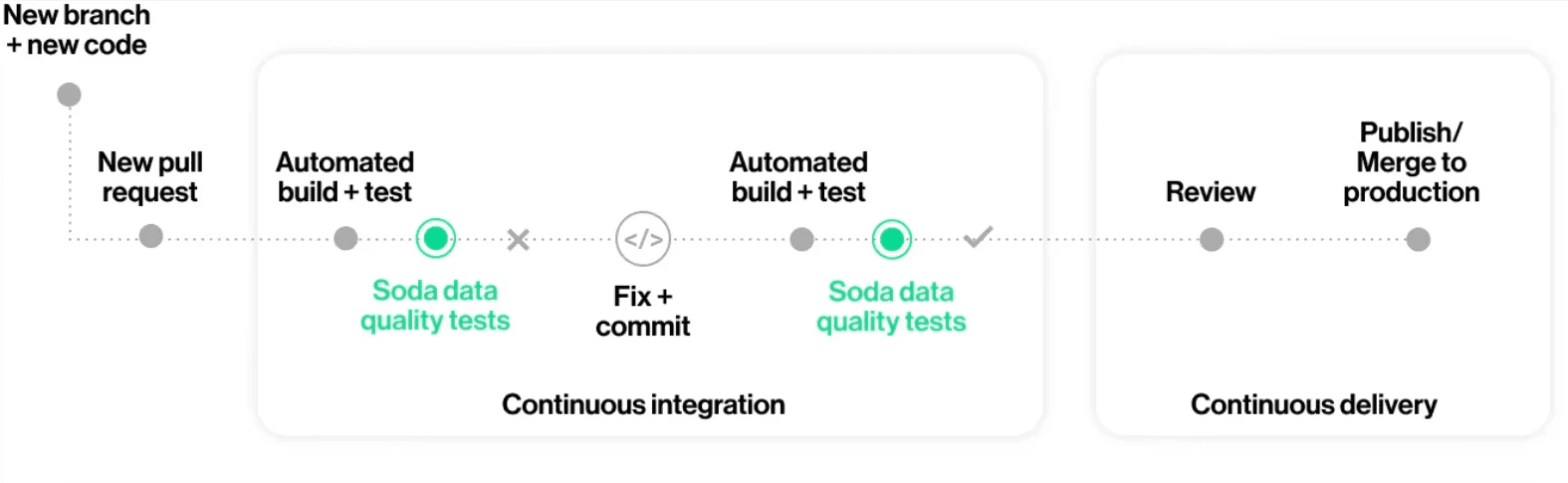
Contracts also integrate naturally into CI/CD workflows. When a code change breaks a quality expectation, such as a transformation that introduces nulls into a required field, the failure surfaces in the pull request rather than in a downstream dashboard. This moves quality enforcement to the point of change, where it is fastest and cheapest to fix.
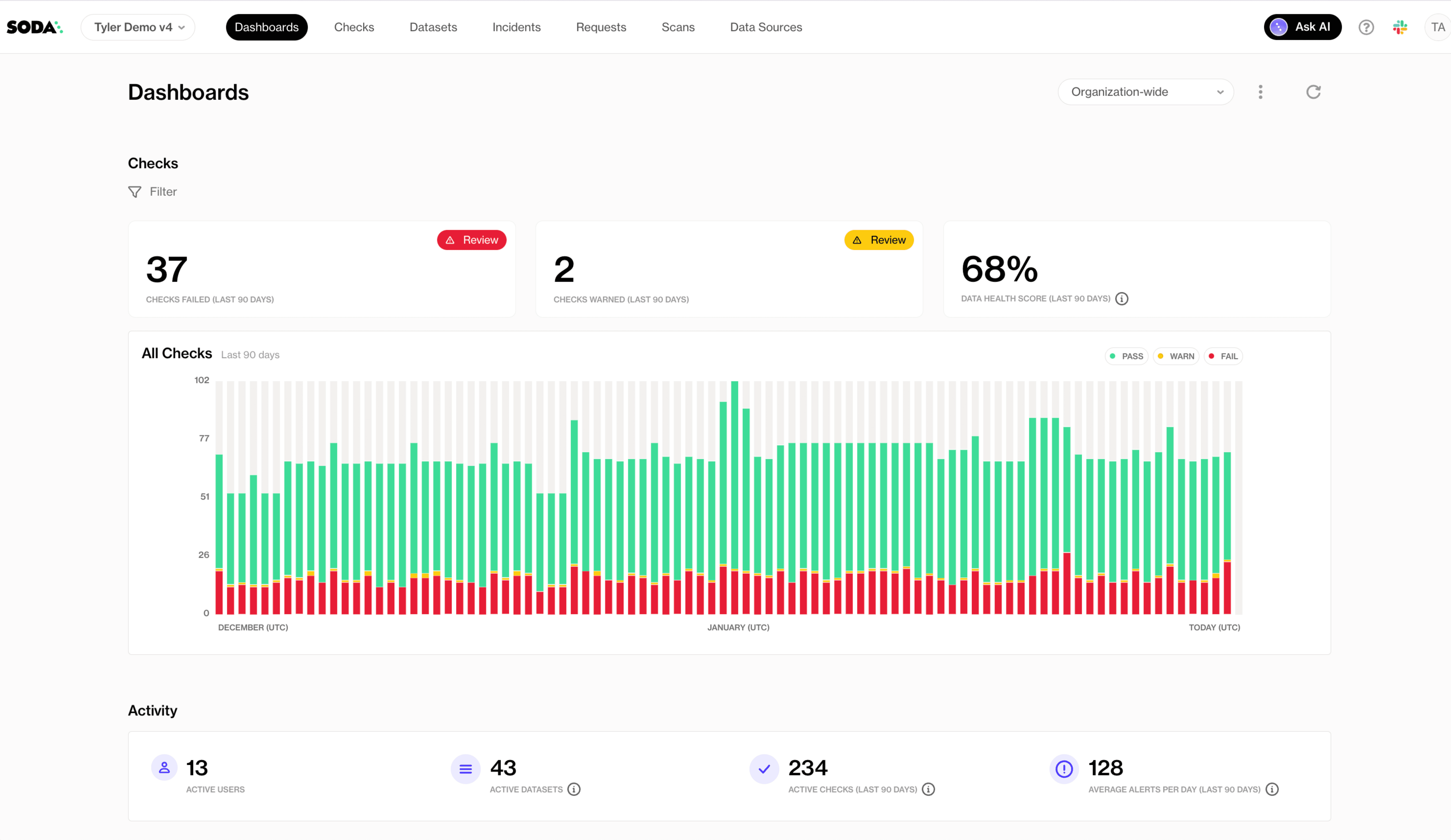
For broader oversight, Soda Cloud provides centralized visibility across all contract runs, with check results, historical trends, alert routing, and dataset ownership in one place. This makes it possible to track which datasets fail most often, which checks fire most frequently, and whether quality is improving over time, turning data validation into a measurable and manageable part of your data platform.
Frequently Asked Questions
Data validation testing is the practice of checking whether your data matches expectations before it reaches dashboards, machine learning models, customer-facing apps, or downstream systems. It prevents “silent failures” like missing IDs, duplicate records, broken joins, or out-of-range values that can quietly distort reporting and decision-making.
In this guide, you’ll learn:
The 10 most important data validation techniques.
When to use each validation method.
What types of failures each technique catches.
How to implement automated validation using Data Contracts.
Data contracts at Soda work like unit tests for data: you define checks in a YAML contract and verify them against actual data. If verification fails, teams can be alerted or data releases can be stopped, depending on your process.
Introduction to Data Validation
Data validation (in the context of testing) means verifying that data is accurate, consistent, complete, and usable according to defined rules. You can think of it as enforcing “what good data looks like” before anyone relies on it.
Why data validation is essential:
Accuracy: prevents wrong values like negative revenue or impossible dates.
Consistency: ensures metrics and definitions don’t change across systems.
Completeness: flags missing critical fields like primary keys or timestamps.
Reliability: catches pipeline breakages early (row count drops, schema drift).
Data Contracts help encode these expectations as dataset-level checks (such as schema and row count) and column-level checks (such as missing, invalid, and duplicate values). You can also apply thresholds, filters, and metadata to standardize validation across teams.
10 Data Validation Testing Techniques
Before you put data into dashboards, models, or downstream systems, it’s crucial to make sure it meets expectations. The following 10 techniques cover the most common and effective ways to validate data, from basic checks like ranges and types to more advanced rules and cross-system consistency.
1. Schema and Type Validation
Schema and data type validation ensure the dataset schema matches expected data types (for example, timestamps stay timestamps and numeric IDs stay numeric). This is useful for detecting unannounced upstream changes before they affect downstream systems.
When to use it: Use schema validation for any dataset that receives data from an external producer, a third-party pipeline, or a team that may not always communicate changes. It’s especially useful at ingestion boundaries, where a silent upstream schema change, such as a renamed column, a widened type, or a dropped field, can trigger cascading failures downstream before anyone notices.
How to implement schema and type validation in Soda Data Contracts:
Use a schema check at the dataset level.
In the contract’s column list, specify the expected data type for each column.
Configure schema strictness: whether to allow extra columns and whether to allow re-ordered columns.
Example data contract:
dataset: postgres_ds/db/public/orders

checks:
  - schema:
      allow_other_column_order: false

columns:
  - name: order_id
    data_type: varchar
  - name: customer_id
    data_type: integer
  - name: created_at
    data_type: timestamp
  - name: order_total
    data_type
What schema and type validation catches:
Columns added, removed, or renamed by upstream changes
Data type changes (e.g., a numeric field silently cast to text)
Unexpected column reordering that breaks position-dependent consumers
2. Null Validation
Null checks identify missing values in required fields. This is one of the highest ROI validation types because missing keys and timestamps commonly break joins and create incorrect metrics.
When to use it: Apply null checks to every column that downstream queries, joins, or aggregations rely on. Primary keys, foreign keys, timestamps, and status fields are common problem areas. Even a small percentage of nulls in a join key can silently drop rows from reports and skew metrics without triggering a visible error.
How to implement null validation in Soda Data Contracts:
Add a missing check for each required column.
If the field must never be null, keep a strict expectation (no missing values).
If some missingness is acceptable, define a threshold:
Use a count threshold for fixed limits (for example, fewer than 10 missing rows).
Use a percent threshold for fluctuating volumes (for example, less than 5% missing).
Optionally, treat certain placeholders like “N/A”, “-”, or “None” as missing too.
Example data contract:
dataset: postgres_ds/db/public/orders

columns:
  - name: order_id
    checks:
      - missing:
          name: "Order ID must never be null"
  - name: customer_email
    checks:
      - missing:
          name: "Customer email missing rate must stay below 5%"
          threshold:
            metric: percent
            must_be_less_than: 5
  - name: referral_source
    checks:
      - missing:
          name: "Referral source — treat N/A, dash, and blank as missing"
          missing_values: ["N/A", "-", "None", ""]
          threshold:
            metric: percent
            must_be_less_than: 5
What null validation catches:
Null or blank primary keys that break downstream joins
Missing timestamps that disrupt time-based queries and partitioning
Empty required fields that cause incorrect aggregations or filtering
3. Uniqueness Validation
Uniqueness validation ensures identifiers that should be unique are unique. This includes primary keys and composite keys.
When to use it: Use uniqueness validation on any column or combination of columns that serves as an identifier. Duplicate primary keys corrupt aggregations and cause incorrect counts. Duplicate composite keys, such as (order_id, line_number), are particularly common after pipeline re-runs or failed idempotency logic and are often invisible until a downstream report produces inflated totals.
How to implement uniqueness validation in Soda Data Contracts:
For a single-column uniqueness rule, add a duplicate check on that column.
For multi-column uniqueness, add a dataset-level duplicate check listing the set of columns that must be unique together.
Optionally, allow a threshold (but most unique keys should be strict).
Example data contract
dataset: postgres_ds/db/public/orders

checks:
  - duplicate:
      name: "The combination of order_id and line_number must be unique"
      columns: [order_id, line_number]  # multi-column composite key

columns:
  - name: order_id
    checks:
      - duplicate:
          name: "Order ID must be unique across the dataset"
What uniqueness validation catches:
Duplicate primary keys that inflate row counts and distort metrics
Duplicate composite keys introduced by failed idempotency logic
Double-ingested records from overlapping or retried batch loads
4. Format Validation
Format validation checks that values match a required pattern, usually via a regular expression (regex). This is common for emails, UUIDs, phone numbers, postal codes, and product codes.
When to use it: Use format validation when a column holds structured strings that must conform to a known pattern for downstream processing to work correctly. If an email address, phone number, or product code is malformed, it will fail at the point of use (a send, a lookup, a join) rather than at ingestion. Catching it early, at the contract layer, is far cheaper than tracing the failure back through a pipeline.
How to Implement Format Validation in Soda Data Contracts:
Add an invalid check to the string column.
Define a valid format using a regex pattern.
Include a short, human-readable description for the regex so readers understand the intent.
Make sure the regex syntax matches your SQL engine.
Example data contract:
dataset: postgres_ds/db/public/customers

columns:
  - name: email
    checks:
      - invalid:
          name: "Email must match a standard email address format"
          valid_format:
            name: "email format"
            regex: "^[A-Za-z0-9._%+-]+@[A-Za-z0-9.-]+\\.[A-Za-z]{2,}$"
  - name: phone_number
    checks:
      - invalid:
          name: "Phone number must follow E.164 format (e.g. +12125551234)"
          valid_format:
            name: "phone format"
            regex: "^\\+[1-9][0-9]{7,14}$"
What format validation catches:
Values that do not match a required pattern (e.g., emails, phone numbers, UUIDs)
Malformed identifiers that fail downstream lookups or joins
Encoding or truncation errors that corrupt structured strings
5. Range Validation
Range validation ensures values fall within a plausible or allowed minimum and maximum. This is common for financial metrics, quantities, ratings, percentages, and measured values.
When to use it: Apply range validation to any numeric column where values outside a known boundary signal a data issue rather than a legitimate edge case. Typical examples include order totals, quantities, ages, percentages, and scores. If values like -500 or 9,999,999 would never make sense in your domain, you can use a range check to catch them.
How to implement range validation in Soda Data Contracts:
Add an invalid check on any numeric column.
Define the minimum allowed value using the
valid_minsetting.Define the maximum allowed value using the
valid_maxsetting.Use a human-readable check name.
Example data contract:
dataset: postgres_ds/db/public/orders

columns:
  - name: order_total
    checks:
      - invalid:
          name: "Order total must be between 0 and 100000"
          valid_min: 0
          valid_max: 100000
  - name: discount_rate
    checks:
      - invalid:
          name: "Discount rate must be a value between 0 and 1"
          valid_min: 0
          valid_max: 1
What range validation catches:
Numeric values below or above a plausible boundary for the domain
Percentages or rates outside their logical range (e.g., negative or above 100%)
Outliers introduced by unit conversion or data-type casting errors
6. Length Validation
Length validation ensures values are not too short, not too long, or exactly the required length. This is common for codes, IDs stored as strings, names, and standardized text fields.
When to use it: Use length validation when a column holds structured text where length itself carries meaning or has downstream implications. Country codes, currency codes, and postal codes typically have exact required lengths. Free-text fields like names and descriptions need upper bounds to prevent values that would overflow a downstream column or break a UI component.
How to implement length validation in Soda Data Contracts:
Add an invalid check on the column.
Set a fixed length when values must be exact (for example, a 2-character country code).
Or set minimum length and maximum length for fields like names or descriptions.
Example data contract:
dataset: postgres_ds/db/public/customers

columns:
  - name: country_code
    checks:
      - invalid:
          name: "Country code must be exactly 2 characters"
          valid_length: 2
  - name: customer_name
    checks:
      - invalid:
          name: "Customer name must be between 1 and 255 characters"
          valid_min_length: 1
          valid_max_length: 255
What length validation catches:
Truncated values from upstream character-limit changes
Overly long strings that overflow downstream columns or UI fields
Fixed-length codes that are incomplete or padded incorrectly
7. Cross-Field Validation
Cross-field validation ensures values across multiple fields in the same row agree logically. Examples include date comparisons and conditional requirements.
When to use it: Use cross-field validation when the correctness of one column depends on the value of another. A single-column check cannot catch a row where both start_date and end_date are individually valid but end_date is earlier than start_date. Any time your data model has conditional rules or logical relationships between fields, a cross-field check is the right layer to enforce them.
How to implement cross-field validation in Soda Data Contracts:
Use a failed rows check.
Write a SQL expression that identifies violating records (think of it like a WHERE clause that returns “bad rows”).
By default, the rule is that there should be zero failed rows.
Example data contract:
dataset: postgres_ds/db/public/orders

checks:
  - failed_rows:
      name: "End date must not be earlier than start date"
      qualifier: date_order
      expression: end_date < start_date
  - failed_rows:
      name: "Discounted price must not exceed the list price"
      qualifier: price_cap
      expression: discounted_price > list_price
  - failed_rows:
      name: "Orders with status SHIPPED must have a shipped_at timestamp"
      qualifier: shipped_timestamp
      expression: status = 'SHIPPED'
What cross-field validation catches:
Logical contradictions between related columns in the same row
Date or sequence fields that violate expected ordering
Conditional requirements where one field's value mandates another
8. Reconciliation and Consistency Validation
Reconciliation and consistency validation ensure data remains consistent across systems (for example, validating a replica, a migration, or pipeline output against a source).
When to use it: Use reconciliation checks whenever data moves between systems and you need confidence that nothing was lost, duplicated, or transformed incorrectly. They are especially important during migrations, when setting up a new replica, or when a pipeline feeds a reporting layer that must exactly reflect the source of truth. Row count mismatches and aggregate discrepancies often provide the earliest signal that a load has broken.
How to implement reconciliation and consistency validation in Soda Data Contracts:
Use reconciliation checks to compare a source dataset and a target dataset.
Compare row counts (difference should be zero).
Compare aggregates (for example, the sum of revenue should match within tolerance).
Choose thresholds based on how strict the match needs to be.
Example data contract:
dataset: postgres_ds/db/public/orders_replica

reconciliation:
  sources:
    - name: orders_source
      dataset: postgres_ds/db/public/orders
  checks:
    - row_count_diff:
        name: "Replica row count must exactly match the source"
        source: orders_source
        threshold:
          must_be: 0
    - aggregate_diff:
        name: "Total revenue must match the source within 0.01%"
        source: orders_source
        function: sum
        column: order_total
        threshold:
          metric: percent
          must_be_less_than: 0.01
What reconciliation and consistency validation catches:
Row count mismatches between source and target systems
Aggregate discrepancies introduced by transformation or loading errors
Silently dropped or duplicated batches during data movement
9. Referential Integrity Validation
Referential integrity ensures foreign keys in one dataset exist in a reference dataset (for example, orders.customer_id must exist in customers.customer_id). This prevents broken joins and orphan records.
When to use it: Use referential integrity checks on any foreign key column where orphan records would cause silent data loss in joins or incorrect results in aggregations. This is particularly important in event-driven or microservice architectures where records in one table are written independently of their referenced entities, creating windows where the foreign key does not yet exist in the reference table.
How to implement referential integrity validation in Soda Data Contracts:
Add an invalid check on the foreign key column.
Configure it to validate against reference data by pointing to:
the fully qualified reference dataset name, and
the reference column containing valid values.
Name the check clearly so ownership and intent are obvious.
Example data contract:
dataset: postgres_ds/db/public/orders

columns:
  - name: customer_id
    checks:
      - missing:
      - invalid:
          name: "customer_id must exist in the customers table"
          valid_reference_data:
            dataset: postgres_ds/db/public/customers
            column: id
  - name: product_id
    checks:
      - missing:
      - invalid:
          name: "product_id must exist in the products table"
          valid_reference_data:
            dataset: postgres_ds/db/public/products
            column
What referential integrity validation catches:
orphan records
broken joins
missing dimension keys
10. Custom Business Rules Validation
Custom rules cover domain-specific logic that doesn’t fit neatly into range/missing/duplicate categories. This is where teams encode business expectations.
When to use it: Use custom business rule checks when your quality requirement reflects domain knowledge and cannot be expressed as a simple column-level constraint. If a rule depends on your product logic, lifecycle states, or SLOs, such as “average delivery time must stay under 5 days” or “fulfilled orders must always have a fulfillment date,” a custom check is the right choice. These checks also help encode agreements defined in data contracts between producers and consumers.
How to Implement Custom Business Rules Validation in Soda Data Contracts:
Use failed rows for row-level business rules:
write an expression that returns rows violating your rule
expect zero failed rows
Use metric checks for KPI/SLO-style validation:
compute a single numeric metric using a SQL expression or query
apply a threshold such as
must_be_greater_than_or_equal
Example data contract:
dataset: postgres_ds/db/public/orders

checks:
  - failed_rows:
      name: "Fulfilled or shipped orders must have a fulfillment_date"
      qualifier: fulfillment_check
      expression: status IN ('FULFILLED', 'SHIPPED') AND fulfillment_date IS NULL
  - failed_rows:
      name: "Individual order delivery must not exceed 5 days"
      qualifier: delivery_time
      expression: (delivery_date - order_date) > 5
  - row_count:
      name: "Daily order volume must reach at least 100 rows"
      threshold:
        must_be_greater_than_or_equal: 100
What custom business rules validation catches:
Domain-specific constraints that standard check types cannot express
Lifecycle or status violations (e.g., a required field missing for a given state)
KPI or SLO breaches detected through aggregate metric thresholds
Performance tip: Referential integrity, regex, and reconciliation checks can be expensive on large tables. Prefer verifying on incremental partitions (latest batch) or on a staging table before promotion. Use thresholds and sampling where strict equality isn’t realistic.
How to Build a Reusable Data Validation Checklist
The goal isn't to write a contract once and move on, but to establish a pattern that any team member can apply to any new dataset without starting from scratch.
Think of it as building a template in layers: structural checks first, then correctness, then relationships, then cross-system consistency. Each layer adds protection without requiring you to know everything about the data upfront.
Start with What Must Never Break
Before adding anything domain-specific, every dataset should have a missing check on its primary key, a duplicate check on any ID column, and a schema check to catch unexpected structural changes. These three checks require no domain knowledge and together catch a large proportion of real pipeline failures: null keys, double-loaded records, and columns that changed type upstream without warning.
Add Data Correctness Checks
Add data correctness checks next. Once you’ve established the structural baseline, start layering in validation rules for numeric ranges, format patterns, and length constraints on any column that feeds a calculation, a join, or a customer-facing output. This is where you define what “plausible” really means in your domain.
For example, order totals shouldn’t be negative, country codes must be exactly two characters, and email addresses need a valid format. These simple rules are easy to implement but go a long way in preventing errors and safeguarding the integrity of reports, dashboards, and downstream applications.
Make Relationships Explicit
Any column used in a join is a potential failure point if it's never validated. Add referential integrity checks for foreign keys, and failed_rows checks for any business rule that spans multiple columns in the same row. For example, that shipped_at is always populated when status = 'SHIPPED'. These are the checks that prevent broken joins and orphaned records from silently distorting your metrics.
Protect Data as It Moves Between Systems
When data is migrated, replicated, or transformed, add reconciliation checks to confirm that row counts and key aggregates match between source and target. This is especially important for financial or compliance-critical datasets where a silent discrepancy has real consequences.
Standardize Before You Scale
A checklist only becomes reusable when it's consistent. Agree on threshold conventions per check type, establish a name format that non-technical stakeholders can read and understand, and use ownership attributes so that when a check fails, it's immediately clear who is responsible and what the downstream impact is.
Soda's contract YAML is designed to live in version control alongside your analytics code, so contracts can be reviewed, adapted, and shared through normal pull request workflows just like any other piece of infrastructure.
Common Pitfalls in Data Validation Testing
Even well-designed validation systems have blind spots. These are the four most common mistakes teams make and what to do instead.
Overlooking Edge Cases
Sometimes data doesn’t behave as expected. A record that arrives late can suddenly break a freshness check that seemed fine yesterday. Time zone changes can throw off timestamp comparisons, especially around daylight saving transitions. Leap years reveal date logic that never accounted for February 29. Empty strings might slip past a null check but cause problems later in string operations. Even refunds can create negative values that range checks wrongly flag as errors.
☑️ The solution here isn't to anticipate every edge case upfront but to treat every unexpected check failure as a signal to ask whether your rule is complete, not just whether the data is wrong.
Ignoring Anomalies
When a value looks unusual, there's a temptation to either dismiss it as noise or assume it's bad data. Neither response is useful on its own. A sudden spike in order volume might be a genuine sales event or a sign of double-ingestion. An unusually low row count might reflect a quiet Sunday or a pipeline that silently dropped records.
☑️ Use failed_rows checks to make these distinctions explicit. Write rules that define what "impossible" looks like for your domain, so that anomalies that fall outside those rules can be investigated rather than ignored.
Not Validating Across the Pipeline
Checking only the final output table allows problems from ingestion or transformation to propagate before you notice them. For example, if someone casts a column incorrectly during a transform, partially loads a batch at ingestion, or a join silently drops rows, these issues can remain invisible at the end of the pipeline.
☑️ Add contract checks at every critical stage: when raw data lands, after transformations, and before you publish the dataset for downstream use.
Treating Schema as Stable
Schema drift is one of the most common causes of silent failures in data pipelines and it rarely triggers a warning. Without schema checks, upstream changes can slip into production unnoticed.
☑️ Adding a schema check is one of the lowest-effort, highest-impact ways to protect your pipelines: you can configure it in minutes, and it immediately flags any structural changes that deviate from the contract.
How to Automate Data Validation Testing
Soda Data Contracts are self-contained YAML files that define the quality rules a dataset must satisfy. Each contract specifies a dataset identifier, an optional top-level checks block for dataset-wide rules, and a columns block for column-level checks. To run a verification locally:
soda contract verify --data-source ds_config.yml --contract
To publish results to Soda Cloud for monitoring and alerting, add your Soda Cloud config and the --publish flag:
soda contract verify --data-source ds_config.yml --contract contract.yml -sc sc_config.yml --publish
Running contracts manually is a start, but a true quality gate means running them automatically every time new data arrives, before anything downstream consumes it. The most effective place to do this is right after data is produced or transformed, while it is still in a staging table.
Soda's Python library supports this directly: you call it from within your pipeline, inspect the result, and control what happens next:
from soda_core.contracts import verify_contract_locally

result = verify_contract_locally(
    data_source_file_path="soda/data_source.yml",
    contract_file_path="contracts/orders.yml",
)

if not result.is_ok:
    # Stop the pipeline, quarantine the batch, or trigger an alert
    raise Exception(f"Contract verification failed:\n{result.get_errors_str()}")

# All checks passed — safe to promote data to the production table
The recommended pattern is to load incoming data into a staging table, verify the contract against it, and only promote records to the production table once all checks pass. This ensures downstream systems and users are never exposed to data that has not been validated.
Contracts also integrate naturally into CI/CD workflows. When a code change breaks a quality expectation, such as a transformation that introduces nulls into a required field, the failure surfaces in the pull request rather than in a downstream dashboard. This moves quality enforcement to the point of change, where it is fastest and cheapest to fix.
For broader oversight, Soda Cloud provides centralized visibility across all contract runs, with check results, historical trends, alert routing, and dataset ownership in one place. This makes it possible to track which datasets fail most often, which checks fire most frequently, and whether quality is improving over time, turning data validation into a measurable and manageable part of your data platform.
Frequently Asked Questions
Data validation testing is the practice of checking whether your data matches expectations before it reaches dashboards, machine learning models, customer-facing apps, or downstream systems. It prevents “silent failures” like missing IDs, duplicate records, broken joins, or out-of-range values that can quietly distort reporting and decision-making.
In this guide, you’ll learn:
The 10 most important data validation techniques.
When to use each validation method.
What types of failures each technique catches.
How to implement automated validation using Data Contracts.
Data contracts at Soda work like unit tests for data: you define checks in a YAML contract and verify them against actual data. If verification fails, teams can be alerted or data releases can be stopped, depending on your process.
Introduction to Data Validation
Data validation (in the context of testing) means verifying that data is accurate, consistent, complete, and usable according to defined rules. You can think of it as enforcing “what good data looks like” before anyone relies on it.
Why data validation is essential:
Accuracy: prevents wrong values like negative revenue or impossible dates.
Consistency: ensures metrics and definitions don’t change across systems.
Completeness: flags missing critical fields like primary keys or timestamps.
Reliability: catches pipeline breakages early (row count drops, schema drift).
Data Contracts help encode these expectations as dataset-level checks (such as schema and row count) and column-level checks (such as missing, invalid, and duplicate values). You can also apply thresholds, filters, and metadata to standardize validation across teams.
10 Data Validation Testing Techniques
Before you put data into dashboards, models, or downstream systems, it’s crucial to make sure it meets expectations. The following 10 techniques cover the most common and effective ways to validate data, from basic checks like ranges and types to more advanced rules and cross-system consistency.
1. Schema and Type Validation
Schema and data type validation ensure the dataset schema matches expected data types (for example, timestamps stay timestamps and numeric IDs stay numeric). This is useful for detecting unannounced upstream changes before they affect downstream systems.
When to use it: Use schema validation for any dataset that receives data from an external producer, a third-party pipeline, or a team that may not always communicate changes. It’s especially useful at ingestion boundaries, where a silent upstream schema change, such as a renamed column, a widened type, or a dropped field, can trigger cascading failures downstream before anyone notices.
How to implement schema and type validation in Soda Data Contracts:
Use a schema check at the dataset level.
In the contract’s column list, specify the expected data type for each column.
Configure schema strictness: whether to allow extra columns and whether to allow re-ordered columns.
Example data contract:
dataset: postgres_ds/db/public/orders

checks:
  - schema:
      allow_other_column_order: false

columns:
  - name: order_id
    data_type: varchar
  - name: customer_id
    data_type: integer
  - name: created_at
    data_type: timestamp
  - name: order_total
    data_type
What schema and type validation catches:
Columns added, removed, or renamed by upstream changes
Data type changes (e.g., a numeric field silently cast to text)
Unexpected column reordering that breaks position-dependent consumers
2. Null Validation
Null checks identify missing values in required fields. This is one of the highest ROI validation types because missing keys and timestamps commonly break joins and create incorrect metrics.
When to use it: Apply null checks to every column that downstream queries, joins, or aggregations rely on. Primary keys, foreign keys, timestamps, and status fields are common problem areas. Even a small percentage of nulls in a join key can silently drop rows from reports and skew metrics without triggering a visible error.
How to implement null validation in Soda Data Contracts:
Add a missing check for each required column.
If the field must never be null, keep a strict expectation (no missing values).
If some missingness is acceptable, define a threshold:
Use a count threshold for fixed limits (for example, fewer than 10 missing rows).
Use a percent threshold for fluctuating volumes (for example, less than 5% missing).
Optionally, treat certain placeholders like “N/A”, “-”, or “None” as missing too.
Example data contract:
dataset: postgres_ds/db/public/orders

columns:
  - name: order_id
    checks:
      - missing:
          name: "Order ID must never be null"
  - name: customer_email
    checks:
      - missing:
          name: "Customer email missing rate must stay below 5%"
          threshold:
            metric: percent
            must_be_less_than: 5
  - name: referral_source
    checks:
      - missing:
          name: "Referral source — treat N/A, dash, and blank as missing"
          missing_values: ["N/A", "-", "None", ""]
          threshold:
            metric: percent
            must_be_less_than: 5
What null validation catches:
Null or blank primary keys that break downstream joins
Missing timestamps that disrupt time-based queries and partitioning
Empty required fields that cause incorrect aggregations or filtering
3. Uniqueness Validation
Uniqueness validation ensures identifiers that should be unique are unique. This includes primary keys and composite keys.
When to use it: Use uniqueness validation on any column or combination of columns that serves as an identifier. Duplicate primary keys corrupt aggregations and cause incorrect counts. Duplicate composite keys, such as (order_id, line_number), are particularly common after pipeline re-runs or failed idempotency logic and are often invisible until a downstream report produces inflated totals.
How to implement uniqueness validation in Soda Data Contracts:
For a single-column uniqueness rule, add a duplicate check on that column.
For multi-column uniqueness, add a dataset-level duplicate check listing the set of columns that must be unique together.
Optionally, allow a threshold (but most unique keys should be strict).
Example data contract
dataset: postgres_ds/db/public/orders

checks:
  - duplicate:
      name: "The combination of order_id and line_number must be unique"
      columns: [order_id, line_number]  # multi-column composite key

columns:
  - name: order_id
    checks:
      - duplicate:
          name: "Order ID must be unique across the dataset"
What uniqueness validation catches:
Duplicate primary keys that inflate row counts and distort metrics
Duplicate composite keys introduced by failed idempotency logic
Double-ingested records from overlapping or retried batch loads
4. Format Validation
Format validation checks that values match a required pattern, usually via a regular expression (regex). This is common for emails, UUIDs, phone numbers, postal codes, and product codes.
When to use it: Use format validation when a column holds structured strings that must conform to a known pattern for downstream processing to work correctly. If an email address, phone number, or product code is malformed, it will fail at the point of use (a send, a lookup, a join) rather than at ingestion. Catching it early, at the contract layer, is far cheaper than tracing the failure back through a pipeline.
How to Implement Format Validation in Soda Data Contracts:
Add an invalid check to the string column.
Define a valid format using a regex pattern.
Include a short, human-readable description for the regex so readers understand the intent.
Make sure the regex syntax matches your SQL engine.
Example data contract:
dataset: postgres_ds/db/public/customers

columns:
  - name: email
    checks:
      - invalid:
          name: "Email must match a standard email address format"
          valid_format:
            name: "email format"
            regex: "^[A-Za-z0-9._%+-]+@[A-Za-z0-9.-]+\\.[A-Za-z]{2,}$"
  - name: phone_number
    checks:
      - invalid:
          name: "Phone number must follow E.164 format (e.g. +12125551234)"
          valid_format:
            name: "phone format"
            regex: "^\\+[1-9][0-9]{7,14}$"
What format validation catches:
Values that do not match a required pattern (e.g., emails, phone numbers, UUIDs)
Malformed identifiers that fail downstream lookups or joins
Encoding or truncation errors that corrupt structured strings
5. Range Validation
Range validation ensures values fall within a plausible or allowed minimum and maximum. This is common for financial metrics, quantities, ratings, percentages, and measured values.
When to use it: Apply range validation to any numeric column where values outside a known boundary signal a data issue rather than a legitimate edge case. Typical examples include order totals, quantities, ages, percentages, and scores. If values like -500 or 9,999,999 would never make sense in your domain, you can use a range check to catch them.
How to implement range validation in Soda Data Contracts:
Add an invalid check on any numeric column.
Define the minimum allowed value using the
valid_minsetting.Define the maximum allowed value using the
valid_maxsetting.Use a human-readable check name.
Example data contract:
dataset: postgres_ds/db/public/orders

columns:
  - name: order_total
    checks:
      - invalid:
          name: "Order total must be between 0 and 100000"
          valid_min: 0
          valid_max: 100000
  - name: discount_rate
    checks:
      - invalid:
          name: "Discount rate must be a value between 0 and 1"
          valid_min: 0
          valid_max: 1
What range validation catches:
Numeric values below or above a plausible boundary for the domain
Percentages or rates outside their logical range (e.g., negative or above 100%)
Outliers introduced by unit conversion or data-type casting errors
6. Length Validation
Length validation ensures values are not too short, not too long, or exactly the required length. This is common for codes, IDs stored as strings, names, and standardized text fields.
When to use it: Use length validation when a column holds structured text where length itself carries meaning or has downstream implications. Country codes, currency codes, and postal codes typically have exact required lengths. Free-text fields like names and descriptions need upper bounds to prevent values that would overflow a downstream column or break a UI component.
How to implement length validation in Soda Data Contracts:
Add an invalid check on the column.
Set a fixed length when values must be exact (for example, a 2-character country code).
Or set minimum length and maximum length for fields like names or descriptions.
Example data contract:
dataset: postgres_ds/db/public/customers

columns:
  - name: country_code
    checks:
      - invalid:
          name: "Country code must be exactly 2 characters"
          valid_length: 2
  - name: customer_name
    checks:
      - invalid:
          name: "Customer name must be between 1 and 255 characters"
          valid_min_length: 1
          valid_max_length: 255
What length validation catches:
Truncated values from upstream character-limit changes
Overly long strings that overflow downstream columns or UI fields
Fixed-length codes that are incomplete or padded incorrectly
7. Cross-Field Validation
Cross-field validation ensures values across multiple fields in the same row agree logically. Examples include date comparisons and conditional requirements.
When to use it: Use cross-field validation when the correctness of one column depends on the value of another. A single-column check cannot catch a row where both start_date and end_date are individually valid but end_date is earlier than start_date. Any time your data model has conditional rules or logical relationships between fields, a cross-field check is the right layer to enforce them.
How to implement cross-field validation in Soda Data Contracts:
Use a failed rows check.
Write a SQL expression that identifies violating records (think of it like a WHERE clause that returns “bad rows”).
By default, the rule is that there should be zero failed rows.
Example data contract:
dataset: postgres_ds/db/public/orders

checks:
  - failed_rows:
      name: "End date must not be earlier than start date"
      qualifier: date_order
      expression: end_date < start_date
  - failed_rows:
      name: "Discounted price must not exceed the list price"
      qualifier: price_cap
      expression: discounted_price > list_price
  - failed_rows:
      name: "Orders with status SHIPPED must have a shipped_at timestamp"
      qualifier: shipped_timestamp
      expression: status = 'SHIPPED'
What cross-field validation catches:
Logical contradictions between related columns in the same row
Date or sequence fields that violate expected ordering
Conditional requirements where one field's value mandates another
8. Reconciliation and Consistency Validation
Reconciliation and consistency validation ensure data remains consistent across systems (for example, validating a replica, a migration, or pipeline output against a source).
When to use it: Use reconciliation checks whenever data moves between systems and you need confidence that nothing was lost, duplicated, or transformed incorrectly. They are especially important during migrations, when setting up a new replica, or when a pipeline feeds a reporting layer that must exactly reflect the source of truth. Row count mismatches and aggregate discrepancies often provide the earliest signal that a load has broken.
How to implement reconciliation and consistency validation in Soda Data Contracts:
Use reconciliation checks to compare a source dataset and a target dataset.
Compare row counts (difference should be zero).
Compare aggregates (for example, the sum of revenue should match within tolerance).
Choose thresholds based on how strict the match needs to be.
Example data contract:
dataset: postgres_ds/db/public/orders_replica

reconciliation:
  sources:
    - name: orders_source
      dataset: postgres_ds/db/public/orders
  checks:
    - row_count_diff:
        name: "Replica row count must exactly match the source"
        source: orders_source
        threshold:
          must_be: 0
    - aggregate_diff:
        name: "Total revenue must match the source within 0.01%"
        source: orders_source
        function: sum
        column: order_total
        threshold:
          metric: percent
          must_be_less_than: 0.01
What reconciliation and consistency validation catches:
Row count mismatches between source and target systems
Aggregate discrepancies introduced by transformation or loading errors
Silently dropped or duplicated batches during data movement
9. Referential Integrity Validation
Referential integrity ensures foreign keys in one dataset exist in a reference dataset (for example, orders.customer_id must exist in customers.customer_id). This prevents broken joins and orphan records.
When to use it: Use referential integrity checks on any foreign key column where orphan records would cause silent data loss in joins or incorrect results in aggregations. This is particularly important in event-driven or microservice architectures where records in one table are written independently of their referenced entities, creating windows where the foreign key does not yet exist in the reference table.
How to implement referential integrity validation in Soda Data Contracts:
Add an invalid check on the foreign key column.
Configure it to validate against reference data by pointing to:
the fully qualified reference dataset name, and
the reference column containing valid values.
Name the check clearly so ownership and intent are obvious.
Example data contract:
dataset: postgres_ds/db/public/orders

columns:
  - name: customer_id
    checks:
      - missing:
      - invalid:
          name: "customer_id must exist in the customers table"
          valid_reference_data:
            dataset: postgres_ds/db/public/customers
            column: id
  - name: product_id
    checks:
      - missing:
      - invalid:
          name: "product_id must exist in the products table"
          valid_reference_data:
            dataset: postgres_ds/db/public/products
            column
What referential integrity validation catches:
orphan records
broken joins
missing dimension keys
10. Custom Business Rules Validation
Custom rules cover domain-specific logic that doesn’t fit neatly into range/missing/duplicate categories. This is where teams encode business expectations.
When to use it: Use custom business rule checks when your quality requirement reflects domain knowledge and cannot be expressed as a simple column-level constraint. If a rule depends on your product logic, lifecycle states, or SLOs, such as “average delivery time must stay under 5 days” or “fulfilled orders must always have a fulfillment date,” a custom check is the right choice. These checks also help encode agreements defined in data contracts between producers and consumers.
How to Implement Custom Business Rules Validation in Soda Data Contracts:
Use failed rows for row-level business rules:
write an expression that returns rows violating your rule
expect zero failed rows
Use metric checks for KPI/SLO-style validation:
compute a single numeric metric using a SQL expression or query
apply a threshold such as
must_be_greater_than_or_equal
Example data contract:
dataset: postgres_ds/db/public/orders

checks:
  - failed_rows:
      name: "Fulfilled or shipped orders must have a fulfillment_date"
      qualifier: fulfillment_check
      expression: status IN ('FULFILLED', 'SHIPPED') AND fulfillment_date IS NULL
  - failed_rows:
      name: "Individual order delivery must not exceed 5 days"
      qualifier: delivery_time
      expression: (delivery_date - order_date) > 5
  - row_count:
      name: "Daily order volume must reach at least 100 rows"
      threshold:
        must_be_greater_than_or_equal: 100
What custom business rules validation catches:
Domain-specific constraints that standard check types cannot express
Lifecycle or status violations (e.g., a required field missing for a given state)
KPI or SLO breaches detected through aggregate metric thresholds
Performance tip: Referential integrity, regex, and reconciliation checks can be expensive on large tables. Prefer verifying on incremental partitions (latest batch) or on a staging table before promotion. Use thresholds and sampling where strict equality isn’t realistic.
How to Build a Reusable Data Validation Checklist
The goal isn't to write a contract once and move on, but to establish a pattern that any team member can apply to any new dataset without starting from scratch.
Think of it as building a template in layers: structural checks first, then correctness, then relationships, then cross-system consistency. Each layer adds protection without requiring you to know everything about the data upfront.
Start with What Must Never Break
Before adding anything domain-specific, every dataset should have a missing check on its primary key, a duplicate check on any ID column, and a schema check to catch unexpected structural changes. These three checks require no domain knowledge and together catch a large proportion of real pipeline failures: null keys, double-loaded records, and columns that changed type upstream without warning.
Add Data Correctness Checks
Add data correctness checks next. Once you’ve established the structural baseline, start layering in validation rules for numeric ranges, format patterns, and length constraints on any column that feeds a calculation, a join, or a customer-facing output. This is where you define what “plausible” really means in your domain.
For example, order totals shouldn’t be negative, country codes must be exactly two characters, and email addresses need a valid format. These simple rules are easy to implement but go a long way in preventing errors and safeguarding the integrity of reports, dashboards, and downstream applications.
Make Relationships Explicit
Any column used in a join is a potential failure point if it's never validated. Add referential integrity checks for foreign keys, and failed_rows checks for any business rule that spans multiple columns in the same row. For example, that shipped_at is always populated when status = 'SHIPPED'. These are the checks that prevent broken joins and orphaned records from silently distorting your metrics.
Protect Data as It Moves Between Systems
When data is migrated, replicated, or transformed, add reconciliation checks to confirm that row counts and key aggregates match between source and target. This is especially important for financial or compliance-critical datasets where a silent discrepancy has real consequences.
Standardize Before You Scale
A checklist only becomes reusable when it's consistent. Agree on threshold conventions per check type, establish a name format that non-technical stakeholders can read and understand, and use ownership attributes so that when a check fails, it's immediately clear who is responsible and what the downstream impact is.
Soda's contract YAML is designed to live in version control alongside your analytics code, so contracts can be reviewed, adapted, and shared through normal pull request workflows just like any other piece of infrastructure.
Common Pitfalls in Data Validation Testing
Even well-designed validation systems have blind spots. These are the four most common mistakes teams make and what to do instead.
Overlooking Edge Cases
Sometimes data doesn’t behave as expected. A record that arrives late can suddenly break a freshness check that seemed fine yesterday. Time zone changes can throw off timestamp comparisons, especially around daylight saving transitions. Leap years reveal date logic that never accounted for February 29. Empty strings might slip past a null check but cause problems later in string operations. Even refunds can create negative values that range checks wrongly flag as errors.
☑️ The solution here isn't to anticipate every edge case upfront but to treat every unexpected check failure as a signal to ask whether your rule is complete, not just whether the data is wrong.
Ignoring Anomalies
When a value looks unusual, there's a temptation to either dismiss it as noise or assume it's bad data. Neither response is useful on its own. A sudden spike in order volume might be a genuine sales event or a sign of double-ingestion. An unusually low row count might reflect a quiet Sunday or a pipeline that silently dropped records.
☑️ Use failed_rows checks to make these distinctions explicit. Write rules that define what "impossible" looks like for your domain, so that anomalies that fall outside those rules can be investigated rather than ignored.
Not Validating Across the Pipeline
Checking only the final output table allows problems from ingestion or transformation to propagate before you notice them. For example, if someone casts a column incorrectly during a transform, partially loads a batch at ingestion, or a join silently drops rows, these issues can remain invisible at the end of the pipeline.
☑️ Add contract checks at every critical stage: when raw data lands, after transformations, and before you publish the dataset for downstream use.
Treating Schema as Stable
Schema drift is one of the most common causes of silent failures in data pipelines and it rarely triggers a warning. Without schema checks, upstream changes can slip into production unnoticed.
☑️ Adding a schema check is one of the lowest-effort, highest-impact ways to protect your pipelines: you can configure it in minutes, and it immediately flags any structural changes that deviate from the contract.
How to Automate Data Validation Testing
Soda Data Contracts are self-contained YAML files that define the quality rules a dataset must satisfy. Each contract specifies a dataset identifier, an optional top-level checks block for dataset-wide rules, and a columns block for column-level checks. To run a verification locally:
soda contract verify --data-source ds_config.yml --contract
To publish results to Soda Cloud for monitoring and alerting, add your Soda Cloud config and the --publish flag:
soda contract verify --data-source ds_config.yml --contract contract.yml -sc sc_config.yml --publish
Running contracts manually is a start, but a true quality gate means running them automatically every time new data arrives, before anything downstream consumes it. The most effective place to do this is right after data is produced or transformed, while it is still in a staging table.
Soda's Python library supports this directly: you call it from within your pipeline, inspect the result, and control what happens next:
from soda_core.contracts import verify_contract_locally

result = verify_contract_locally(
    data_source_file_path="soda/data_source.yml",
    contract_file_path="contracts/orders.yml",
)

if not result.is_ok:
    # Stop the pipeline, quarantine the batch, or trigger an alert
    raise Exception(f"Contract verification failed:\n{result.get_errors_str()}")

# All checks passed — safe to promote data to the production table
The recommended pattern is to load incoming data into a staging table, verify the contract against it, and only promote records to the production table once all checks pass. This ensures downstream systems and users are never exposed to data that has not been validated.
Contracts also integrate naturally into CI/CD workflows. When a code change breaks a quality expectation, such as a transformation that introduces nulls into a required field, the failure surfaces in the pull request rather than in a downstream dashboard. This moves quality enforcement to the point of change, where it is fastest and cheapest to fix.
For broader oversight, Soda Cloud provides centralized visibility across all contract runs, with check results, historical trends, alert routing, and dataset ownership in one place. This makes it possible to track which datasets fail most often, which checks fire most frequently, and whether quality is improving over time, turning data validation into a measurable and manageable part of your data platform.
Frequently Asked Questions
How do I choose which validation technique to use?
Start with the highest-impact checks: missing values on keys, uniqueness on IDs, schema checks, and referential integrity for core joins. Then add range/format/length checks and domain-specific rules based on how the data is used.
Can validation testing be done without coding?
Yes. All of the contract checks covered in this guide can be configured directly in Soda Cloud using the UI contract editor, no code required. For teams that prefer a code-first approach, the same rules are available as YAML. And for more complex domain-specific logic, SQL expressions give you the flexibility to encode anything your business defines as valid data without the overhead of building and maintaining a custom validation framework from scratch.
What tools can I use to automate data validation?
Soda is one option for contract-driven testing and monitoring. Other teams automate with orchestration + SQL tests or data quality frameworks. The key is repeatability, alerting, and integration into the pipeline.
Trusted by the world’s leading enterprises
Real stories from companies using Soda to keep their data reliable, accurate, and ready for action.
At the end of the day, we don’t want to be in there managing the checks, updating the checks, adding the checks. We just want to go and observe what’s happening, and that’s what Soda is enabling right now.

Sid Srivastava
Director of Data Governance, Quality and MLOps
Investing in data quality is key for cross-functional teams to make accurate, complete decisions with fewer risks and greater returns, using initiatives such as product thinking, data governance, and self-service platforms.

Mario Konschake
Director of Product-Data Platform
Soda has integrated seamlessly into our technology stack and given us the confidence to find, analyze, implement, and resolve data issues through a simple self-serve capability.

Sutaraj Dutta
Data Engineering Manager
Our goal was to deliver high-quality datasets in near real-time, ensuring dashboards reflect live data as it flows in. But beyond solving technical challenges, we wanted to spark a cultural shift - empowering the entire organization to make decisions grounded in accurate, timely data.

Gu Xie
Head of Data Engineering
4.4 of 5
Your data has problems.
Now they fix themselves.
Automated data quality, remediation, and management.
One platform, agents that do the work, you approve.
Trusted by








Trusted by the world’s leading enterprises
Real stories from companies using Soda to keep their data reliable, accurate, and ready for action.
At the end of the day, we don’t want to be in there managing the checks, updating the checks, adding the checks. We just want to go and observe what’s happening, and that’s what Soda is enabling right now.
Sid Srivastava
Director of Data Governance, Quality and MLOps
Investing in data quality is key for cross-functional teams to make accurate, complete decisions with fewer risks and greater returns, using initiatives such as product thinking, data governance, and self-service platforms.
Mario Konschake
Director of Product-Data Platform
Soda has integrated seamlessly into our technology stack and given us the confidence to find, analyze, implement, and resolve data issues through a simple self-serve capability.
Sutaraj Dutta
Data Engineering Manager
Our goal was to deliver high-quality datasets in near real-time, ensuring dashboards reflect live data as it flows in. But beyond solving technical challenges, we wanted to spark a cultural shift - empowering the entire organization to make decisions grounded in accurate, timely data.
Gu Xie
Head of Data Engineering
4.4 of 5
Your data has problems.
Now they fix themselves.
Automated data quality, remediation, and management.
One platform, agents that do the work, you approve.
Trusted by
Solutions
Trusted by the world’s leading enterprises
Real stories from companies using Soda to keep their data reliable, accurate, and ready for action.
At the end of the day, we don’t want to be in there managing the checks, updating the checks, adding the checks. We just want to go and observe what’s happening, and that’s what Soda is enabling right now.
Sid Srivastava
Director of Data Governance, Quality and MLOps
Investing in data quality is key for cross-functional teams to make accurate, complete decisions with fewer risks and greater returns, using initiatives such as product thinking, data governance, and self-service platforms.
Mario Konschake
Director of Product-Data Platform
Soda has integrated seamlessly into our technology stack and given us the confidence to find, analyze, implement, and resolve data issues through a simple self-serve capability.
Sutaraj Dutta
Data Engineering Manager
Our goal was to deliver high-quality datasets in near real-time, ensuring dashboards reflect live data as it flows in. But beyond solving technical challenges, we wanted to spark a cultural shift - empowering the entire organization to make decisions grounded in accurate, timely data.
Gu Xie
Head of Data Engineering
4.4 of 5
Your data has problems.
Now they fix themselves.
Automated data quality, remediation, and management.
One platform, agents that do the work, you approve.
Trusted by
Solutions