How to Enforce Data Contracts in Your CI/CD Pipeline
How to Enforce Data Contracts in Your CI/CD Pipeline
How to Enforce Data Contracts in Your CI/CD Pipeline

Fabiana Ferraz
Fabiana Ferraz
Technical Writer at Soda
Technical Writer at Soda
Table of Contents
Data contract adoption tends to follow a familiar pattern. Teams define the contract, document it, walk through it in an architecture meeting, and feel good about the decision. Then, a few weeks later, someone pushes a schema change, a required field goes nullable, and the downstream dashboard breaks before anyone has had a chance to catch it. The contract was never the issue. The problem is that nobody set up anything to actually check it.
Writing a contract is the easy part. Defining which columns are required, what values are valid, and how fresh the data should be takes a few hours of writing YAML. The harder part is making that contract mean something at the moment it matters most: when code is changing and moving toward production.
Most data quality programs fall apart right there. The contract becomes a reference document that engineers consult occasionally, but nobody is truly accountable to it.
We’re going to fix that with CI/CD. Specifically:
Where contract checks actually belong in your pipeline
How to structure contracts so they’re built for automated validation
How to wire it all together with a working GitHub Actions example using Soda
By the end, you’ll have a pattern you can adapt to your own stack, one where a bad schema change doesn’t reach production without someone knowing about it first.
Where Should Data Contract Enforcement Happen in Your CI/CD Pipeline?
The most common mistake teams make with data contracts is treating enforcement as a single step, something that happens once before deployment. In practice, different checks belong at different points in your workflow, and running them all in one place means you’re either catching problems too late or slowing down every commit with checks that don’t need to run yet.
A more useful mental model is enforcement gates: specific points in your CI/CD pipeline where a defined set of contract checks runs automatically. Each gate has a clear scope. It checks what it can verify at that moment, and no more.
There are four gates worth building toward:
Gate | When it runs | What it checks |
|---|---|---|
Pre-commit | Local, before push | Contract file syntax and linting |
PR check | On pull request | Schema and structural contract tests |
Post-merge | After merge to main | Full quality and freshness checks |
Post-ingest | After data lands in warehouse | Row-level quality, nulls, ranges |
Each gate narrows the blast radius of a bad change. A malformed contract file gets caught before it ever reaches your repository. A breaking schema change surfaces during code review, not after a pipeline run fails at 2am. By the time data lands in your warehouse, the checks running there are focused entirely on the data itself, not on whether the contract was written correctly.
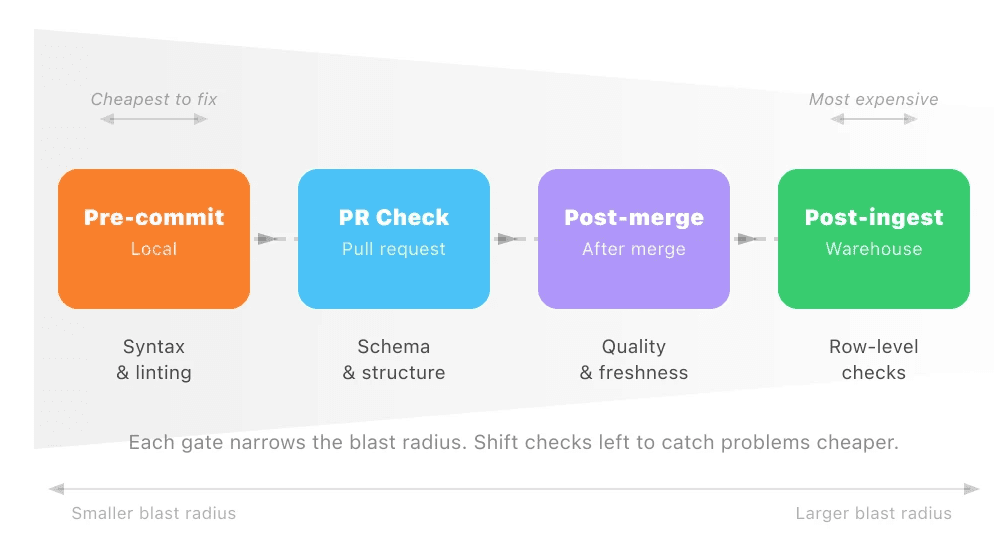
The further left you push a check, the cheaper it is to fix what it finds. That’s the principle worth optimizing for.
What Do Data Contract Tests Actually Verify?
Before wiring up any automation, it helps to be precise about what you’re actually testing. A data contract typically covers three categories of checks, all defined in a single file, and each category catches a different class of problem.
Schema checks: structure and types
The schema layer is the most familiar. It defines the structure of your data: which columns exist, what type they are, and whether they can be null. Schema checks catch the changes that seem minor but aren’t, like a column being renamed, a type being widened from integer to string, or a previously required field becoming optional. These are the changes that break downstream consumers silently.
Quality checks: values and thresholds
The quality layer goes deeper than structure. It defines what valid data actually looks like inside those columns. That includes row count thresholds (is the table suspiciously empty?), null rates (is a field that should be mostly populated suddenly 40% null?), value ranges, and uniqueness constraints. A table can be perfectly structured and still be full of garbage. Quality checks are what catch that.
Freshness checks: timeliness and SLAs
The freshness layer is the one teams most often skip, and it’s the one that tends to bite them. It defines how recent the data in a table should be. If your orders table is supposed to update every hour and it hasn’t been touched in six hours, something has failed upstream. Without a freshness check, that failure is invisible until someone notices a dashboard looks stale.
Together, these three layers give you a complete picture of whether a dataset is safe to use.
Here’s what a Soda contract covering all three layers looks like in practice:
dataset: local_postgres/your_database/public/orders

columns:
  - name: order_id
    data_type: integer
    checks:
      - missing:
      - duplicate:
  - name: customer_id
    data_type: integer
    checks:
      - missing:
  - name: status
    data_type: varchar
    checks:
      - invalid:
          valid_values: ['pending', 'processing', 'shipped', 'delivered', 'cancelled']
          threshold:
            must_be_less_than: 10
  - name: order_total
    data_type: decimal
    checks:
      - missing:
  - name: updated_at
    data_type: timestamp

checks:
  - freshness:
      column: updated_at
      threshold:
        unit: hour
        must_be_less_than: 6
  - row_count:
      threshold:
        must_be_greater_than: 0
This is doing more than it might look like at first glance. The column-level checks handle schema and quality together: data types enforce structure, while checks like invalid and missing enforce what valid data looks like inside those columns. The dataset-level row_count check at the bottom confirms the table isn’t empty, and the freshness check on updated_at handles the SLA layer, making sure the data is recent enough to trust.
This single file gives you something you can version in Git, review in a pull request, and run automatically at multiple points in your pipeline. Check Soda Contract Language Reference for a full list of check types.
Enforcing Contracts in GitHub Actions: A Working Example
With your contract file in place, the next step is making it run automatically. The goal is simple: every time someone opens a pull request against your main branch, GitHub Actions should install Soda, run your contract checks, and block the merge if anything fails.
Soda’s contract verification runs through a Python API rather than a CLI command. Your workflow calls a small Python script that runs the verification and exits with a non-zero code if any checks fail. GitHub Actions picks up that exit code and blocks the merge automatically.
Here’s the verification script to sit alongside your contract file:
import sys
from soda_core.contracts import verify_contract_locally

result = verify_contract_locally(
    data_source_file_path="soda/data_source.yml",
    contract_file_path="contracts/orders.contract.yml",
    publish=False,
)

if not result.is_ok():
    print(str(result))
    sys.exit(1)

print("All contract checks passed.")
And the data source config yml it references:
name: local_postgres
type: postgres
connection:
  host: localhost
  database: your_database
  username: ${POSTGRES_USERNAME}
  password
And the GitHub Actions workflow file, saved to .github/workflows/data-contract.yml:
name: Data Contract Validation

on:
  pull_request:
    branches:
      - main

jobs:
  validate-contracts:
    runs-on: ubuntu-latest
    steps:
      - name: Checkout repository
        uses: actions/checkout@v3

      - name: Set up Python
        uses: actions/setup-python@v4
        with:
          python-version: '3.11'

      - name: Install Soda
        run: |
          pip install soda-postgres  # swap for your warehouse driver

      - name: Run contract verification
        env:
          POSTGRES_USERNAME: ${{ secrets.POSTGRES_USERNAME }}
          POSTGRES_PASSWORD: ${{ secrets.POSTGRES_PASSWORD }}
        run: |
          python scripts/verify_contracts.py
A few things to walk through here.
The on: pull_request trigger means this workflow runs every time a PR is opened or updated against main. It won’t wait until after a merge to catch a problem.
The soda-postgres package is the warehouse-specific Soda install. Swap it out for whatever you’re running: soda-snowflake, soda-bigquery, soda-redshift, and so on.
The verification script points at two things: your data_source.yml, which holds your warehouse connection details, and your contract file. If you’re managing contracts for multiple datasets, call verify_contract_locally once per contract file or loop over a list of paths.
Connection credentials are passed as GitHub secrets and referenced as environment variables in the data source config. Your warehouse credentials should never be hardcoded into the workflow or committed to your repository, even a private one.
When a check fails, result.is_ok returns False, the script prints a summary of which checks failed, and exits with code 1. GitHub Actions interprets that as a failed step, the PR gets blocked, and the engineer who opened it sees exactly what needs fixing before the merge can go through.
That’s the core loop of automated data contract enforcement: define the contract, commit it alongside your code, and let the pipeline tell you when something breaks.
Ready to try this yourself? Soda’s contract verification works with Snowflake, BigQuery, Redshift, Databricks, and more. Explore the data contracts documentation to set up your first contract, or see Soda’s contract features for a full overview of what’s possible.
Handling Violations: Block, Quarantine, or Alert?
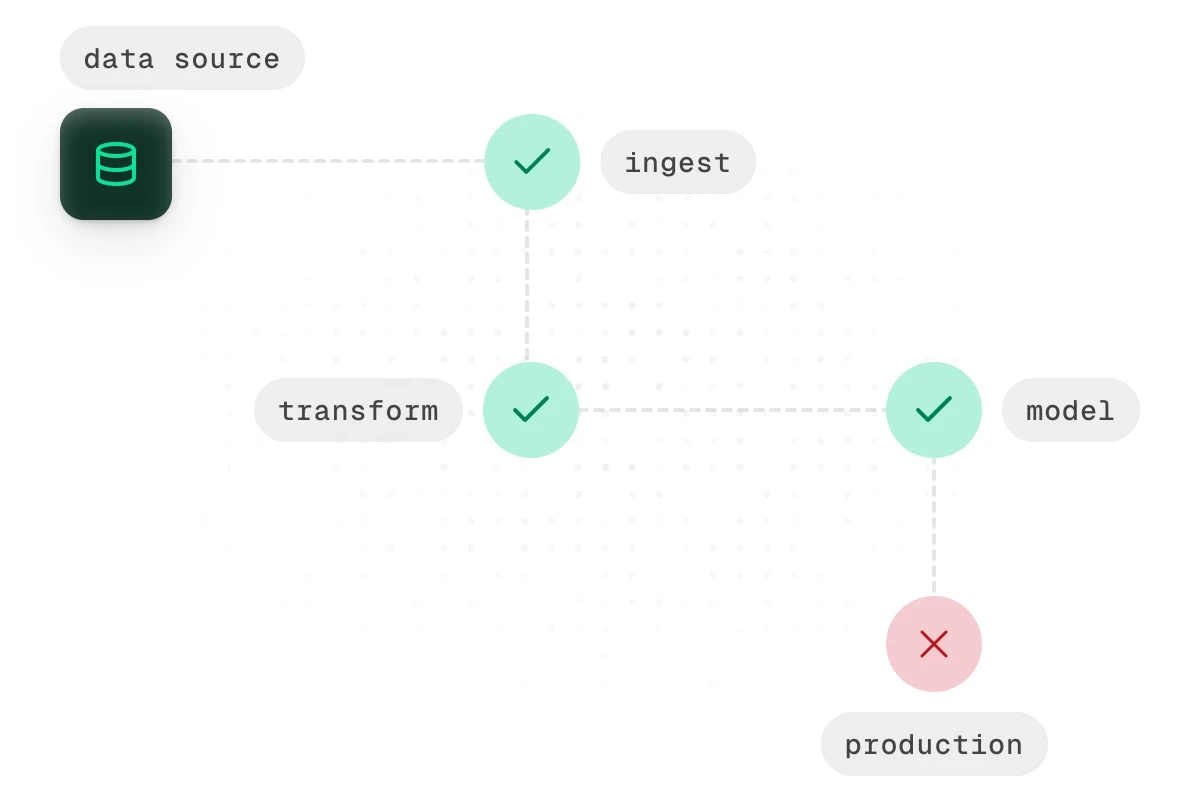
Not every contract violation deserves the same response. Treating them all the same way creates its own problems. Fail every pipeline on any breach and your workflow becomes fragile. Let everything through with a warning and your contracts become decorative.
The more useful question is: what’s the right response for this specific violation? There are three options worth having in your toolkit. Choosing between them comes down to two factors: how critical the affected field is, and whether stopping the pipeline does more harm than letting the data through.
1. Block: fail the pipeline
Use this for violations that make the data fundamentally unsafe for downstream consumption. Schema violations belong here. So do nullability failures on key fields.
If order_id is defined in your contract as non-nullable and 3% of rows in the latest batch are null, nothing downstream should touch that data. Incomplete order IDs produce incorrect results. Those are often harder to recover from than a delayed pipeline.
The rule of thumb: if the violation would cause silent errors downstream rather than obvious ones, block.
2. Quarantine: route to a holding table
Use this when the data is suspicious, but halting the pipeline entirely would cause more harm than routing the bad batch somewhere safe. This pattern works well in high-volume pipelines where a full stop has real operational consequences.
In practice, quarantine means your pipeline writes the failing batch to a separate table (something like orders_quarantine) while clean data continues to flow. Your data team sees what was held back and why. They can investigate without pressure, and once the issue is resolved, the quarantined records can be reprocessed or discarded.
A quality threshold breach is a good candidate for quarantine. The schema is fine and the structure is intact, but 12% of customer_id values failed a validity check when your contract allows a maximum of 2%. Not broken enough for a full stop. Not clean enough to trust without review.
3. Alert-Only: warn and continue
Use this for SLA and freshness checks, or for soft thresholds where the team needs visibility, but the data is still usable. If your orders table is supposed to refresh every two hours and it’s been three, that’s worth knowing about. But it probably doesn’t justify blocking every downstream process.
Alert-only responses are also appropriate during a rollout phase, when you’re still calibrating thresholds. Run in warn mode for a few weeks. You’ll get real data on how often each threshold is breached and whether your definitions are well-calibrated before you start blocking on them.
Here’s a simple way to think about which response fits:
Violation type | Recommended response |
|---|---|
Schema change, missing required column | Block |
Nullability failure on a key field | Block |
Quality threshold breach on non-critical field | Quarantine |
High null rate on an enrichment field | Quarantine |
Freshness or SLA breach | Alert |
Soft threshold breach during rollout | Alert |
The goal of data contract enforcement isn’t to make your pipeline stop as often as possible. It’s to make sure the right people know about the right problems at the right time, and that the response is proportional to the risk.
Making Enforcement Stick: Practical Rollout Tips
Getting the technical setup right is only half the work. The other half is making enforcement part of how your team operates. Otherwise, it gets disabled the first time it blocks a deployment at an inconvenient moment.
A few things that make the difference between a contract enforcement setup that lasts and one that quietly gets turned off after a month.
Start in warn mode, not block mode
The fastest way to lose trust in your contract checks is to have them block a legitimate deployment over an aggressive threshold. Before you start failing pipelines, run your checks in warn mode for two to four weeks. Collect the results. Look at how often each check fires and whether the violations are real problems or miscalibrations.
Version-control your data contracts alongside your pipeline code
A contract file that lives in a separate repository, a shared drive, or a wiki page will fall out of sync. When your pipeline code changes, the contract file needs to change with it. Keep them in the same repository, in the same pull request workflow, reviewed by the same people. A schema change and its corresponding contract update should ship together or not at all.
Treat contracts like a test suite, not a one-time artifact
A contract file written at the time a table was created will not accurately reflect that table six months later. Columns get added, types get changed, volume patterns shift. Every significant schema change should include a pass over the relevant contract file. Think of it the same way you’d update a unit test when you change the function it covers. If your team already maintains tests, this is a natural extension. If not, now is a good time to start.
Assign ownership to every data contract
Unowned contracts drift. If the person who created a data contract moves to another team and nobody takes over, that file goes stale. It becomes noise, not signal.
Assign a named owner to every contract. Document it in the file itself if needed. Include contract review in your standard off-boarding process when team members change roles. It takes five minutes to add an owner field to a YAML file. It takes considerably longer to untangle a broken pipeline because nobody knows who was responsible.
None of these is complicated in isolation. The challenge is consistency. Data contract validation works best when it’s treated as infrastructure. Maintain it with the same care as the pipelines it protects, not as a project that gets set up once and forgotten.
From Document to Infrastructure
Data contracts are only as useful as the systems that enforce them. Without automated checks wired into your CI/CD pipeline, even well-written contracts become shelf documentation that nobody consults until something has already broken.
The pattern outlined in this guide gives you a practical starting point:
Layer your enforcement gates across pre-commit, PR check, post-merge, and post-ingest stages to catch problems at the cheapest point in the cycle.
Cover all three contract layers — schema, quality, and freshness — so you’re validating structure, content, and timeliness, not just one of the three.
Match your response to the severity: block for critical schema violations, quarantine for suspicious quality breaches, and alert for soft thresholds and SLA drifts.
Treat contracts as living infrastructure: version them alongside pipeline code, maintain them like test suites, and assign clear ownership.
Start with one dataset, one contract file, and one CI check. Get the loop working end-to-end before expanding. The goal is not to enforce everything on day one. It’s to build a pattern that scales as your team’s confidence grows.
Start with Soda’s contract verification. Follow the quickstart guide to run your first contract check in minutes, or try Soda Cloud to manage contracts, alerts, and ownership in a single dashboard.
Frequently Asked Questions
Data contract adoption tends to follow a familiar pattern. Teams define the contract, document it, walk through it in an architecture meeting, and feel good about the decision. Then, a few weeks later, someone pushes a schema change, a required field goes nullable, and the downstream dashboard breaks before anyone has had a chance to catch it. The contract was never the issue. The problem is that nobody set up anything to actually check it.
Writing a contract is the easy part. Defining which columns are required, what values are valid, and how fresh the data should be takes a few hours of writing YAML. The harder part is making that contract mean something at the moment it matters most: when code is changing and moving toward production.
Most data quality programs fall apart right there. The contract becomes a reference document that engineers consult occasionally, but nobody is truly accountable to it.
We’re going to fix that with CI/CD. Specifically:
Where contract checks actually belong in your pipeline
How to structure contracts so they’re built for automated validation
How to wire it all together with a working GitHub Actions example using Soda
By the end, you’ll have a pattern you can adapt to your own stack, one where a bad schema change doesn’t reach production without someone knowing about it first.
Where Should Data Contract Enforcement Happen in Your CI/CD Pipeline?
The most common mistake teams make with data contracts is treating enforcement as a single step, something that happens once before deployment. In practice, different checks belong at different points in your workflow, and running them all in one place means you’re either catching problems too late or slowing down every commit with checks that don’t need to run yet.
A more useful mental model is enforcement gates: specific points in your CI/CD pipeline where a defined set of contract checks runs automatically. Each gate has a clear scope. It checks what it can verify at that moment, and no more.
There are four gates worth building toward:
Gate | When it runs | What it checks |
|---|---|---|
Pre-commit | Local, before push | Contract file syntax and linting |
PR check | On pull request | Schema and structural contract tests |
Post-merge | After merge to main | Full quality and freshness checks |
Post-ingest | After data lands in warehouse | Row-level quality, nulls, ranges |
Each gate narrows the blast radius of a bad change. A malformed contract file gets caught before it ever reaches your repository. A breaking schema change surfaces during code review, not after a pipeline run fails at 2am. By the time data lands in your warehouse, the checks running there are focused entirely on the data itself, not on whether the contract was written correctly.
The further left you push a check, the cheaper it is to fix what it finds. That’s the principle worth optimizing for.
What Do Data Contract Tests Actually Verify?
Before wiring up any automation, it helps to be precise about what you’re actually testing. A data contract typically covers three categories of checks, all defined in a single file, and each category catches a different class of problem.
Schema checks: structure and types
The schema layer is the most familiar. It defines the structure of your data: which columns exist, what type they are, and whether they can be null. Schema checks catch the changes that seem minor but aren’t, like a column being renamed, a type being widened from integer to string, or a previously required field becoming optional. These are the changes that break downstream consumers silently.
Quality checks: values and thresholds
The quality layer goes deeper than structure. It defines what valid data actually looks like inside those columns. That includes row count thresholds (is the table suspiciously empty?), null rates (is a field that should be mostly populated suddenly 40% null?), value ranges, and uniqueness constraints. A table can be perfectly structured and still be full of garbage. Quality checks are what catch that.
Freshness checks: timeliness and SLAs
The freshness layer is the one teams most often skip, and it’s the one that tends to bite them. It defines how recent the data in a table should be. If your orders table is supposed to update every hour and it hasn’t been touched in six hours, something has failed upstream. Without a freshness check, that failure is invisible until someone notices a dashboard looks stale.
Together, these three layers give you a complete picture of whether a dataset is safe to use.
Here’s what a Soda contract covering all three layers looks like in practice:
dataset: local_postgres/your_database/public/orders

columns:
  - name: order_id
    data_type: integer
    checks:
      - missing:
      - duplicate:
  - name: customer_id
    data_type: integer
    checks:
      - missing:
  - name: status
    data_type: varchar
    checks:
      - invalid:
          valid_values: ['pending', 'processing', 'shipped', 'delivered', 'cancelled']
          threshold:
            must_be_less_than: 10
  - name: order_total
    data_type: decimal
    checks:
      - missing:
  - name: updated_at
    data_type: timestamp

checks:
  - freshness:
      column: updated_at
      threshold:
        unit: hour
        must_be_less_than: 6
  - row_count:
      threshold:
        must_be_greater_than: 0
This is doing more than it might look like at first glance. The column-level checks handle schema and quality together: data types enforce structure, while checks like invalid and missing enforce what valid data looks like inside those columns. The dataset-level row_count check at the bottom confirms the table isn’t empty, and the freshness check on updated_at handles the SLA layer, making sure the data is recent enough to trust.
This single file gives you something you can version in Git, review in a pull request, and run automatically at multiple points in your pipeline. Check Soda Contract Language Reference for a full list of check types.
Enforcing Contracts in GitHub Actions: A Working Example
With your contract file in place, the next step is making it run automatically. The goal is simple: every time someone opens a pull request against your main branch, GitHub Actions should install Soda, run your contract checks, and block the merge if anything fails.
Soda’s contract verification runs through a Python API rather than a CLI command. Your workflow calls a small Python script that runs the verification and exits with a non-zero code if any checks fail. GitHub Actions picks up that exit code and blocks the merge automatically.
Here’s the verification script to sit alongside your contract file:
import sys
from soda_core.contracts import verify_contract_locally

result = verify_contract_locally(
    data_source_file_path="soda/data_source.yml",
    contract_file_path="contracts/orders.contract.yml",
    publish=False,
)

if not result.is_ok():
    print(str(result))
    sys.exit(1)

print("All contract checks passed.")
And the data source config yml it references:
name: local_postgres
type: postgres
connection:
  host: localhost
  database: your_database
  username: ${POSTGRES_USERNAME}
  password
And the GitHub Actions workflow file, saved to .github/workflows/data-contract.yml:
name: Data Contract Validation

on:
  pull_request:
    branches:
      - main

jobs:
  validate-contracts:
    runs-on: ubuntu-latest
    steps:
      - name: Checkout repository
        uses: actions/checkout@v3

      - name: Set up Python
        uses: actions/setup-python@v4
        with:
          python-version: '3.11'

      - name: Install Soda
        run: |
          pip install soda-postgres  # swap for your warehouse driver

      - name: Run contract verification
        env:
          POSTGRES_USERNAME: ${{ secrets.POSTGRES_USERNAME }}
          POSTGRES_PASSWORD: ${{ secrets.POSTGRES_PASSWORD }}
        run: |
          python scripts/verify_contracts.py
A few things to walk through here.
The on: pull_request trigger means this workflow runs every time a PR is opened or updated against main. It won’t wait until after a merge to catch a problem.
The soda-postgres package is the warehouse-specific Soda install. Swap it out for whatever you’re running: soda-snowflake, soda-bigquery, soda-redshift, and so on.
The verification script points at two things: your data_source.yml, which holds your warehouse connection details, and your contract file. If you’re managing contracts for multiple datasets, call verify_contract_locally once per contract file or loop over a list of paths.
Connection credentials are passed as GitHub secrets and referenced as environment variables in the data source config. Your warehouse credentials should never be hardcoded into the workflow or committed to your repository, even a private one.
When a check fails, result.is_ok returns False, the script prints a summary of which checks failed, and exits with code 1. GitHub Actions interprets that as a failed step, the PR gets blocked, and the engineer who opened it sees exactly what needs fixing before the merge can go through.
That’s the core loop of automated data contract enforcement: define the contract, commit it alongside your code, and let the pipeline tell you when something breaks.
Ready to try this yourself? Soda’s contract verification works with Snowflake, BigQuery, Redshift, Databricks, and more. Explore the data contracts documentation to set up your first contract, or see Soda’s contract features for a full overview of what’s possible.
Handling Violations: Block, Quarantine, or Alert?
Not every contract violation deserves the same response. Treating them all the same way creates its own problems. Fail every pipeline on any breach and your workflow becomes fragile. Let everything through with a warning and your contracts become decorative.
The more useful question is: what’s the right response for this specific violation? There are three options worth having in your toolkit. Choosing between them comes down to two factors: how critical the affected field is, and whether stopping the pipeline does more harm than letting the data through.
1. Block: fail the pipeline
Use this for violations that make the data fundamentally unsafe for downstream consumption. Schema violations belong here. So do nullability failures on key fields.
If order_id is defined in your contract as non-nullable and 3% of rows in the latest batch are null, nothing downstream should touch that data. Incomplete order IDs produce incorrect results. Those are often harder to recover from than a delayed pipeline.
The rule of thumb: if the violation would cause silent errors downstream rather than obvious ones, block.
2. Quarantine: route to a holding table
Use this when the data is suspicious, but halting the pipeline entirely would cause more harm than routing the bad batch somewhere safe. This pattern works well in high-volume pipelines where a full stop has real operational consequences.
In practice, quarantine means your pipeline writes the failing batch to a separate table (something like orders_quarantine) while clean data continues to flow. Your data team sees what was held back and why. They can investigate without pressure, and once the issue is resolved, the quarantined records can be reprocessed or discarded.
A quality threshold breach is a good candidate for quarantine. The schema is fine and the structure is intact, but 12% of customer_id values failed a validity check when your contract allows a maximum of 2%. Not broken enough for a full stop. Not clean enough to trust without review.
3. Alert-Only: warn and continue
Use this for SLA and freshness checks, or for soft thresholds where the team needs visibility, but the data is still usable. If your orders table is supposed to refresh every two hours and it’s been three, that’s worth knowing about. But it probably doesn’t justify blocking every downstream process.
Alert-only responses are also appropriate during a rollout phase, when you’re still calibrating thresholds. Run in warn mode for a few weeks. You’ll get real data on how often each threshold is breached and whether your definitions are well-calibrated before you start blocking on them.
Here’s a simple way to think about which response fits:
Violation type | Recommended response |
|---|---|
Schema change, missing required column | Block |
Nullability failure on a key field | Block |
Quality threshold breach on non-critical field | Quarantine |
High null rate on an enrichment field | Quarantine |
Freshness or SLA breach | Alert |
Soft threshold breach during rollout | Alert |
The goal of data contract enforcement isn’t to make your pipeline stop as often as possible. It’s to make sure the right people know about the right problems at the right time, and that the response is proportional to the risk.
Making Enforcement Stick: Practical Rollout Tips
Getting the technical setup right is only half the work. The other half is making enforcement part of how your team operates. Otherwise, it gets disabled the first time it blocks a deployment at an inconvenient moment.
A few things that make the difference between a contract enforcement setup that lasts and one that quietly gets turned off after a month.
Start in warn mode, not block mode
The fastest way to lose trust in your contract checks is to have them block a legitimate deployment over an aggressive threshold. Before you start failing pipelines, run your checks in warn mode for two to four weeks. Collect the results. Look at how often each check fires and whether the violations are real problems or miscalibrations.
Version-control your data contracts alongside your pipeline code
A contract file that lives in a separate repository, a shared drive, or a wiki page will fall out of sync. When your pipeline code changes, the contract file needs to change with it. Keep them in the same repository, in the same pull request workflow, reviewed by the same people. A schema change and its corresponding contract update should ship together or not at all.
Treat contracts like a test suite, not a one-time artifact
A contract file written at the time a table was created will not accurately reflect that table six months later. Columns get added, types get changed, volume patterns shift. Every significant schema change should include a pass over the relevant contract file. Think of it the same way you’d update a unit test when you change the function it covers. If your team already maintains tests, this is a natural extension. If not, now is a good time to start.
Assign ownership to every data contract
Unowned contracts drift. If the person who created a data contract moves to another team and nobody takes over, that file goes stale. It becomes noise, not signal.
Assign a named owner to every contract. Document it in the file itself if needed. Include contract review in your standard off-boarding process when team members change roles. It takes five minutes to add an owner field to a YAML file. It takes considerably longer to untangle a broken pipeline because nobody knows who was responsible.
None of these is complicated in isolation. The challenge is consistency. Data contract validation works best when it’s treated as infrastructure. Maintain it with the same care as the pipelines it protects, not as a project that gets set up once and forgotten.
From Document to Infrastructure
Data contracts are only as useful as the systems that enforce them. Without automated checks wired into your CI/CD pipeline, even well-written contracts become shelf documentation that nobody consults until something has already broken.
The pattern outlined in this guide gives you a practical starting point:
Layer your enforcement gates across pre-commit, PR check, post-merge, and post-ingest stages to catch problems at the cheapest point in the cycle.
Cover all three contract layers — schema, quality, and freshness — so you’re validating structure, content, and timeliness, not just one of the three.
Match your response to the severity: block for critical schema violations, quarantine for suspicious quality breaches, and alert for soft thresholds and SLA drifts.
Treat contracts as living infrastructure: version them alongside pipeline code, maintain them like test suites, and assign clear ownership.
Start with one dataset, one contract file, and one CI check. Get the loop working end-to-end before expanding. The goal is not to enforce everything on day one. It’s to build a pattern that scales as your team’s confidence grows.
Start with Soda’s contract verification. Follow the quickstart guide to run your first contract check in minutes, or try Soda Cloud to manage contracts, alerts, and ownership in a single dashboard.
Frequently Asked Questions
Data contract adoption tends to follow a familiar pattern. Teams define the contract, document it, walk through it in an architecture meeting, and feel good about the decision. Then, a few weeks later, someone pushes a schema change, a required field goes nullable, and the downstream dashboard breaks before anyone has had a chance to catch it. The contract was never the issue. The problem is that nobody set up anything to actually check it.
Writing a contract is the easy part. Defining which columns are required, what values are valid, and how fresh the data should be takes a few hours of writing YAML. The harder part is making that contract mean something at the moment it matters most: when code is changing and moving toward production.
Most data quality programs fall apart right there. The contract becomes a reference document that engineers consult occasionally, but nobody is truly accountable to it.
We’re going to fix that with CI/CD. Specifically:
Where contract checks actually belong in your pipeline
How to structure contracts so they’re built for automated validation
How to wire it all together with a working GitHub Actions example using Soda
By the end, you’ll have a pattern you can adapt to your own stack, one where a bad schema change doesn’t reach production without someone knowing about it first.
Where Should Data Contract Enforcement Happen in Your CI/CD Pipeline?
The most common mistake teams make with data contracts is treating enforcement as a single step, something that happens once before deployment. In practice, different checks belong at different points in your workflow, and running them all in one place means you’re either catching problems too late or slowing down every commit with checks that don’t need to run yet.
A more useful mental model is enforcement gates: specific points in your CI/CD pipeline where a defined set of contract checks runs automatically. Each gate has a clear scope. It checks what it can verify at that moment, and no more.
There are four gates worth building toward:
Gate | When it runs | What it checks |
|---|---|---|
Pre-commit | Local, before push | Contract file syntax and linting |
PR check | On pull request | Schema and structural contract tests |
Post-merge | After merge to main | Full quality and freshness checks |
Post-ingest | After data lands in warehouse | Row-level quality, nulls, ranges |
Each gate narrows the blast radius of a bad change. A malformed contract file gets caught before it ever reaches your repository. A breaking schema change surfaces during code review, not after a pipeline run fails at 2am. By the time data lands in your warehouse, the checks running there are focused entirely on the data itself, not on whether the contract was written correctly.
The further left you push a check, the cheaper it is to fix what it finds. That’s the principle worth optimizing for.
What Do Data Contract Tests Actually Verify?
Before wiring up any automation, it helps to be precise about what you’re actually testing. A data contract typically covers three categories of checks, all defined in a single file, and each category catches a different class of problem.
Schema checks: structure and types
The schema layer is the most familiar. It defines the structure of your data: which columns exist, what type they are, and whether they can be null. Schema checks catch the changes that seem minor but aren’t, like a column being renamed, a type being widened from integer to string, or a previously required field becoming optional. These are the changes that break downstream consumers silently.
Quality checks: values and thresholds
The quality layer goes deeper than structure. It defines what valid data actually looks like inside those columns. That includes row count thresholds (is the table suspiciously empty?), null rates (is a field that should be mostly populated suddenly 40% null?), value ranges, and uniqueness constraints. A table can be perfectly structured and still be full of garbage. Quality checks are what catch that.
Freshness checks: timeliness and SLAs
The freshness layer is the one teams most often skip, and it’s the one that tends to bite them. It defines how recent the data in a table should be. If your orders table is supposed to update every hour and it hasn’t been touched in six hours, something has failed upstream. Without a freshness check, that failure is invisible until someone notices a dashboard looks stale.
Together, these three layers give you a complete picture of whether a dataset is safe to use.
Here’s what a Soda contract covering all three layers looks like in practice:
dataset: local_postgres/your_database/public/orders

columns:
  - name: order_id
    data_type: integer
    checks:
      - missing:
      - duplicate:
  - name: customer_id
    data_type: integer
    checks:
      - missing:
  - name: status
    data_type: varchar
    checks:
      - invalid:
          valid_values: ['pending', 'processing', 'shipped', 'delivered', 'cancelled']
          threshold:
            must_be_less_than: 10
  - name: order_total
    data_type: decimal
    checks:
      - missing:
  - name: updated_at
    data_type: timestamp

checks:
  - freshness:
      column: updated_at
      threshold:
        unit: hour
        must_be_less_than: 6
  - row_count:
      threshold:
        must_be_greater_than: 0
This is doing more than it might look like at first glance. The column-level checks handle schema and quality together: data types enforce structure, while checks like invalid and missing enforce what valid data looks like inside those columns. The dataset-level row_count check at the bottom confirms the table isn’t empty, and the freshness check on updated_at handles the SLA layer, making sure the data is recent enough to trust.
This single file gives you something you can version in Git, review in a pull request, and run automatically at multiple points in your pipeline. Check Soda Contract Language Reference for a full list of check types.
Enforcing Contracts in GitHub Actions: A Working Example
With your contract file in place, the next step is making it run automatically. The goal is simple: every time someone opens a pull request against your main branch, GitHub Actions should install Soda, run your contract checks, and block the merge if anything fails.
Soda’s contract verification runs through a Python API rather than a CLI command. Your workflow calls a small Python script that runs the verification and exits with a non-zero code if any checks fail. GitHub Actions picks up that exit code and blocks the merge automatically.
Here’s the verification script to sit alongside your contract file:
import sys
from soda_core.contracts import verify_contract_locally

result = verify_contract_locally(
    data_source_file_path="soda/data_source.yml",
    contract_file_path="contracts/orders.contract.yml",
    publish=False,
)

if not result.is_ok():
    print(str(result))
    sys.exit(1)

print("All contract checks passed.")
And the data source config yml it references:
name: local_postgres
type: postgres
connection:
  host: localhost
  database: your_database
  username: ${POSTGRES_USERNAME}
  password
And the GitHub Actions workflow file, saved to .github/workflows/data-contract.yml:
name: Data Contract Validation

on:
  pull_request:
    branches:
      - main

jobs:
  validate-contracts:
    runs-on: ubuntu-latest
    steps:
      - name: Checkout repository
        uses: actions/checkout@v3

      - name: Set up Python
        uses: actions/setup-python@v4
        with:
          python-version: '3.11'

      - name: Install Soda
        run: |
          pip install soda-postgres  # swap for your warehouse driver

      - name: Run contract verification
        env:
          POSTGRES_USERNAME: ${{ secrets.POSTGRES_USERNAME }}
          POSTGRES_PASSWORD: ${{ secrets.POSTGRES_PASSWORD }}
        run: |
          python scripts/verify_contracts.py
A few things to walk through here.
The on: pull_request trigger means this workflow runs every time a PR is opened or updated against main. It won’t wait until after a merge to catch a problem.
The soda-postgres package is the warehouse-specific Soda install. Swap it out for whatever you’re running: soda-snowflake, soda-bigquery, soda-redshift, and so on.
The verification script points at two things: your data_source.yml, which holds your warehouse connection details, and your contract file. If you’re managing contracts for multiple datasets, call verify_contract_locally once per contract file or loop over a list of paths.
Connection credentials are passed as GitHub secrets and referenced as environment variables in the data source config. Your warehouse credentials should never be hardcoded into the workflow or committed to your repository, even a private one.
When a check fails, result.is_ok returns False, the script prints a summary of which checks failed, and exits with code 1. GitHub Actions interprets that as a failed step, the PR gets blocked, and the engineer who opened it sees exactly what needs fixing before the merge can go through.
That’s the core loop of automated data contract enforcement: define the contract, commit it alongside your code, and let the pipeline tell you when something breaks.
Ready to try this yourself? Soda’s contract verification works with Snowflake, BigQuery, Redshift, Databricks, and more. Explore the data contracts documentation to set up your first contract, or see Soda’s contract features for a full overview of what’s possible.
Handling Violations: Block, Quarantine, or Alert?
Not every contract violation deserves the same response. Treating them all the same way creates its own problems. Fail every pipeline on any breach and your workflow becomes fragile. Let everything through with a warning and your contracts become decorative.
The more useful question is: what’s the right response for this specific violation? There are three options worth having in your toolkit. Choosing between them comes down to two factors: how critical the affected field is, and whether stopping the pipeline does more harm than letting the data through.
1. Block: fail the pipeline
Use this for violations that make the data fundamentally unsafe for downstream consumption. Schema violations belong here. So do nullability failures on key fields.
If order_id is defined in your contract as non-nullable and 3% of rows in the latest batch are null, nothing downstream should touch that data. Incomplete order IDs produce incorrect results. Those are often harder to recover from than a delayed pipeline.
The rule of thumb: if the violation would cause silent errors downstream rather than obvious ones, block.
2. Quarantine: route to a holding table
Use this when the data is suspicious, but halting the pipeline entirely would cause more harm than routing the bad batch somewhere safe. This pattern works well in high-volume pipelines where a full stop has real operational consequences.
In practice, quarantine means your pipeline writes the failing batch to a separate table (something like orders_quarantine) while clean data continues to flow. Your data team sees what was held back and why. They can investigate without pressure, and once the issue is resolved, the quarantined records can be reprocessed or discarded.
A quality threshold breach is a good candidate for quarantine. The schema is fine and the structure is intact, but 12% of customer_id values failed a validity check when your contract allows a maximum of 2%. Not broken enough for a full stop. Not clean enough to trust without review.
3. Alert-Only: warn and continue
Use this for SLA and freshness checks, or for soft thresholds where the team needs visibility, but the data is still usable. If your orders table is supposed to refresh every two hours and it’s been three, that’s worth knowing about. But it probably doesn’t justify blocking every downstream process.
Alert-only responses are also appropriate during a rollout phase, when you’re still calibrating thresholds. Run in warn mode for a few weeks. You’ll get real data on how often each threshold is breached and whether your definitions are well-calibrated before you start blocking on them.
Here’s a simple way to think about which response fits:
Violation type | Recommended response |
|---|---|
Schema change, missing required column | Block |
Nullability failure on a key field | Block |
Quality threshold breach on non-critical field | Quarantine |
High null rate on an enrichment field | Quarantine |
Freshness or SLA breach | Alert |
Soft threshold breach during rollout | Alert |
The goal of data contract enforcement isn’t to make your pipeline stop as often as possible. It’s to make sure the right people know about the right problems at the right time, and that the response is proportional to the risk.
Making Enforcement Stick: Practical Rollout Tips
Getting the technical setup right is only half the work. The other half is making enforcement part of how your team operates. Otherwise, it gets disabled the first time it blocks a deployment at an inconvenient moment.
A few things that make the difference between a contract enforcement setup that lasts and one that quietly gets turned off after a month.
Start in warn mode, not block mode
The fastest way to lose trust in your contract checks is to have them block a legitimate deployment over an aggressive threshold. Before you start failing pipelines, run your checks in warn mode for two to four weeks. Collect the results. Look at how often each check fires and whether the violations are real problems or miscalibrations.
Version-control your data contracts alongside your pipeline code
A contract file that lives in a separate repository, a shared drive, or a wiki page will fall out of sync. When your pipeline code changes, the contract file needs to change with it. Keep them in the same repository, in the same pull request workflow, reviewed by the same people. A schema change and its corresponding contract update should ship together or not at all.
Treat contracts like a test suite, not a one-time artifact
A contract file written at the time a table was created will not accurately reflect that table six months later. Columns get added, types get changed, volume patterns shift. Every significant schema change should include a pass over the relevant contract file. Think of it the same way you’d update a unit test when you change the function it covers. If your team already maintains tests, this is a natural extension. If not, now is a good time to start.
Assign ownership to every data contract
Unowned contracts drift. If the person who created a data contract moves to another team and nobody takes over, that file goes stale. It becomes noise, not signal.
Assign a named owner to every contract. Document it in the file itself if needed. Include contract review in your standard off-boarding process when team members change roles. It takes five minutes to add an owner field to a YAML file. It takes considerably longer to untangle a broken pipeline because nobody knows who was responsible.
None of these is complicated in isolation. The challenge is consistency. Data contract validation works best when it’s treated as infrastructure. Maintain it with the same care as the pipelines it protects, not as a project that gets set up once and forgotten.
From Document to Infrastructure
Data contracts are only as useful as the systems that enforce them. Without automated checks wired into your CI/CD pipeline, even well-written contracts become shelf documentation that nobody consults until something has already broken.
The pattern outlined in this guide gives you a practical starting point:
Layer your enforcement gates across pre-commit, PR check, post-merge, and post-ingest stages to catch problems at the cheapest point in the cycle.
Cover all three contract layers — schema, quality, and freshness — so you’re validating structure, content, and timeliness, not just one of the three.
Match your response to the severity: block for critical schema violations, quarantine for suspicious quality breaches, and alert for soft thresholds and SLA drifts.
Treat contracts as living infrastructure: version them alongside pipeline code, maintain them like test suites, and assign clear ownership.
Start with one dataset, one contract file, and one CI check. Get the loop working end-to-end before expanding. The goal is not to enforce everything on day one. It’s to build a pattern that scales as your team’s confidence grows.
Start with Soda’s contract verification. Follow the quickstart guide to run your first contract check in minutes, or try Soda Cloud to manage contracts, alerts, and ownership in a single dashboard.
Frequently Asked Questions
What's the difference between data contract validation and data contract enforcement?
Data contract validation is the act of checking whether your data conforms to the rules defined in a contract: the schema, quality thresholds, freshness requirements, and so on. Enforcement is what happens as a result of that check. You can run validation and do nothing with the output, which is useful for monitoring but doesn't actually protect anything. Enforcement means the validation result triggers a consequence: a pipeline fails, a batch gets quarantined, an alert fires. Think of validation as the test and enforcement as the policy that decides what to do when the test fails. Both matter, but a lot of teams build the first without ever committing to the second.
Can I enforce data contracts without a dedicated tool like Soda?
Yes, though the trade-off is maintenance overhead. If you're already using dbt, its [model contracts](https://docs.getdbt.com/docs/collaborate/govern/model-contracts) feature (`enforced: true` in the model config) provides schema-level enforcement without additional tooling. For data quality checks, you can write custom SQL assertions that run as pipeline steps and exit with a non-zero code on failure. GitHub Actions does not care what causes the failure. It only needs that non-zero exit to block a merge. Dedicated tools like Soda become valuable because they provide a structured contract format, built-in check types, and clear, readable output without requiring you to build and maintain that infrastructure yourself. For small teams or simple pipelines, building your own solution is reasonable. As the number of datasets and checks increases, the case for a purpose-built tool becomes much stronger.
How do I handle contract violations in a streaming pipeline vs. a batch pipeline?
The core principle is the same: detect a violation, decide on a response, and act on it. The difference is in execution. Batch pipelines have natural pause points, so you can run full checks before data moves forward. If something fails, you can stop the batch, quarantine records, or alert before downstream impact. Streaming pipelines do not offer that flexibility. Data flows continuously, so validation is built into the processing logic. Records are checked as they arrive, invalid ones are routed to a dead-letter queue or separate stream, and clean data keeps moving. Freshness checks differ as well. Streaming focuses on lag rather than timestamps, so alerting and quarantine are more common, while full stops are reserved for critical issues like breaking schema changes.
Trusted by the world’s leading enterprises
Real stories from companies using Soda to keep their data reliable, accurate, and ready for action.
At the end of the day, we don’t want to be in there managing the checks, updating the checks, adding the checks. We just want to go and observe what’s happening, and that’s what Soda is enabling right now.

Sid Srivastava
Director of Data Governance, Quality and MLOps
Investing in data quality is key for cross-functional teams to make accurate, complete decisions with fewer risks and greater returns, using initiatives such as product thinking, data governance, and self-service platforms.

Mario Konschake
Director of Product-Data Platform
Soda has integrated seamlessly into our technology stack and given us the confidence to find, analyze, implement, and resolve data issues through a simple self-serve capability.

Sutaraj Dutta
Data Engineering Manager
Our goal was to deliver high-quality datasets in near real-time, ensuring dashboards reflect live data as it flows in. But beyond solving technical challenges, we wanted to spark a cultural shift - empowering the entire organization to make decisions grounded in accurate, timely data.

Gu Xie
Head of Data Engineering
4.4 of 5
Your data has problems.
Now they fix themselves.
Automated data quality, remediation, and management.
One platform, agents that do the work, you approve.
Trusted by








Trusted by the world’s leading enterprises
Real stories from companies using Soda to keep their data reliable, accurate, and ready for action.
At the end of the day, we don’t want to be in there managing the checks, updating the checks, adding the checks. We just want to go and observe what’s happening, and that’s what Soda is enabling right now.
Sid Srivastava
Director of Data Governance, Quality and MLOps
Investing in data quality is key for cross-functional teams to make accurate, complete decisions with fewer risks and greater returns, using initiatives such as product thinking, data governance, and self-service platforms.
Mario Konschake
Director of Product-Data Platform
Soda has integrated seamlessly into our technology stack and given us the confidence to find, analyze, implement, and resolve data issues through a simple self-serve capability.
Sutaraj Dutta
Data Engineering Manager
Our goal was to deliver high-quality datasets in near real-time, ensuring dashboards reflect live data as it flows in. But beyond solving technical challenges, we wanted to spark a cultural shift - empowering the entire organization to make decisions grounded in accurate, timely data.
Gu Xie
Head of Data Engineering
4.4 of 5
Your data has problems.
Now they fix themselves.
Automated data quality, remediation, and management.
One platform, agents that do the work, you approve.
Trusted by
Solutions
Trusted by the world’s leading enterprises
Real stories from companies using Soda to keep their data reliable, accurate, and ready for action.
At the end of the day, we don’t want to be in there managing the checks, updating the checks, adding the checks. We just want to go and observe what’s happening, and that’s what Soda is enabling right now.
Sid Srivastava
Director of Data Governance, Quality and MLOps
Investing in data quality is key for cross-functional teams to make accurate, complete decisions with fewer risks and greater returns, using initiatives such as product thinking, data governance, and self-service platforms.
Mario Konschake
Director of Product-Data Platform
Soda has integrated seamlessly into our technology stack and given us the confidence to find, analyze, implement, and resolve data issues through a simple self-serve capability.
Sutaraj Dutta
Data Engineering Manager
Our goal was to deliver high-quality datasets in near real-time, ensuring dashboards reflect live data as it flows in. But beyond solving technical challenges, we wanted to spark a cultural shift - empowering the entire organization to make decisions grounded in accurate, timely data.
Gu Xie
Head of Data Engineering
4.4 of 5
Your data has problems.
Now they fix themselves.
Automated data quality, remediation, and management.
One platform, agents that do the work, you approve.
Trusted by
Solutions