CLI, API, or MCP? Pick the right way to use Soda for the job
CLI, API, or MCP? Pick the right way to use Soda for the job
CLI, API, or MCP? Pick the right way to use Soda for the job

Kavita Rana
Kavita Rana
Rédacteur technique chez Soda
Rédacteur technique chez Soda
Table des matières
Soda now provides three ways to run your data quality processes: CLI, API and MCP. This blog aims to make it easier for you to decide which one to start with.
One contract, three interfaces
Before you pick an interface, it helps to know what they share. The CLI, the API, and the MCP server all read and write the same thing: your data contract. A data contract is a version-controlled YAML file that defines what good data looks like, the way a unit test defines correct code. You author it once, and every interface works from that one definition.
This is what makes the three a set rather than three separate products. The contract a CLI verifies in your pipeline is the exact one an agent reasons over through MCP, and the same one whose results the API serves to a dashboard. You switch interfaces without forking your source of truth, and you never relearn data quality to move between them.
It also sets the ground rules for the AI path that the MCP section builds on. Soda AI reads your metadata and your contracts, never your raw rows, and it proposes rather than acts. You approve every change before it takes effect, so a human stays in the loop on every decision.
Soda CLI: automate checks in your pipeline
With the Soda CLI, you can type one command that checks your data, which will return feedback on passes and fails immediately.
You don't need super-complicated integration code and can directly get started with data quality in your CI/CD pipelines with one quick run that will load every time. This ease does not come naturally with the API since one would have to write and maintain a program.
The Soda CLI is the right tool whenever a check needs to run on its own, the same way, again and again.
Use the Soda CLI for:
Adding a circuit breaker to your pipelines. On every run, an exit code of 1 tells your orchestrator, whether that is Airflow, Dagster, or a dbt job, that a check has failed, so the run halts and a bad load never reaches your production tables or the dashboards and models sitting downstream.
Building deterministic checks for pipelines you cannot afford to get wrong, such as financial close or compliance reporting. The CLI returns the same result on the same data every time, with no AI judgment in the loop, so every run is reproducible and easy to audit.
Catching problems before they ship. You can verify a contract against your dev or staging database inside a pull request, so schema drift from a changed dbt model or a renamed source column shows up in review instead of in production at 2 a.m.
Treating data quality as code. Your contracts are YAML files that live in the repo next to your dbt models and pipeline code, so you commit them to git, review them in pull requests, diff them across branches, and run them in CI like any other test.
Soda CLI is naturally suitable for the data engineer who wants to work with code directly and prefers not to add new tools to their natural daily flow. It is not the right tool to embed Soda in an app, since it can only automate checks, but when you want to put Soda inside your own software, you should use the API.
Get started with the Soda CLI
After installation, you can run checks in three steps.
# Authenticate
$ sodacli auth login
# Connect, monitor, and generate contracts - all in one command
$ sodacli datasource onboard. ./snowflake.yml --monitoring --contracts copilot
# Check results across all datasets
$ sodacli results list --status
Once those run, you are checking data from the command line. To make it automatic, you put the same verify command in your CI/CD pipeline and let the exit code decide whether the pipeline continues. You only need to generate your API keys once and log in, and after that, you are ready to go.
Soda API: build data quality into your own software
Soda data quality checks can be integrated into your own production software, dashboards, Dagster pipeline, or even a data catalog using the Soda API.
Soda provides a Python API, REST API, and Webhook API.
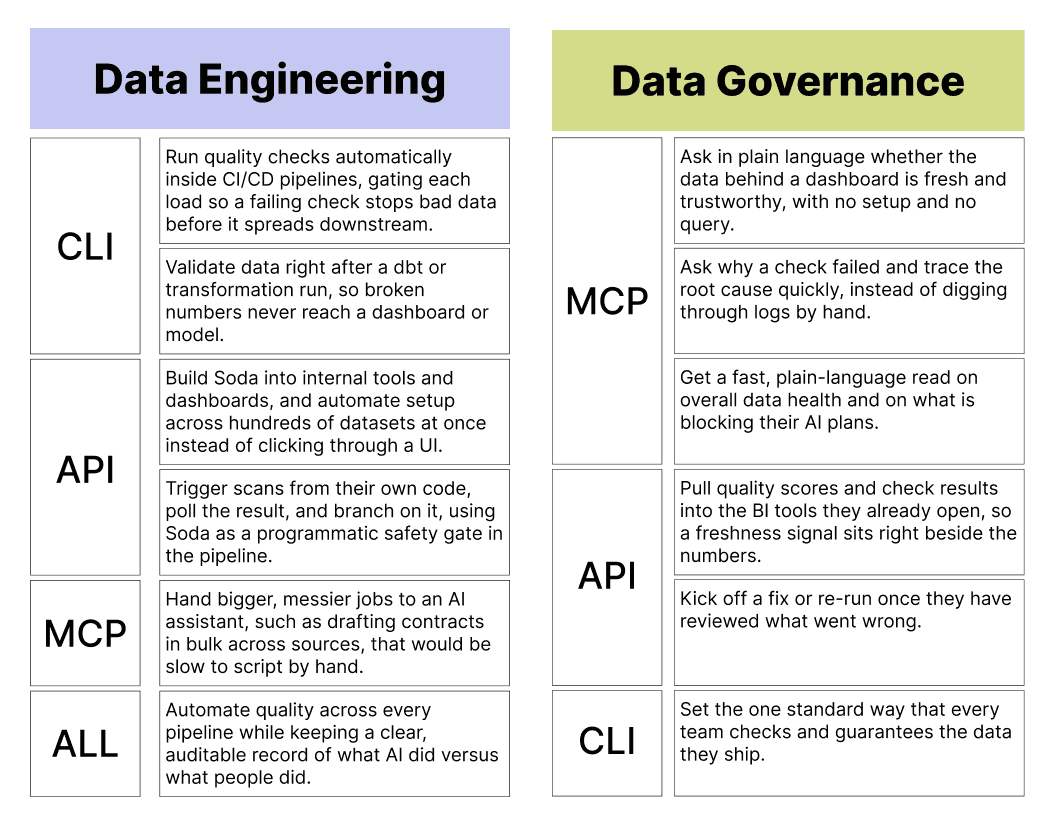
API works best for the data engineer who builds internal tooling or automates setup across many datasets, and for the analytics engineer who feeds quality data into the BI tools the team already uses. The analyst will benefit too, even without touching the API, because the freshness score will simply show up in the dashboard they already use.
Soda MCP: let an AI agent run the job
MCP, the Model Context Protocol, is an open standard that lets an AI assistant call external tools on its own. Soda runs an MCP server that exposes its capabilities, such as reading quality status, investigating failures, and drafting contracts, as tools the assistant can call. You connect that server once to an MCP-compatible client such as Claude or Cursor, the assistant discovers the Soda tools that are available, and from then on it calls them for you based on what you ask.
You write no commands and no code. You describe what you want, and the model decides which Soda tools to call and in what order.
This is the key difference compared to the CLI and the API. With those two, you have to know the exact command or endpoint before anything happens, because you are the one driving. With the MCP, you state your intent in plain language, and the model does the driving, so it can chain several steps together to answer a single question. That makes MCP the natural fit for the big, fuzzy jobs that are slow or impossible to do by hand:
"Is the data behind my sales dashboard trustworthy?"
"Why did the orders check fail last night, and what is the root cause?"
"Draft quality contracts for these five new tables."
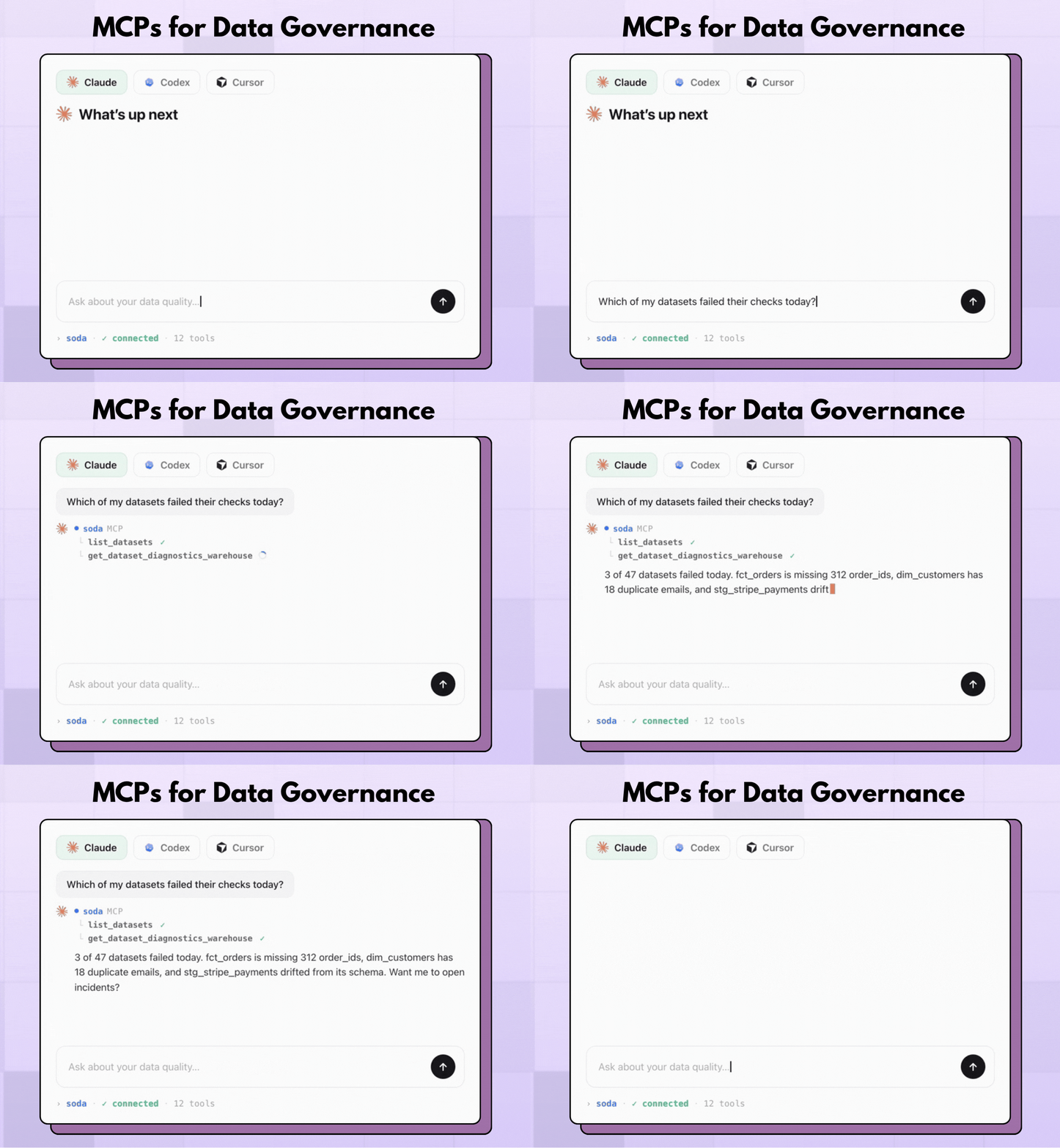
Two technical points matter here. First, MCP works on the same source of truth as the CLI and the API because your contracts and quality status are shared across all three. An answer you get over MCP reflects the exact same definitions your pipelines enforce. Second, Soda AI runs on metadata rather than your raw rows, and it works by proposing rather than acting. It drafts a contract or suggests a fix, and you approve the change before anything takes effect, which keeps a human in the loop on every decision.
MCP also opens a door that the others do not, because it lets autonomous AI agents, not only people, work with your data quality. The same server an analyst uses to ask one question is the one an agent uses to draft contracts in bulk across every source at once, which is the kind of coverage that would otherwise take a team weeks by hand.
MCP works best for the data analyst who wants a quick, plain-language read on whether a dashboard's data holds up, for the data steward who needs to find the root cause of a failure fast, and for the CDO who wants a clear picture of data health and of what is blocking their AI plans. Engineers reach for it too, whenever a job is large or messy enough that describing it beats scripting it. To start, you connect the Soda MCP server to your assistant and ask your first question.
How to choose: a 30-second decision
Ask: What is driving the job, and how often? A pipeline that runs itself points to the CLI. Your own software that needs quality built-in points to the API. A person or an agent describing a job in plain language points to MCP.
Can you use them together?
Yes, and most teams should. Because all three sit on the same contract, combining them adds coverage without adding a second source of truth.
A common setup runs all three at once on a single orders contract. The CLI gates the pipeline in CI, so a failing check stops a bad load before it spreads. An analyst or steward uses MCP to triage what went wrong and, as a preview capability, to draft new contracts in bulk. The API feeds the always-on dashboard the whole team watches. One contract sits underneath all of it, authored once and read everywhere.
Start with the interface that fits the job
You don't have to pick just one. Because the CLI, the API, and the MCP server all read the same data contract, switching between them never means rebuilding your data quality — you reach for whichever one matches the work in front of you, and combine them as your needs grow. One contract, authored once, enforced everywhere.
The quickest way in is the CLI: write a contract and run it against your own data with Soda Core, Soda OSS data contracts engine. When you're ready to bring AI agents to that same contract, explore Soda AI or book a demo.
Frequently Asked Questions
Soda now provides three ways to run your data quality processes: CLI, API and MCP. This blog aims to make it easier for you to decide which one to start with.
One contract, three interfaces
Before you pick an interface, it helps to know what they share. The CLI, the API, and the MCP server all read and write the same thing: your data contract. A data contract is a version-controlled YAML file that defines what good data looks like, the way a unit test defines correct code. You author it once, and every interface works from that one definition.
This is what makes the three a set rather than three separate products. The contract a CLI verifies in your pipeline is the exact one an agent reasons over through MCP, and the same one whose results the API serves to a dashboard. You switch interfaces without forking your source of truth, and you never relearn data quality to move between them.
It also sets the ground rules for the AI path that the MCP section builds on. Soda AI reads your metadata and your contracts, never your raw rows, and it proposes rather than acts. You approve every change before it takes effect, so a human stays in the loop on every decision.
Soda CLI: automate checks in your pipeline
With the Soda CLI, you can type one command that checks your data, which will return feedback on passes and fails immediately.
You don't need super-complicated integration code and can directly get started with data quality in your CI/CD pipelines with one quick run that will load every time. This ease does not come naturally with the API since one would have to write and maintain a program.
The Soda CLI is the right tool whenever a check needs to run on its own, the same way, again and again.
Use the Soda CLI for:
Adding a circuit breaker to your pipelines. On every run, an exit code of 1 tells your orchestrator, whether that is Airflow, Dagster, or a dbt job, that a check has failed, so the run halts and a bad load never reaches your production tables or the dashboards and models sitting downstream.
Building deterministic checks for pipelines you cannot afford to get wrong, such as financial close or compliance reporting. The CLI returns the same result on the same data every time, with no AI judgment in the loop, so every run is reproducible and easy to audit.
Catching problems before they ship. You can verify a contract against your dev or staging database inside a pull request, so schema drift from a changed dbt model or a renamed source column shows up in review instead of in production at 2 a.m.
Treating data quality as code. Your contracts are YAML files that live in the repo next to your dbt models and pipeline code, so you commit them to git, review them in pull requests, diff them across branches, and run them in CI like any other test.
Soda CLI is naturally suitable for the data engineer who wants to work with code directly and prefers not to add new tools to their natural daily flow. It is not the right tool to embed Soda in an app, since it can only automate checks, but when you want to put Soda inside your own software, you should use the API.
Get started with the Soda CLI
After installation, you can run checks in three steps.
# Authenticate
$ sodacli auth login
# Connect, monitor, and generate contracts - all in one command
$ sodacli datasource onboard. ./snowflake.yml --monitoring --contracts copilot
# Check results across all datasets
$ sodacli results list --status
Once those run, you are checking data from the command line. To make it automatic, you put the same verify command in your CI/CD pipeline and let the exit code decide whether the pipeline continues. You only need to generate your API keys once and log in, and after that, you are ready to go.
Soda API: build data quality into your own software
Soda data quality checks can be integrated into your own production software, dashboards, Dagster pipeline, or even a data catalog using the Soda API.
Soda provides a Python API, REST API, and Webhook API.
API works best for the data engineer who builds internal tooling or automates setup across many datasets, and for the analytics engineer who feeds quality data into the BI tools the team already uses. The analyst will benefit too, even without touching the API, because the freshness score will simply show up in the dashboard they already use.
Soda MCP: let an AI agent run the job
MCP, the Model Context Protocol, is an open standard that lets an AI assistant call external tools on its own. Soda runs an MCP server that exposes its capabilities, such as reading quality status, investigating failures, and drafting contracts, as tools the assistant can call. You connect that server once to an MCP-compatible client such as Claude or Cursor, the assistant discovers the Soda tools that are available, and from then on it calls them for you based on what you ask.
You write no commands and no code. You describe what you want, and the model decides which Soda tools to call and in what order.
This is the key difference compared to the CLI and the API. With those two, you have to know the exact command or endpoint before anything happens, because you are the one driving. With the MCP, you state your intent in plain language, and the model does the driving, so it can chain several steps together to answer a single question. That makes MCP the natural fit for the big, fuzzy jobs that are slow or impossible to do by hand:
"Is the data behind my sales dashboard trustworthy?"
"Why did the orders check fail last night, and what is the root cause?"
"Draft quality contracts for these five new tables."
Two technical points matter here. First, MCP works on the same source of truth as the CLI and the API because your contracts and quality status are shared across all three. An answer you get over MCP reflects the exact same definitions your pipelines enforce. Second, Soda AI runs on metadata rather than your raw rows, and it works by proposing rather than acting. It drafts a contract or suggests a fix, and you approve the change before anything takes effect, which keeps a human in the loop on every decision.
MCP also opens a door that the others do not, because it lets autonomous AI agents, not only people, work with your data quality. The same server an analyst uses to ask one question is the one an agent uses to draft contracts in bulk across every source at once, which is the kind of coverage that would otherwise take a team weeks by hand.
MCP works best for the data analyst who wants a quick, plain-language read on whether a dashboard's data holds up, for the data steward who needs to find the root cause of a failure fast, and for the CDO who wants a clear picture of data health and of what is blocking their AI plans. Engineers reach for it too, whenever a job is large or messy enough that describing it beats scripting it. To start, you connect the Soda MCP server to your assistant and ask your first question.
How to choose: a 30-second decision
Ask: What is driving the job, and how often? A pipeline that runs itself points to the CLI. Your own software that needs quality built-in points to the API. A person or an agent describing a job in plain language points to MCP.
Can you use them together?
Yes, and most teams should. Because all three sit on the same contract, combining them adds coverage without adding a second source of truth.
A common setup runs all three at once on a single orders contract. The CLI gates the pipeline in CI, so a failing check stops a bad load before it spreads. An analyst or steward uses MCP to triage what went wrong and, as a preview capability, to draft new contracts in bulk. The API feeds the always-on dashboard the whole team watches. One contract sits underneath all of it, authored once and read everywhere.
Start with the interface that fits the job
You don't have to pick just one. Because the CLI, the API, and the MCP server all read the same data contract, switching between them never means rebuilding your data quality — you reach for whichever one matches the work in front of you, and combine them as your needs grow. One contract, authored once, enforced everywhere.
The quickest way in is the CLI: write a contract and run it against your own data with Soda Core, Soda OSS data contracts engine. When you're ready to bring AI agents to that same contract, explore Soda AI or book a demo.
Frequently Asked Questions
Soda now provides three ways to run your data quality processes: CLI, API and MCP. This blog aims to make it easier for you to decide which one to start with.
One contract, three interfaces
Before you pick an interface, it helps to know what they share. The CLI, the API, and the MCP server all read and write the same thing: your data contract. A data contract is a version-controlled YAML file that defines what good data looks like, the way a unit test defines correct code. You author it once, and every interface works from that one definition.
This is what makes the three a set rather than three separate products. The contract a CLI verifies in your pipeline is the exact one an agent reasons over through MCP, and the same one whose results the API serves to a dashboard. You switch interfaces without forking your source of truth, and you never relearn data quality to move between them.
It also sets the ground rules for the AI path that the MCP section builds on. Soda AI reads your metadata and your contracts, never your raw rows, and it proposes rather than acts. You approve every change before it takes effect, so a human stays in the loop on every decision.
Soda CLI: automate checks in your pipeline
With the Soda CLI, you can type one command that checks your data, which will return feedback on passes and fails immediately.
You don't need super-complicated integration code and can directly get started with data quality in your CI/CD pipelines with one quick run that will load every time. This ease does not come naturally with the API since one would have to write and maintain a program.
The Soda CLI is the right tool whenever a check needs to run on its own, the same way, again and again.
Use the Soda CLI for:
Adding a circuit breaker to your pipelines. On every run, an exit code of 1 tells your orchestrator, whether that is Airflow, Dagster, or a dbt job, that a check has failed, so the run halts and a bad load never reaches your production tables or the dashboards and models sitting downstream.
Building deterministic checks for pipelines you cannot afford to get wrong, such as financial close or compliance reporting. The CLI returns the same result on the same data every time, with no AI judgment in the loop, so every run is reproducible and easy to audit.
Catching problems before they ship. You can verify a contract against your dev or staging database inside a pull request, so schema drift from a changed dbt model or a renamed source column shows up in review instead of in production at 2 a.m.
Treating data quality as code. Your contracts are YAML files that live in the repo next to your dbt models and pipeline code, so you commit them to git, review them in pull requests, diff them across branches, and run them in CI like any other test.
Soda CLI is naturally suitable for the data engineer who wants to work with code directly and prefers not to add new tools to their natural daily flow. It is not the right tool to embed Soda in an app, since it can only automate checks, but when you want to put Soda inside your own software, you should use the API.
Get started with the Soda CLI
After installation, you can run checks in three steps.
# Authenticate
$ sodacli auth login
# Connect, monitor, and generate contracts - all in one command
$ sodacli datasource onboard. ./snowflake.yml --monitoring --contracts copilot
# Check results across all datasets
$ sodacli results list --status
Once those run, you are checking data from the command line. To make it automatic, you put the same verify command in your CI/CD pipeline and let the exit code decide whether the pipeline continues. You only need to generate your API keys once and log in, and after that, you are ready to go.
Soda API: build data quality into your own software
Soda data quality checks can be integrated into your own production software, dashboards, Dagster pipeline, or even a data catalog using the Soda API.
Soda provides a Python API, REST API, and Webhook API.
API works best for the data engineer who builds internal tooling or automates setup across many datasets, and for the analytics engineer who feeds quality data into the BI tools the team already uses. The analyst will benefit too, even without touching the API, because the freshness score will simply show up in the dashboard they already use.
Soda MCP: let an AI agent run the job
MCP, the Model Context Protocol, is an open standard that lets an AI assistant call external tools on its own. Soda runs an MCP server that exposes its capabilities, such as reading quality status, investigating failures, and drafting contracts, as tools the assistant can call. You connect that server once to an MCP-compatible client such as Claude or Cursor, the assistant discovers the Soda tools that are available, and from then on it calls them for you based on what you ask.
You write no commands and no code. You describe what you want, and the model decides which Soda tools to call and in what order.
This is the key difference compared to the CLI and the API. With those two, you have to know the exact command or endpoint before anything happens, because you are the one driving. With the MCP, you state your intent in plain language, and the model does the driving, so it can chain several steps together to answer a single question. That makes MCP the natural fit for the big, fuzzy jobs that are slow or impossible to do by hand:
"Is the data behind my sales dashboard trustworthy?"
"Why did the orders check fail last night, and what is the root cause?"
"Draft quality contracts for these five new tables."
Two technical points matter here. First, MCP works on the same source of truth as the CLI and the API because your contracts and quality status are shared across all three. An answer you get over MCP reflects the exact same definitions your pipelines enforce. Second, Soda AI runs on metadata rather than your raw rows, and it works by proposing rather than acting. It drafts a contract or suggests a fix, and you approve the change before anything takes effect, which keeps a human in the loop on every decision.
MCP also opens a door that the others do not, because it lets autonomous AI agents, not only people, work with your data quality. The same server an analyst uses to ask one question is the one an agent uses to draft contracts in bulk across every source at once, which is the kind of coverage that would otherwise take a team weeks by hand.
MCP works best for the data analyst who wants a quick, plain-language read on whether a dashboard's data holds up, for the data steward who needs to find the root cause of a failure fast, and for the CDO who wants a clear picture of data health and of what is blocking their AI plans. Engineers reach for it too, whenever a job is large or messy enough that describing it beats scripting it. To start, you connect the Soda MCP server to your assistant and ask your first question.
How to choose: a 30-second decision
Ask: What is driving the job, and how often? A pipeline that runs itself points to the CLI. Your own software that needs quality built-in points to the API. A person or an agent describing a job in plain language points to MCP.
Can you use them together?
Yes, and most teams should. Because all three sit on the same contract, combining them adds coverage without adding a second source of truth.
A common setup runs all three at once on a single orders contract. The CLI gates the pipeline in CI, so a failing check stops a bad load before it spreads. An analyst or steward uses MCP to triage what went wrong and, as a preview capability, to draft new contracts in bulk. The API feeds the always-on dashboard the whole team watches. One contract sits underneath all of it, authored once and read everywhere.
Start with the interface that fits the job
You don't have to pick just one. Because the CLI, the API, and the MCP server all read the same data contract, switching between them never means rebuilding your data quality — you reach for whichever one matches the work in front of you, and combine them as your needs grow. One contract, authored once, enforced everywhere.
The quickest way in is the CLI: write a contract and run it against your own data with Soda Core, Soda OSS data contracts engine. When you're ready to bring AI agents to that same contract, explore Soda AI or book a demo.
Frequently Asked Questions
When should I use the Soda CLI vs the API?
Use the CLI for checks that run on their own, identically, on a schedule, or in CI. Use the API when Soda has to live inside your own software, a dashboard, or an automated workflow.
What is the Soda MCP server?
soda-mcp is a Model Context Protocol server for Soda Cloud. It lets MCP-capable AI clients inspect and manage your data quality, such as datasets, checks, contracts, scans, and incidents, in plain language. It is available for Soda Cloud customers and runs as a local process.
Does Soda AI read my raw data?
No, not by default. Soda AI works from your schema, metadata, and contracts, never your raw rows or PII, and any source-data features are opt-in.
Can I use the CLI, API, and MCP at the same time?
Yes. All three work on the same contracts and quality status, so running the CLI in CI, MCP for triage, and the API for dashboards is the intended pattern.
Trusted by the world’s leading enterprises
Real stories from companies using Soda to keep their data reliable, accurate, and ready for action.
At the end of the day, we don’t want to be in there managing the checks, updating the checks, adding the checks. We just want to go and observe what’s happening, and that’s what Soda is enabling right now.

Sid Srivastava
Director of Data Governance, Quality and MLOps
Investing in data quality is key for cross-functional teams to make accurate, complete decisions with fewer risks and greater returns, using initiatives such as product thinking, data governance, and self-service platforms.

Mario Konschake
Director of Product-Data Platform
Soda has integrated seamlessly into our technology stack and given us the confidence to find, analyze, implement, and resolve data issues through a simple self-serve capability.

Sutaraj Dutta
Data Engineering Manager
Our goal was to deliver high-quality datasets in near real-time, ensuring dashboards reflect live data as it flows in. But beyond solving technical challenges, we wanted to spark a cultural shift - empowering the entire organization to make decisions grounded in accurate, timely data.

Gu Xie
Head of Data Engineering
4,4 sur 5
Commencez à faire confiance à vos données. Aujourd'hui.
Trouvez, comprenez et corrigez tout problème de qualité des données en quelques secondes.
Du niveau de la table au niveau des enregistrements.
Adopté par
Product








Trusted by the world’s leading enterprises
Real stories from companies using Soda to keep their data reliable, accurate, and ready for action.
At the end of the day, we don’t want to be in there managing the checks, updating the checks, adding the checks. We just want to go and observe what’s happening, and that’s what Soda is enabling right now.
Sid Srivastava
Director of Data Governance, Quality and MLOps
Investing in data quality is key for cross-functional teams to make accurate, complete decisions with fewer risks and greater returns, using initiatives such as product thinking, data governance, and self-service platforms.
Mario Konschake
Director of Product-Data Platform
Soda has integrated seamlessly into our technology stack and given us the confidence to find, analyze, implement, and resolve data issues through a simple self-serve capability.
Sutaraj Dutta
Data Engineering Manager
Our goal was to deliver high-quality datasets in near real-time, ensuring dashboards reflect live data as it flows in. But beyond solving technical challenges, we wanted to spark a cultural shift - empowering the entire organization to make decisions grounded in accurate, timely data.
Gu Xie
Head of Data Engineering
4,4 sur 5
Commencez à faire confiance à vos données. Aujourd'hui.
Trouvez, comprenez et corrigez tout problème de qualité des données en quelques secondes.
Du niveau de la table au niveau des enregistrements.
Adopté par
Product
Solutions
Trusted by the world’s leading enterprises
Real stories from companies using Soda to keep their data reliable, accurate, and ready for action.
At the end of the day, we don’t want to be in there managing the checks, updating the checks, adding the checks. We just want to go and observe what’s happening, and that’s what Soda is enabling right now.
Sid Srivastava
Director of Data Governance, Quality and MLOps
Investing in data quality is key for cross-functional teams to make accurate, complete decisions with fewer risks and greater returns, using initiatives such as product thinking, data governance, and self-service platforms.
Mario Konschake
Director of Product-Data Platform
Soda has integrated seamlessly into our technology stack and given us the confidence to find, analyze, implement, and resolve data issues through a simple self-serve capability.
Sutaraj Dutta
Data Engineering Manager
Our goal was to deliver high-quality datasets in near real-time, ensuring dashboards reflect live data as it flows in. But beyond solving technical challenges, we wanted to spark a cultural shift - empowering the entire organization to make decisions grounded in accurate, timely data.
Gu Xie
Head of Data Engineering
4,4 sur 5
Commencez à faire confiance à vos données. Aujourd'hui.
Trouvez, comprenez et corrigez tout problème de qualité des données en quelques secondes.
Du niveau de la table au niveau des enregistrements.
Adopté par
Product
Solutions
Company