Contract Autopilot: From Zero to Full Coverage
Contract Autopilot: From Zero to Full Coverage
Contract Autopilot: From Zero to Full Coverage

Fabiana Ferraz
Fabiana Ferraz
Technical Writer at Soda
Technical Writer at Soda
Table of Contents
Why the blank page is the wrong starting point
Every data team knows contracts are valuable. The problem is that writing them one at a time doesn’t scale.
You commit to data contracts. You write the first one: schema definitions, freshness rules, null checks, value thresholds. It takes a few hours. The contract is good. You deploy it. It runs. It catches something on day three.
Then someone asks: how long until we have coverage across all 400 tables?
At one contract per few hours, the answer is: a very long time. Meanwhile, those 399 other tables are running untested in production. Pipelines are breaking silently, and bad data is reaching dashboards.
Writing data contracts from scratch requires both data knowledge and time. You need to understand each table’s semantics, its acceptable ranges, its freshness expectations, its nullable columns. For a mature dataset you’ve worked with for months, this is tractable. For a newly ingested source, or the fifteenth table in a domain you’re onboarding, it becomes guesswork.
The alternative most teams default to is to start with the highest-priority tables and leave the rest uncovered. This is a reasonable triage decision. It’s also how bad data keeps slipping through on the tables you didn’t get to.
This coverage gap is the problem Soda Contract Autopilot is built to solve.
Autopilot changes the starting point. Instead of a blank YAML file, you start with a generated contract that already reflects your data’s actual characteristics. Instead of guessing thresholds, you’re reviewing recommendations grounded in production samples.
The goal isn’t to replace engineering judgment. It’s to eliminate the part of the work that doesn’t require it.
Introducing Contract Autopilot
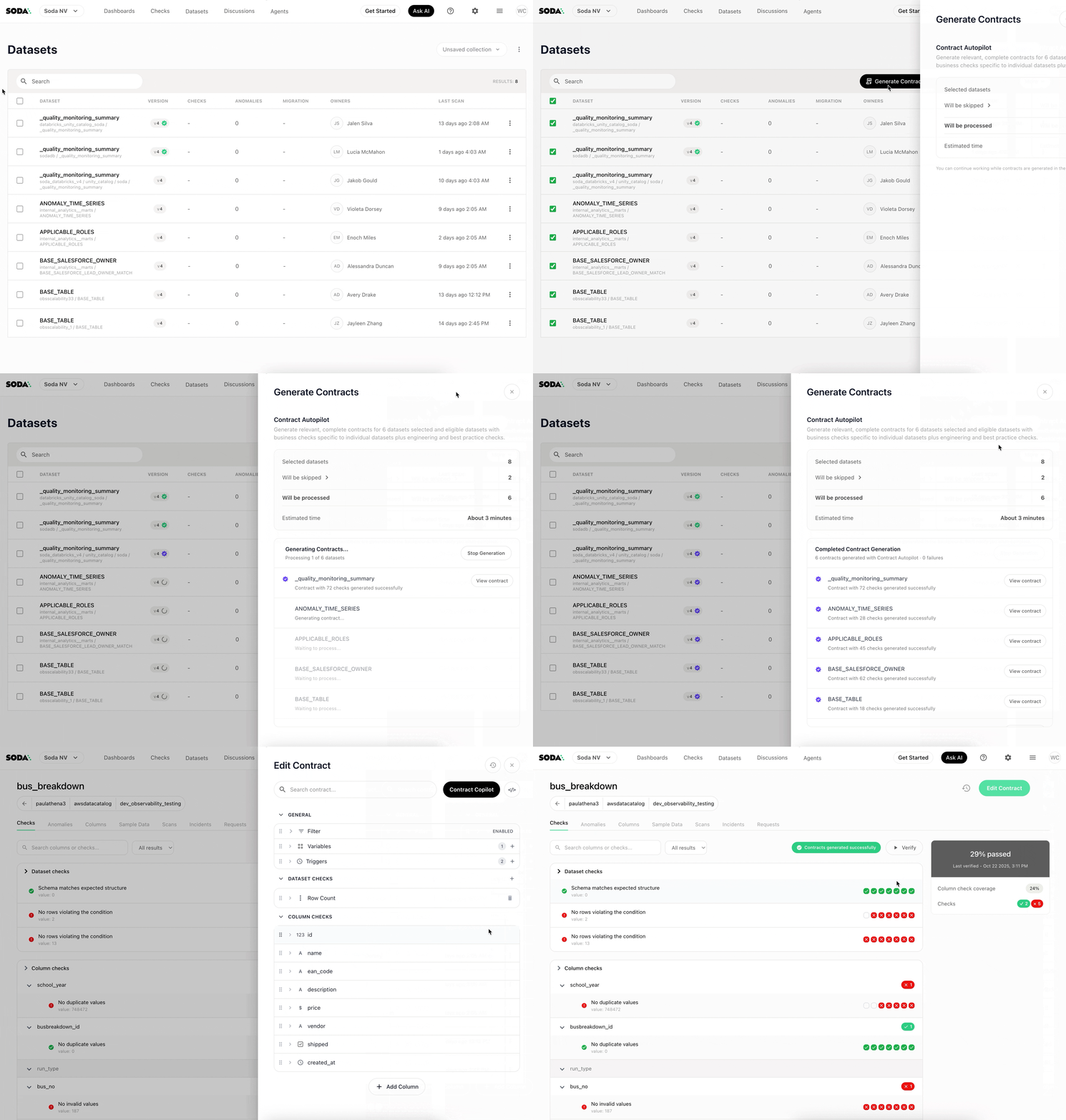
Contract Autopilot is one mode of Soda AI, the AI layer of Soda Cloud. It automatically generates data contracts for your datasets by analyzing your actual production data.
But this is not simply a schema skeleton. When you click Generate Contracts, Autopilot analyzes your dataset and produces a contract that reflects what “good” looks like for that specific table: its patterns, its distributions, its expected structure. You get a contract you can review, adjust, and deploy; not just a template to fill in.
How it works
Step 1: Select datasets
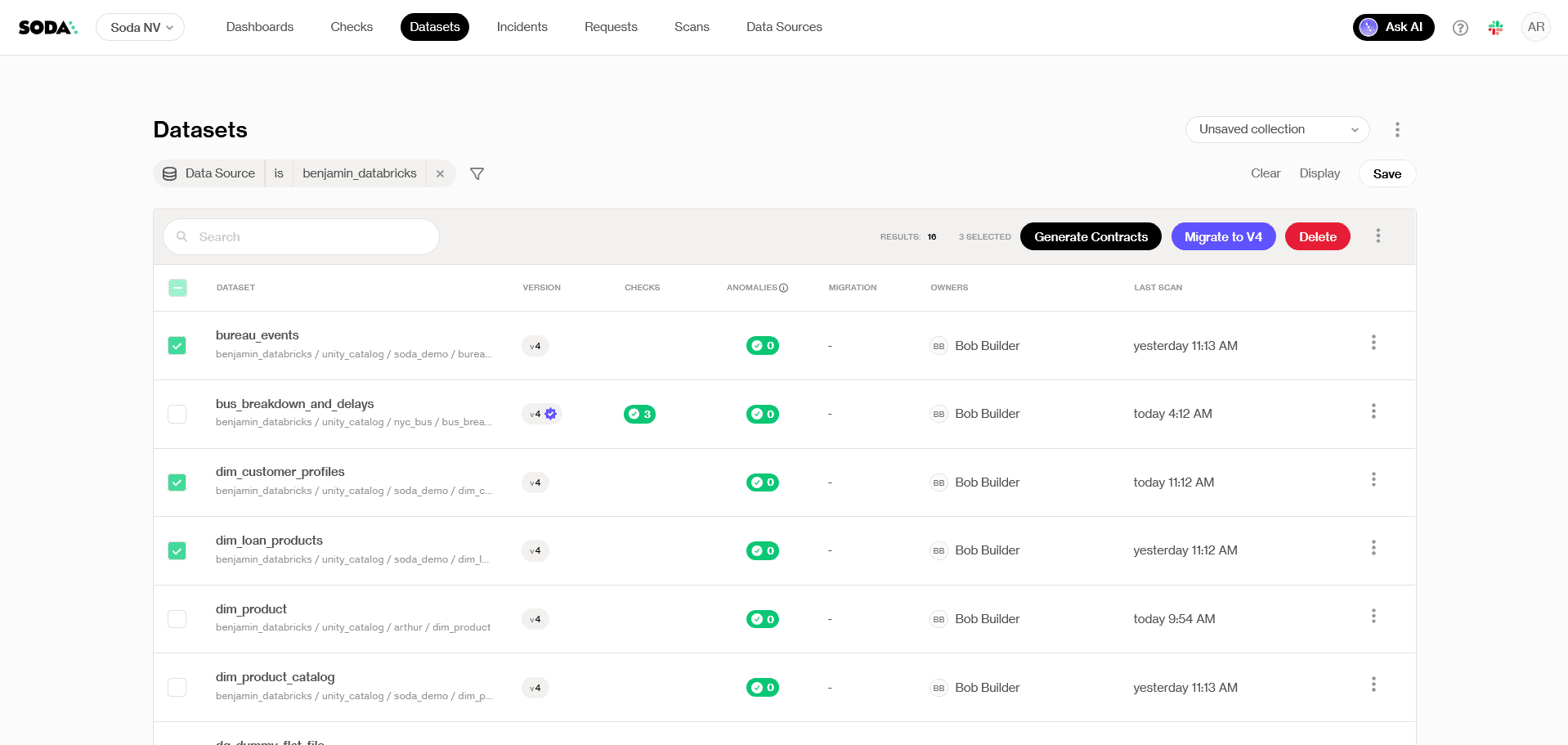
From the Datasets page in Soda Cloud, select the tables you want to cover. Autopilot only generates contracts for datasets that don’t already have an existing contract, so there’s no risk of overwriting work your team has already done.
Click Generate Contracts in the top right.
Step 2: Optionally set a schedule
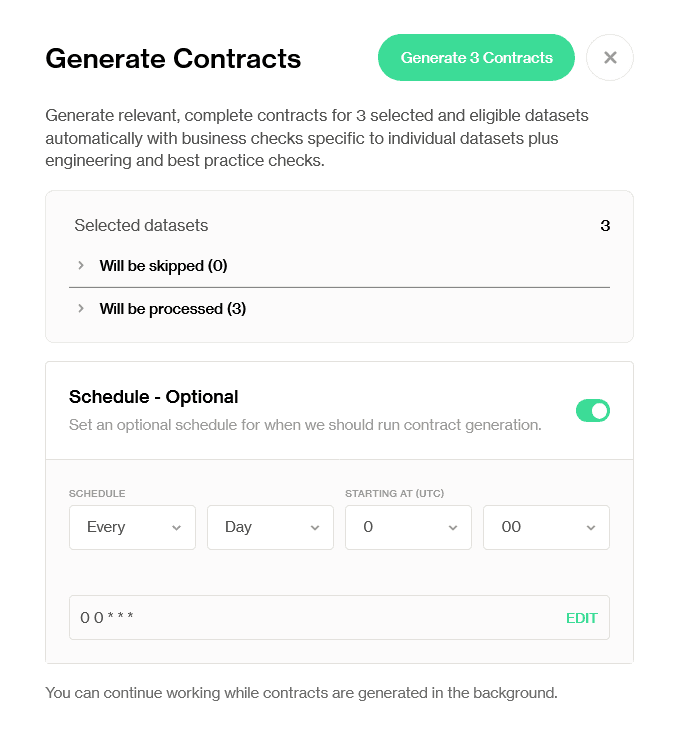
You can trigger generation immediately or schedule it to run at a time that fits your workflow, for example, after a nightly load, when fresh data is available for sampling.
Step 3: Review what will be created
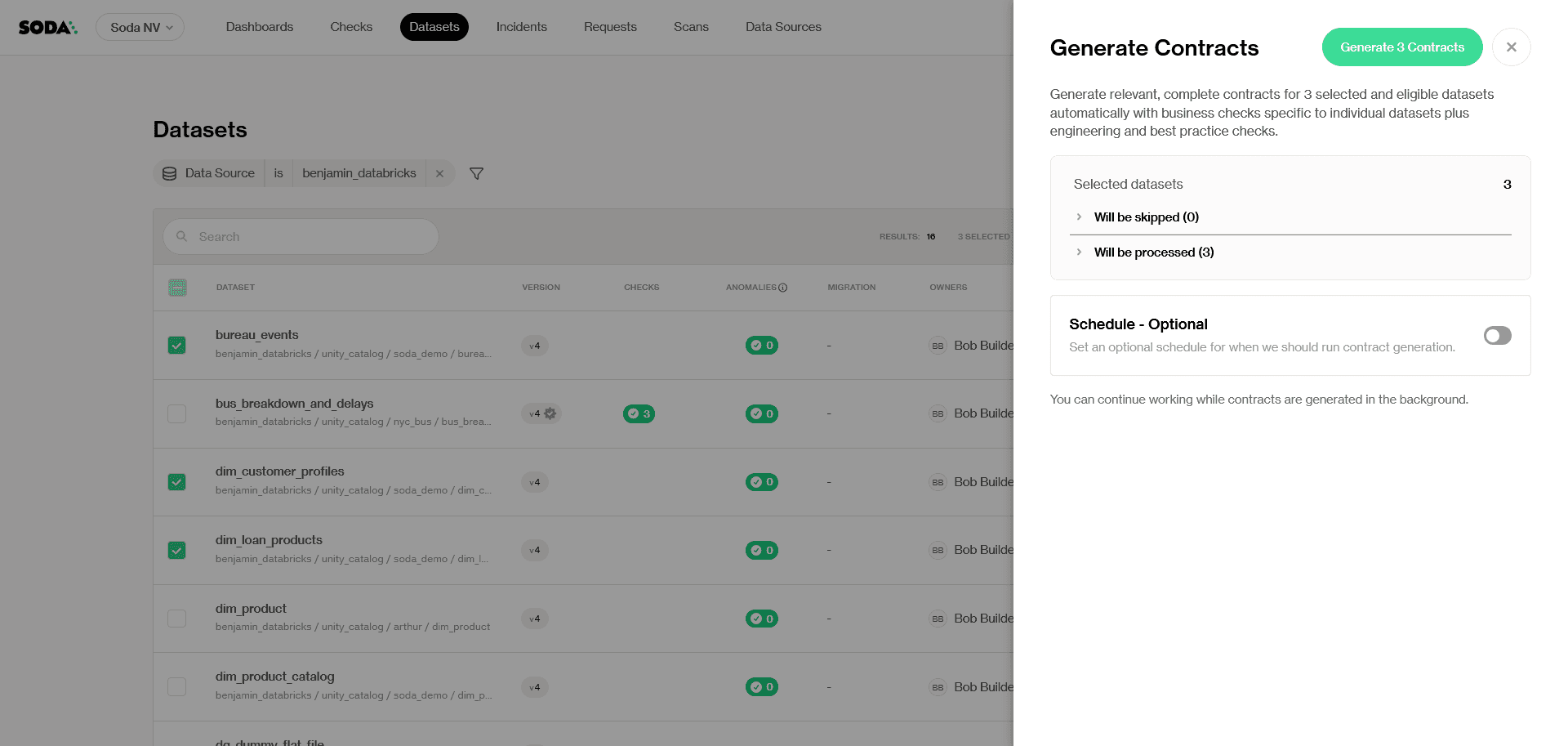
Before generation begins, Soda shows you a snapshot of which contracts will be created and a time estimate. You can continue using Soda Cloud while generation runs in the background.
Click Generate [num] Contracts to confirm.
Step 4: Review, refine, deploy
Once generation completes, the contracts are published and ready for review. Each Autopilot-generated contract carries a purple checkmark icon, distinguishing it from contracts authored by your team. The moment a human makes an edit, the icon changes to a blue checkmark — a small but intentional signal that this contract has been validated by someone who knows the data.
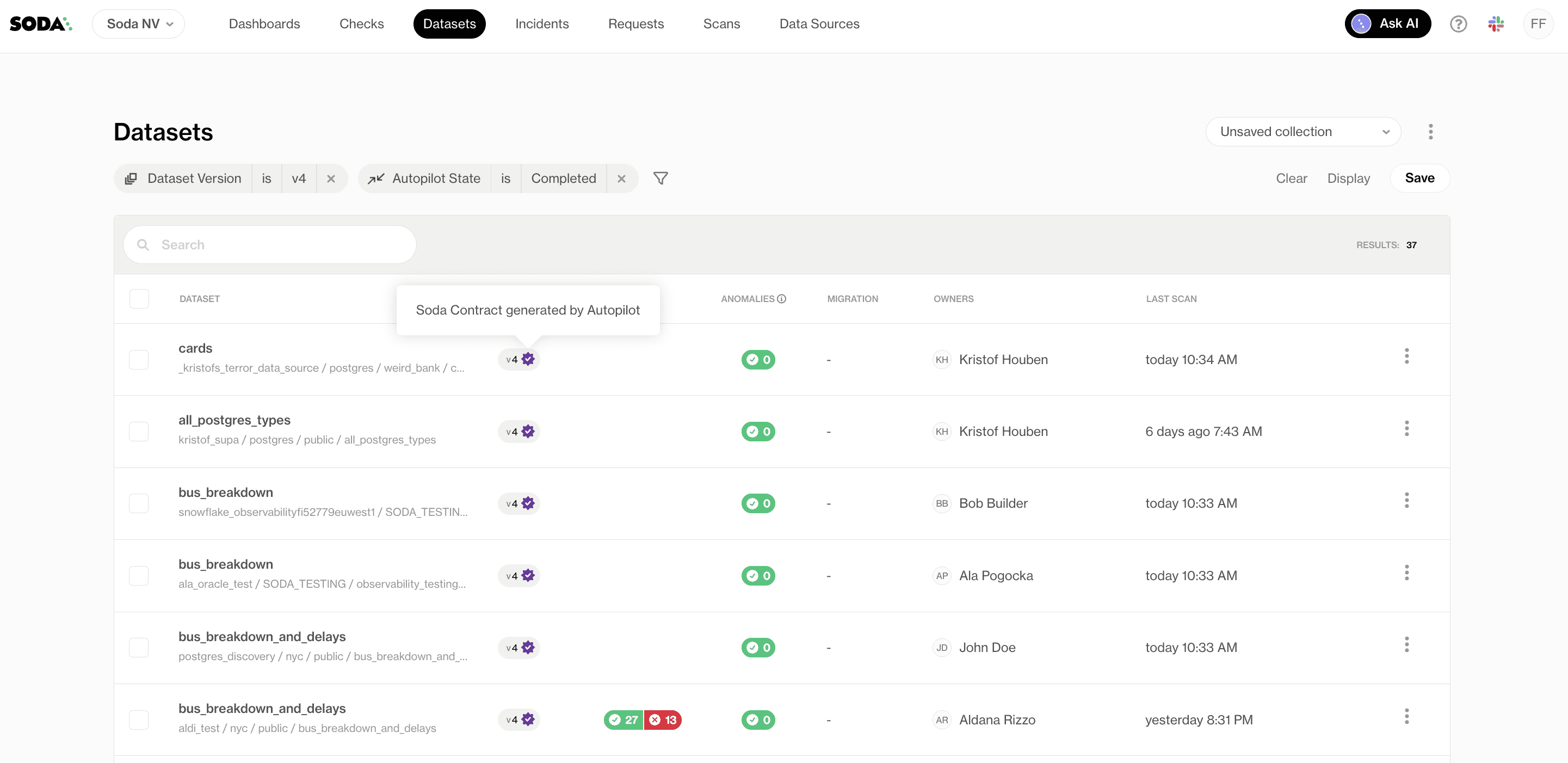
From here, you can review generated checks, validate assumptions with domain experts, adjust thresholds and schedules, and iterate using Contract Copilot for refinements.
What Autopilot generates and what it doesn’t
It helps to understand where Autopilot sits relative to the other ways to create a contract in Soda.
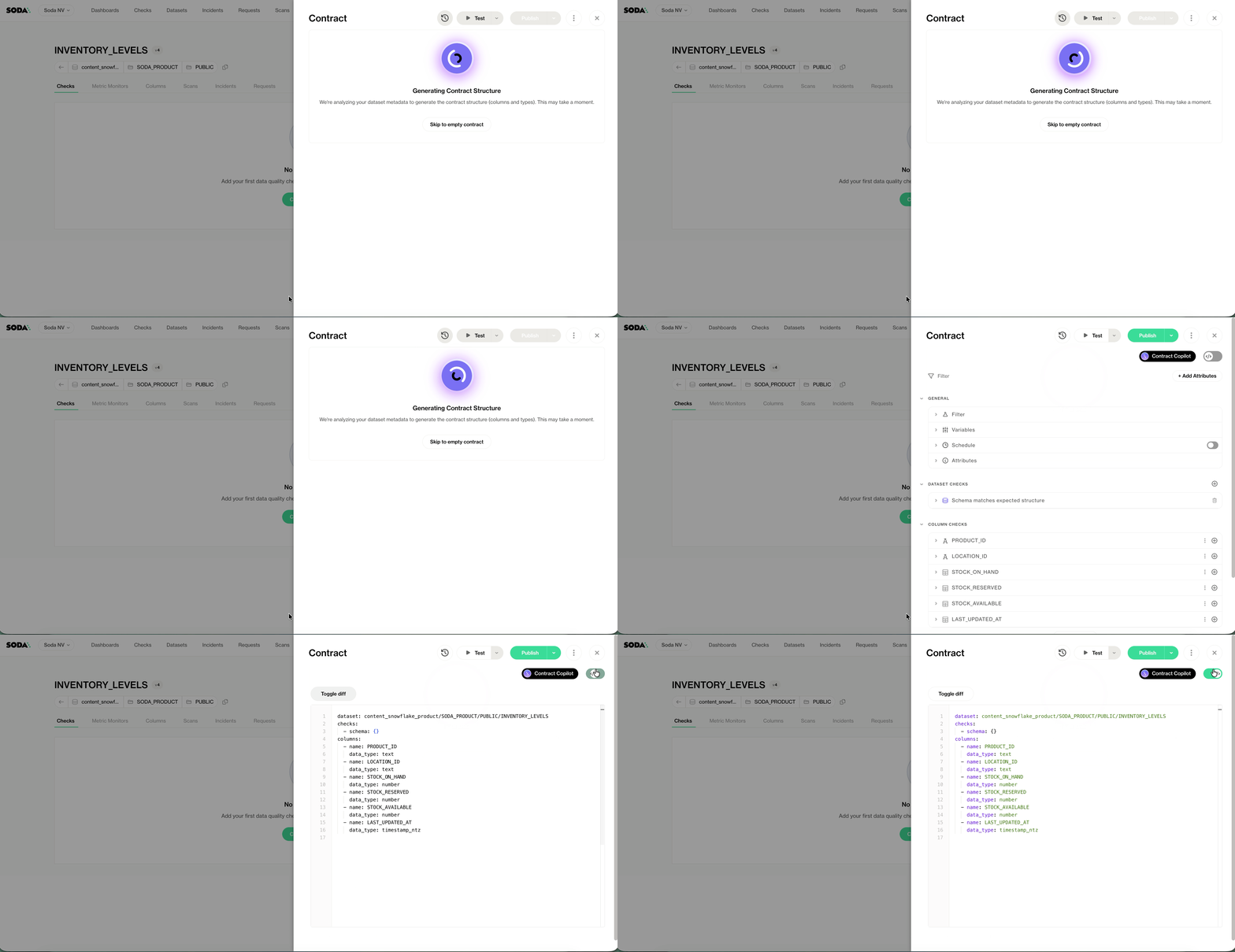
When you use Create Contract (or the CLI generate command), Soda produces a contract skeleton based on the dataset metadata, without analyzing the actual data. No checks, just columns and schema. It’s a starting point for manual authoring.
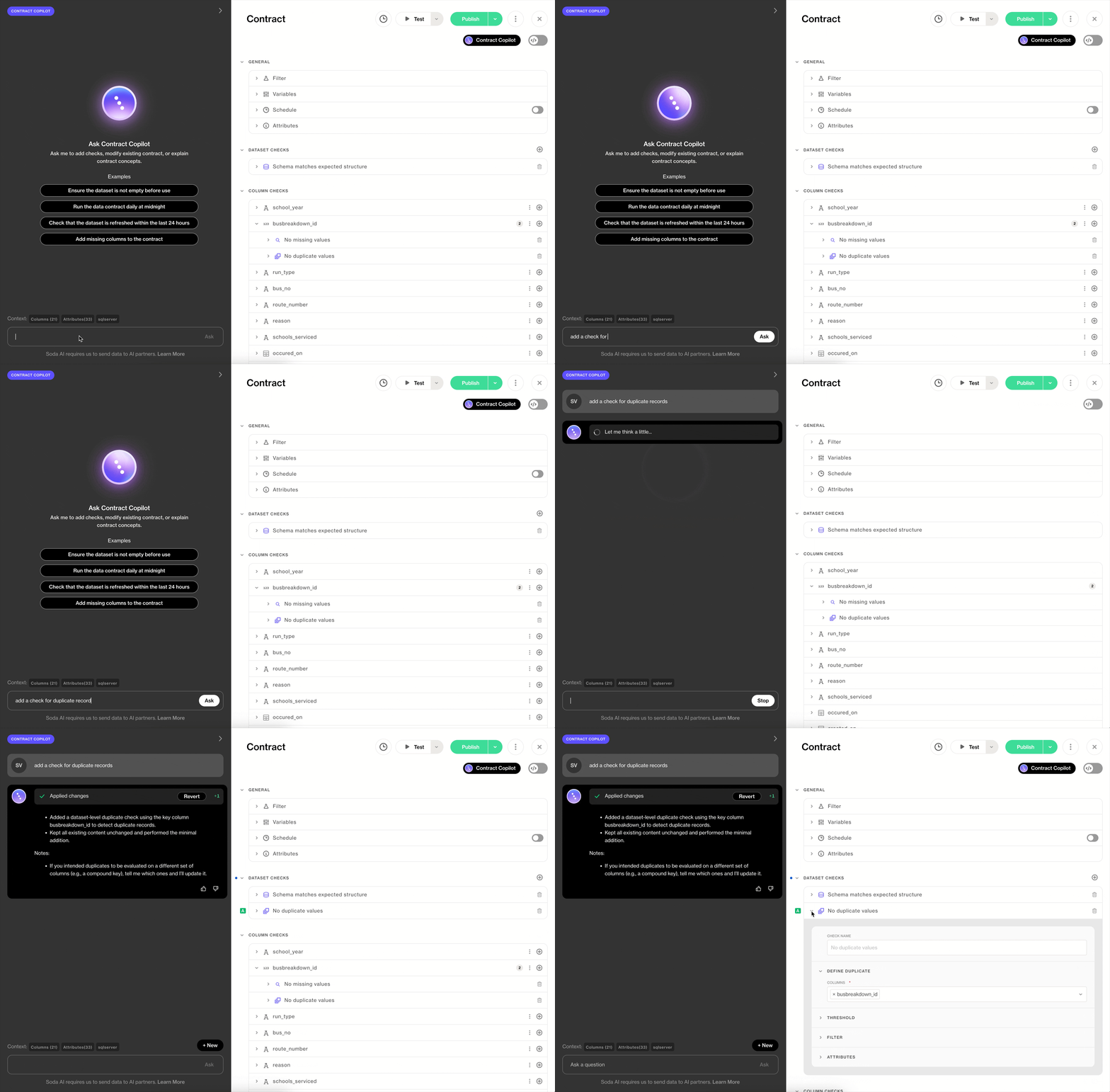
Contract Copilot is an AI assistant that works alongside you in the UI, helping you create or refine a single contract through natural language. You’re in the driver’s seat; Copilot accelerates the work.
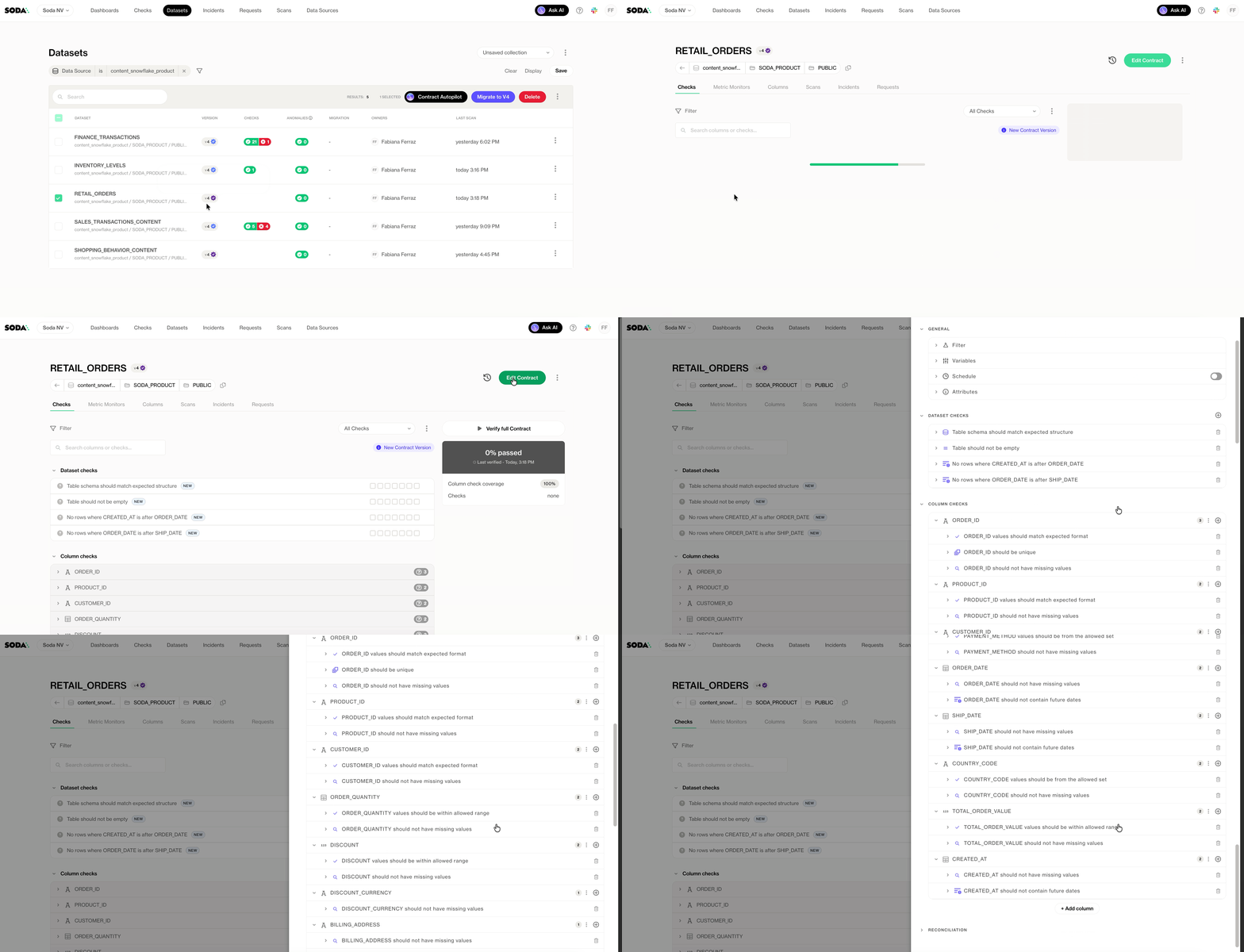
Contract Autopilot is different in scope. It operates in batch mode across many datasets simultaneously, and it produces fully populated contracts—schema definitions plus recommended quality checks— grounded in your production data. No prompting required.
Autopilot and Copilot are the two AI modes of Soda AI. Create Contract is the manual baseline. Copilot helps you write faster. Autopilot helps you achieve coverage at a scale that manual authoring can’t match.
Security and access
Contract Autopilot’s AI processing aligns with Soda’s SOC 2 Type 2 compliance, and any data sent to managed AI providers is not retained for training. Access is governed by dataset-level permissions in Soda Cloud — if a user doesn’t have the Manage contract permission on a dataset, they can’t trigger generation for it.
Human-in-the-loop
Contract Autopilot does not autonomously modify your data, push changes to production, or execute irreversible operations. Every generated contract is a draft waiting for human review before it runs.
This is intentional. Autopilot’s job is to eliminate the blank page and compress the time it takes to get to a reviewable contract — not to replace the judgment of the engineer or data steward who owns that data.
The purple-to-blue checkmark transition is a provenance signal: this contract started as a machine recommendation and was confirmed by a human. As your team iterates, the distinction tells you which contracts have been actively maintained and which are still in their generated baseline state.
Requirements and current limitations
Contract Autopilot is currently in preview. A few things to know before getting started:
A Soda Runner is required (Soda Cloud feature only; CLI and Python API are not supported)
Supported data sources: Snowflake, Databricks, Postgres, Redshift, Athena, Trino, Dremio, Oracle, SQL Server, Synapse, and Fabric
Autopilot profiles text, numeric, and timestamp columns; columns with other types (for example, JSON or structured arrays) aren't currently supported
Autopilot only generates contracts for datasets without an existing contract
APIs for programmatic triggering are not yet available
If a scan fails during generation, the dataset is flagged and the job can be re-triggered after reviewing the scan logs. No partial contracts are published.
Part of a larger direction
Contract Autopilot is one piece of the self-driving data quality vision introduced in Soda 4.0. The direction is a platform where quality rules are derived automatically, enforced continuously, and refined collaboratively.
Autopilot gets you covered. Copilot helps you get it right. Enforcement keeps it that way.
If you’ve been waiting for a practical path to contract coverage at scale, this is it.
Get started
Contract Autopilot is currently available as a preview. Contact support@soda.io for early access.
Why the blank page is the wrong starting point
Every data team knows contracts are valuable. The problem is that writing them one at a time doesn’t scale.
You commit to data contracts. You write the first one: schema definitions, freshness rules, null checks, value thresholds. It takes a few hours. The contract is good. You deploy it. It runs. It catches something on day three.
Then someone asks: how long until we have coverage across all 400 tables?
At one contract per few hours, the answer is: a very long time. Meanwhile, those 399 other tables are running untested in production. Pipelines are breaking silently, and bad data is reaching dashboards.
Writing data contracts from scratch requires both data knowledge and time. You need to understand each table’s semantics, its acceptable ranges, its freshness expectations, its nullable columns. For a mature dataset you’ve worked with for months, this is tractable. For a newly ingested source, or the fifteenth table in a domain you’re onboarding, it becomes guesswork.
The alternative most teams default to is to start with the highest-priority tables and leave the rest uncovered. This is a reasonable triage decision. It’s also how bad data keeps slipping through on the tables you didn’t get to.
This coverage gap is the problem Soda Contract Autopilot is built to solve.
Autopilot changes the starting point. Instead of a blank YAML file, you start with a generated contract that already reflects your data’s actual characteristics. Instead of guessing thresholds, you’re reviewing recommendations grounded in production samples.
The goal isn’t to replace engineering judgment. It’s to eliminate the part of the work that doesn’t require it.
Introducing Contract Autopilot
Contract Autopilot is one mode of Soda AI, the AI layer of Soda Cloud. It automatically generates data contracts for your datasets by analyzing your actual production data.
But this is not simply a schema skeleton. When you click Generate Contracts, Autopilot analyzes your dataset and produces a contract that reflects what “good” looks like for that specific table: its patterns, its distributions, its expected structure. You get a contract you can review, adjust, and deploy; not just a template to fill in.
How it works
Step 1: Select datasets
From the Datasets page in Soda Cloud, select the tables you want to cover. Autopilot only generates contracts for datasets that don’t already have an existing contract, so there’s no risk of overwriting work your team has already done.
Click Generate Contracts in the top right.
Step 2: Optionally set a schedule
You can trigger generation immediately or schedule it to run at a time that fits your workflow, for example, after a nightly load, when fresh data is available for sampling.
Step 3: Review what will be created
Before generation begins, Soda shows you a snapshot of which contracts will be created and a time estimate. You can continue using Soda Cloud while generation runs in the background.
Click Generate [num] Contracts to confirm.
Step 4: Review, refine, deploy
Once generation completes, the contracts are published and ready for review. Each Autopilot-generated contract carries a purple checkmark icon, distinguishing it from contracts authored by your team. The moment a human makes an edit, the icon changes to a blue checkmark — a small but intentional signal that this contract has been validated by someone who knows the data.
From here, you can review generated checks, validate assumptions with domain experts, adjust thresholds and schedules, and iterate using Contract Copilot for refinements.
What Autopilot generates and what it doesn’t
It helps to understand where Autopilot sits relative to the other ways to create a contract in Soda.
When you use Create Contract (or the CLI generate command), Soda produces a contract skeleton based on the dataset metadata, without analyzing the actual data. No checks, just columns and schema. It’s a starting point for manual authoring.
Contract Copilot is an AI assistant that works alongside you in the UI, helping you create or refine a single contract through natural language. You’re in the driver’s seat; Copilot accelerates the work.
Contract Autopilot is different in scope. It operates in batch mode across many datasets simultaneously, and it produces fully populated contracts—schema definitions plus recommended quality checks— grounded in your production data. No prompting required.
Autopilot and Copilot are the two AI modes of Soda AI. Create Contract is the manual baseline. Copilot helps you write faster. Autopilot helps you achieve coverage at a scale that manual authoring can’t match.
Security and access
Contract Autopilot’s AI processing aligns with Soda’s SOC 2 Type 2 compliance, and any data sent to managed AI providers is not retained for training. Access is governed by dataset-level permissions in Soda Cloud — if a user doesn’t have the Manage contract permission on a dataset, they can’t trigger generation for it.
Human-in-the-loop
Contract Autopilot does not autonomously modify your data, push changes to production, or execute irreversible operations. Every generated contract is a draft waiting for human review before it runs.
This is intentional. Autopilot’s job is to eliminate the blank page and compress the time it takes to get to a reviewable contract — not to replace the judgment of the engineer or data steward who owns that data.
The purple-to-blue checkmark transition is a provenance signal: this contract started as a machine recommendation and was confirmed by a human. As your team iterates, the distinction tells you which contracts have been actively maintained and which are still in their generated baseline state.
Requirements and current limitations
Contract Autopilot is currently in preview. A few things to know before getting started:
A Soda Runner is required (Soda Cloud feature only; CLI and Python API are not supported)
Supported data sources: Snowflake, Databricks, Postgres, Redshift, Athena, Trino, Dremio, Oracle, SQL Server, Synapse, and Fabric
Autopilot profiles text, numeric, and timestamp columns; columns with other types (for example, JSON or structured arrays) aren't currently supported
Autopilot only generates contracts for datasets without an existing contract
APIs for programmatic triggering are not yet available
If a scan fails during generation, the dataset is flagged and the job can be re-triggered after reviewing the scan logs. No partial contracts are published.
Part of a larger direction
Contract Autopilot is one piece of the self-driving data quality vision introduced in Soda 4.0. The direction is a platform where quality rules are derived automatically, enforced continuously, and refined collaboratively.
Autopilot gets you covered. Copilot helps you get it right. Enforcement keeps it that way.
If you’ve been waiting for a practical path to contract coverage at scale, this is it.
Get started
Contract Autopilot is currently available as a preview. Contact support@soda.io for early access.
Trusted by the world’s leading enterprises
Real stories from companies using Soda to keep their data reliable, accurate, and ready for action.
At the end of the day, we don’t want to be in there managing the checks, updating the checks, adding the checks. We just want to go and observe what’s happening, and that’s what Soda is enabling right now.

Sid Srivastava
Director of Data Governance, Quality and MLOps
Investing in data quality is key for cross-functional teams to make accurate, complete decisions with fewer risks and greater returns, using initiatives such as product thinking, data governance, and self-service platforms.

Mario Konschake
Director of Product-Data Platform
Soda has integrated seamlessly into our technology stack and given us the confidence to find, analyze, implement, and resolve data issues through a simple self-serve capability.

Sutaraj Dutta
Data Engineering Manager
Our goal was to deliver high-quality datasets in near real-time, ensuring dashboards reflect live data as it flows in. But beyond solving technical challenges, we wanted to spark a cultural shift - empowering the entire organization to make decisions grounded in accurate, timely data.

Gu Xie
Head of Data Engineering
4.4 of 5
Your data has problems.
Now they fix themselves.
Automated data quality, remediation, and management.
One platform, agents that do the work, you approve.
Trusted by








Trusted by the world’s leading enterprises
Real stories from companies using Soda to keep their data reliable, accurate, and ready for action.
At the end of the day, we don’t want to be in there managing the checks, updating the checks, adding the checks. We just want to go and observe what’s happening, and that’s what Soda is enabling right now.
Sid Srivastava
Director of Data Governance, Quality and MLOps
Investing in data quality is key for cross-functional teams to make accurate, complete decisions with fewer risks and greater returns, using initiatives such as product thinking, data governance, and self-service platforms.
Mario Konschake
Director of Product-Data Platform
Soda has integrated seamlessly into our technology stack and given us the confidence to find, analyze, implement, and resolve data issues through a simple self-serve capability.
Sutaraj Dutta
Data Engineering Manager
Our goal was to deliver high-quality datasets in near real-time, ensuring dashboards reflect live data as it flows in. But beyond solving technical challenges, we wanted to spark a cultural shift - empowering the entire organization to make decisions grounded in accurate, timely data.
Gu Xie
Head of Data Engineering
4.4 of 5
Your data has problems.
Now they fix themselves.
Automated data quality, remediation, and management.
One platform, agents that do the work, you approve.
Trusted by
Solutions
Trusted by the world’s leading enterprises
Real stories from companies using Soda to keep their data reliable, accurate, and ready for action.
At the end of the day, we don’t want to be in there managing the checks, updating the checks, adding the checks. We just want to go and observe what’s happening, and that’s what Soda is enabling right now.
Sid Srivastava
Director of Data Governance, Quality and MLOps
Investing in data quality is key for cross-functional teams to make accurate, complete decisions with fewer risks and greater returns, using initiatives such as product thinking, data governance, and self-service platforms.
Mario Konschake
Director of Product-Data Platform
Soda has integrated seamlessly into our technology stack and given us the confidence to find, analyze, implement, and resolve data issues through a simple self-serve capability.
Sutaraj Dutta
Data Engineering Manager
Our goal was to deliver high-quality datasets in near real-time, ensuring dashboards reflect live data as it flows in. But beyond solving technical challenges, we wanted to spark a cultural shift - empowering the entire organization to make decisions grounded in accurate, timely data.
Gu Xie
Head of Data Engineering
4.4 of 5
Your data has problems.
Now they fix themselves.
Automated data quality, remediation, and management.
One platform, agents that do the work, you approve.
Trusted by
Solutions