How to Add Data Contracts to an Airflow Pipeline: A Technical Guide
How to Add Data Contracts to an Airflow Pipeline: A Technical Guide
How to Add Data Contracts to an Airflow Pipeline: A Technical Guide

Kavita Rana
Kavita Rana
Technical Writer at Soda
Technical Writer at Soda
Table of Contents
Bad data doesn't announce itself. The pipeline run goes green, the rows land in Postgres, the dashboards stay up, and three days later an analyst notices the revenue chart looks wrong. By then the bad rows are in five downstream tables and a machine learning model has retrained on them.
The fix isn't another monitoring dashboard. It's moving the check left, to the boundary, before the write happens. That's what a data contract enforced in Airflow gives you: a YAML file that defines what good data looks like, and an Airflow task that validates against it before any of it touches your production table.
This guide walks through the pattern Benjamin Pirotte (PM at Soda) demoed in a recent webinar. One contract, two validation points, four Airflow tasks. The companion code is on GitHub if you want to fork it and test it.
If you're new to data contracts, start with the 101 and come back. Everyone else, keep going.
Key Takeaways |
|---|
|
What is a Data Contract?
A data contract is an explicit agreement between data producers and data consumers. This includes things like which columns exist, what types they have, whether values can be missing, what values are considered valid, and how fresh the data should be.
Data producers are the teams responsible for building and maintaining data pipelines. Data consumers are the people and systems that rely on that data—for analytics dashboards, reports, applications, or machine learning models.
So the purpose of a data contract is to ensure that both sides have a shared understanding of what the data should look like and what guarantees it provides.
What’s important here is that these expectations are not just documented. They are made versioned and testable.
Test Data as Code
A data contract is not simply a description of the data; it is something you can actively validate against real datasets.
This is especially relevant in data governance contexts. Traditionally, governance has focused on defining standards and documenting datasets, often in catalogs or policy documents. But those definitions were static and not enforceable. Over time, data changed, pipelines evolved, and documentation drifted away from reality.
With data contracts, the idea is different. You can track how they evolve over time, keep a history of changes, and continuously test data against them as pipelines and datasets change. This creates a real lifecycle for data expectations, rather than a one-time documentation exercise.
The Anatomy of a Soda Data Contract
A Soda data contract defines the dataset path, dataset-level checks, and column-level checks. Same YAML file, all the quality rules, one source of truth.
The result is a precise, machine-readable definition of what “good data” means.
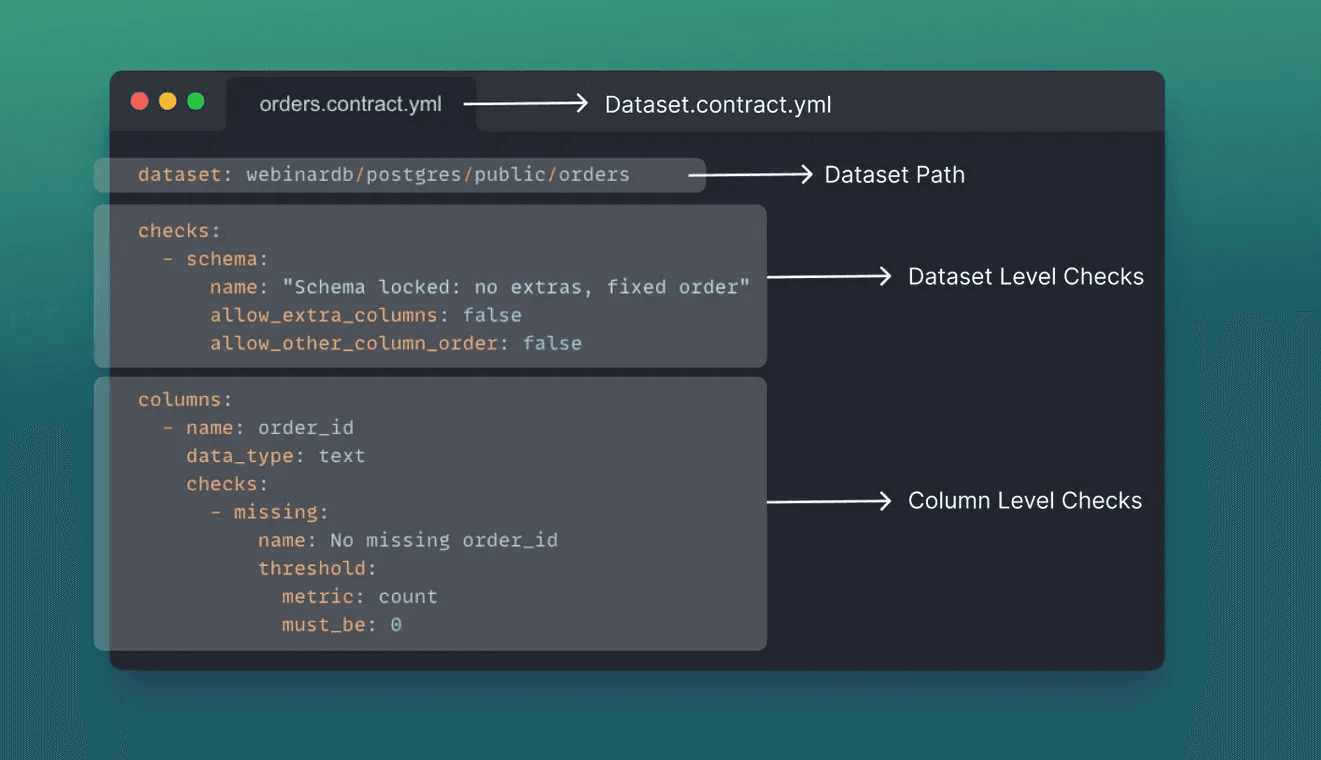
Dataset path
The physical location of the dataset (database, schema, table)
This enables automated execution against the correct source
Dataset-level checks
Rules that apply to the dataset as a whole, such as:
Schema consistency
Freshness expectations
Row count thresholds
Multi-column or relational rules (e.g., date comparisons)
Column definitions and checks
For each column, the contract can specify:
Data type
Nullability
Valid values (ranges, enums, regex patterns)
Uniqueness
Aggregated constraints (averages, sums, thresholds)
Why YAML?
Soda data contracts are YAML for three concrete reasons:
Version control compatibility
Contracts can live in Git, evolve through pull requests, and support diffs and rollbacks.
Human readability
Analysts, domain experts, and data stewards can read and understand contracts without programming knowledge.
Low barrier to authorship
Writing or modifying a contract does not require Python or SQL expertise—only structural understanding.
This allows contracts to become shared artifacts rather than engineering-only assets.
Executability as the Differentiator
Many tools allow teams to describe contracts. The thing that separates Soda from "contracts as documentation" tools is that Soda contracts are executable and enforceable.
They are not passive documentation; they are run against real data and produce pass/fail outcomes. This is what turns contracts into operational safeguards rather than aspirational standards.
YAML Workflow for Data Engineers
Soda is one part of a stack that already exists. Data sources like Postgres, Snowflake, Databricks, and BigQuery. Catalogs like Atlan, Collibra, and Alation. Alerting channels like Slack, Teams, and PagerDuty. Orchestrators like Airflow and dbt.
The integrations are how the contract reaches the data and how the results reach the people who care about them.
In this example, we use Postgres as the data source, there is an orders table, and new data arrives periodically through Airflow as the orchestrator.
Pipeline Steps
The DAG has four tasks. The contract runs in two of them.
Step 1: Load (Generate Test Data)
Generates 5 rows of test order_data with:
Valid UUIDs for
order_idandcustomer_idRandom dates, amounts, addresses, and statuses
Option to generate errors for testing (
hasErrors: true)
Step 2: Verify Locally (DuckDB)
Validates data quality using DuckDB in-memory
Data contract acts as a data quality gate before database write
Fails the pipeline if checks don't pass
Step 3: Insert to PostgreSQL
Inserts verified data into
public.orderstableOnly runs if Step 2 passes
Step 4: Verify on PostgreSQL
Verifies contract on the actual PostgreSQL table
Publishes results to Soda Cloud for monitoring
Why run the contract twice?
Because the two checks do different jobs.
The in-memory check is a gate. It runs against the inbound DataFrame, in DuckDB, before anything writes to Postgres. If the batch has a missing primary key, an invalid status, or a shipping date before its order date, the task fails and the rest of the DAG never executes. No bad rows reach production.
The production check is an audit. It runs against the live Postgres table after the write and publishes results to Soda Cloud. That's where stewards, downstream consumers, and Slack alerts pick it up. If something went sideways during the write itself (type coercion, schema drift, a column getting renamed in flight), this is where you find out.
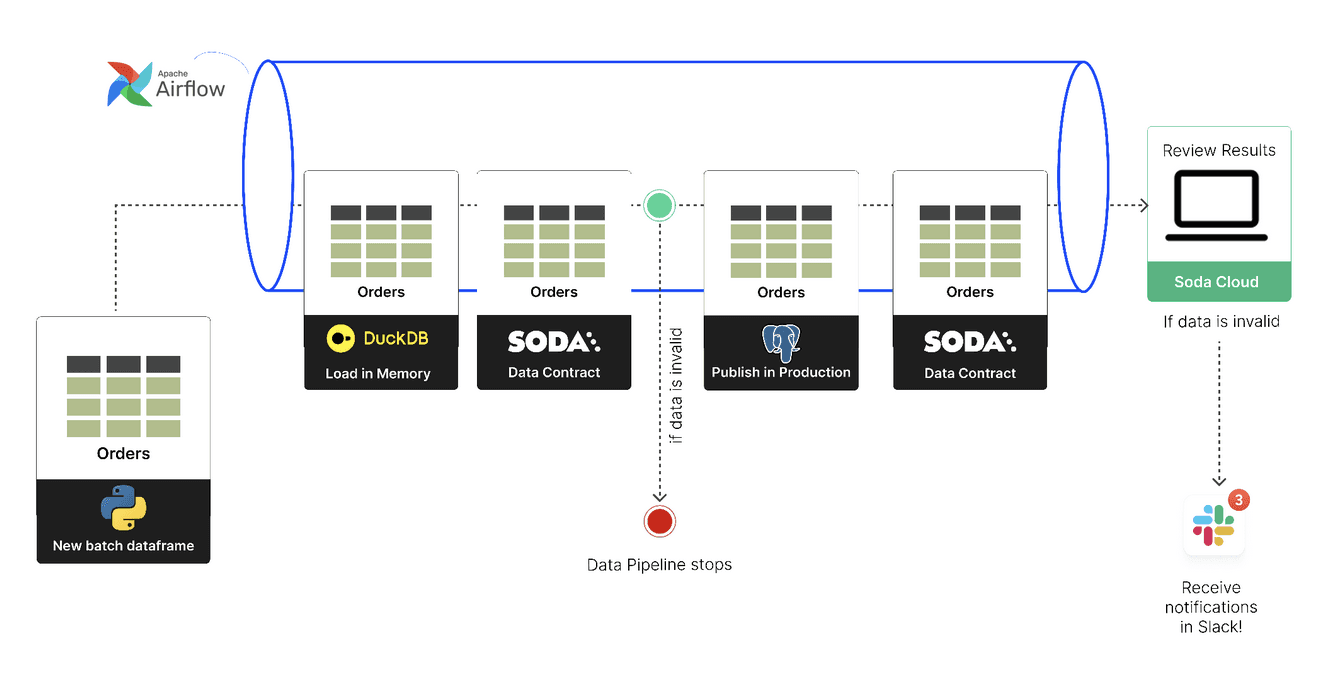
One deliberate decision worth calling out: the in-memory check doesn't publish to Soda Cloud. Staging noise is the reason most data quality tools get muted in Slack after a week. Pre-prod failures stay local to Airflow logs. Only production results get published.
Prerequisites and Environment Setup
What you need before starting:
Python 3.10+
A Postgres database (the example uses an
orderstable)An Airflow installation (Airflow Standalone works for the tutorial)
A Soda Cloud account, for the production-side publishing (the in-memory gate works without one)
The Soda packages
soda-postgresandsoda-duckdb
Set up your environment and install the packages:
# Create virtual environment
python -m venv venv
source venv/bin/activate  # On Windows: venv\\Scripts\\activate

# Install Soda packages from private PyPI
pip install -i <https://pypi.dev.sodadata.io/simple> -U soda-postgres soda-duckdb

# Install other dependencies
pip install -r
You'll have two config files. The first is your Postgres connection details (host, port, database, user, password). The second is the Soda Cloud config with API keys, used to publish results.
Test both connections before going further:
If both come back green, you're ready.
Generate the contract skeleton
Soda ships a CLI that introspects a Postgres table and generates a starter contract. Point it at the dataset path:
./soda.sh generate -pThat produces contracts/webinardb/postgres/public/orders.yaml with three things: the dataset path, the column list with types, and a default schema check.
Run the new contract to confirm Soda can connect and execute:
./soda.sh verify -pYou'll see one passing check. The contract was generated from the table that exists, so the schema check is true. The point of running it is to confirm the wiring works.
Add column-level and dataset-level checks
The real work is in the checks. Here's a usable contract for the orders table with some common check types.
Dataset-level checks are in the first block at the top. The most common ones are:
checks:
  - schema: {}
  - failed_rows:
      name: shipping_date after order_date
      expression: shipping_date <= order_date
      threshold:
        must_be: 0
The failed_rows check is the workhorse for cross-column rules the built-in checks don't cover. The expression is a boolean evaluated per row; any row where it's true counts as a failed row. Here it catches the shipping-on-or-before-order-date case. For composite-key uniqueness or anything else you'd want to write in SQL, failed_rows also accepts a query form instead of expression.
Column-level checks go under each column. Take order_id, the primary key. We want zero missing values, zero duplicates, and a regex confirming the format is a valid UUID v4:
columns:
	- name: order_id
	  data_type: text
	  checks:
	    - missing:
	    - invalid:
	        name: order_id UUID v4
	        valid_format:
	          name: uuid_v4
	          regex: '^[0-9a-fA-F]{8}-[0-9a-fA-F]{4}-4[0-9a-fA-F]{3}-[89abAB][0-9a-fA-F]{3}-[0-9a-fA-F]{12}$'
For amount, we want non-negative numbers:
- name: amount
  data_type: numeric
  checks:
    - missing:
    - invalid:
        valid_min: 0
For status, the value must be one of a small list:
- name: status
  data_type: text
  checks:
    - missing:
    - invalid:
        name: status must be valid
        valid_values
Aggregated checks are also available for numeric columns: avg, sum, count with a threshold. They follow the same shape as the column checks above: a metric, a threshold, a pass-or-fail decision.
Run the contract again with all these checks added. Against the existing orders table, you should see somewhere in the 14–18 range of passing checks, depending on which ones you included. That's your baseline.
For the YAML grammar in full, see the Soda contract language reference.
Wire the in-memory gate into Airflow
Now wire the contract into Airflow. The first place to run it is in memory, against the inbound batch, before the write.
The upstream task generates a pandas DataFrame. This task spins up an in-memory DuckDB, registers the DataFrame as a view, points the contract at it, and aborts the DAG if any checks fail.
import duckdb
import yaml
import tempfile
from airflow.exceptions import AirflowFailException
from soda_core.contracts import verify_contract_locally
from soda_duckdb import DuckDBDataSource

def verify_locally(**context):
    df = context['ti'].xcom_pull(task_ids='load')

    # Spin up an in-memory DuckDB and register the DataFrame as a view
    conn = duckdb.connect(database=":memory:")
    cursor = conn.cursor()
    cursor.register(view_name="orders", python_object=df)

    # Build a temp contract whose dataset path points at DuckDB.
    # Keep the data source name (first segment) and table name (last segment);
    # swap the middle for 'main' (DuckDB's default schema).
    with open("contracts/webinardb/postgres/public/orders.yaml") as f:
        contract = yaml.safe_load(f)
    parts = contract["dataset"].split("/")
    contract["dataset"] = f"{parts[0]}/main/{parts[-1]}"
    tmp = tempfile.NamedTemporaryFile(mode="w", suffix=".yaml", delete=False)
    yaml.dump(contract, tmp, default_flow_style=False)
    tmp.close()

    # Build the DuckDB data source from the cursor, then verify
    data_source = DuckDBDataSource.from_existing_cursor(cursor, name="webinardb")

    result = verify_contract_locally(
        data_sources=[data_source],
        contract_file_path=tmp.name,
        publish=False,
    )

    if result.number_of_checks_failed > 0:
        raise AirflowFailException(
            f"Data quality gate failed: {result.number_of_checks_failed} checks"
        )
Why DuckDB, not Postgres. The DataFrame in memory is exactly what would be written. There's no chance of schema coercion, type casting, or transformation drift between the check and the write, because the check happens before the write. Validate at the boundary. That's the software-engineering instinct, applied to data.
Why the temp contract. The original contract points at webinardb/postgres/public/orders because that's the production location. DuckDB doesn't have a Postgres schema, so the path doesn't resolve. The fix is to load the contract in code, rewrite the dataset path to webinardb/main/orders (DuckDB's default schema is main), and write a temp file. Don't maintain two YAML files for the same contract. They will drift, and you'll spend an afternoon debugging the wrong one.
Why no Soda Cloud publishing here. This is intentional. Staging failures stay in Airflow logs. The day this DAG fires fifty times during a debugging session, you don't want Soda Cloud and Slack to fire fifty alerts.
Write to Postgres, then re-verify and publish
If the gate passes, the next task writes the DataFrame to Postgres. The insert uses psycopg2 with an ON CONFLICT (order_id) DO NOTHING upsert so DAG retries don't double-write the batch:
import os
import psycopg2
from psycopg2 import extras

def insert_to_postgres(**context):
    df = context['ti'].xcom_pull(task_ids='verify_locally')

    conn = psycopg2.connect(
        host=os.getenv("POSTGRES_HOST"),
        port=int(os.getenv("POSTGRES_PORT", "5432")),
        database=os.getenv("POSTGRES_DATABASE"),
        user=os.getenv("POSTGRES_USER"),
        password=os.getenv("POSTGRES_PASSWORD"),
    )
    try:
        cols = [f'"{c}"' for c in df.columns]
        sql = (
            f'INSERT INTO public.orders ({", ".join(cols)}) VALUES %s '
            f'ON CONFLICT (order_id) DO NOTHING'
        )
        rows = [tuple(r) for r in df.to_records(index=False)]
        with conn.cursor() as cur:
            extras.execute_values(cur, sql, rows, page_size=100)
        conn.commit()
    finally:
        conn.close()
After the write, run the same contract again, this time against Postgres, and publish the results to Soda Cloud:
from soda_core.contracts import verify_contract_locally

def verify_production(**context):
    result = verify_contract_locally(
        data_source_file_path="config/postgres.yaml",
        contract_file_path="contracts/webinardb/postgres/public/orders.yaml",
        soda_cloud_file_path="config/soda_cloud.yaml",
        publish=True,  # <-- this is what turns the check into a published audit
    )

    if result.number_of_checks_failed > 0:
        raise AirflowFailException("Production data quality check failed")
That publish=True flag (paired with soda_cloud_file_path) is what turns the second check from "we double-checked the write" into "stakeholders have visibility into the data they depend on." Once published, the result shows up in Soda Cloud, fires whatever notifications are wired up (Slack, Teams, PagerDuty, an integration with a catalog like Atlan or Collibra), and lands on the dashboard the steward checks in the morning.
What this catches that the gate doesn't: the long tail of write-time problems. A schema migration ran between the gate and the write. A type got coerced. A foreign key constraint quietly dropped rows. The gate validated what you intended to write. The audit validates what actually got written.
Watch the pipeline run
A clean run shows all four DAG tasks green, with the production check publishing 16+ passing results to Soda Cloud. A run triggered with bad data stops at verify_locally, leaves Postgres untouched, and surfaces the failing checks in the Airflow log.
The good run. Trigger the DAG with the default config. The load task generates five rows of valid orders. verify_locally runs the contract in DuckDB and confirms all checks pass: schema, row count, missing/duplicate/invalid counts across every column, the cross-column shipping-date rule. Insert-to-Postgres writes the rows. Verify-production runs the contract on the live table and publishes 16+ passing results to Soda Cloud. The whole DAG runs in seconds.
The bad run. Trigger the DAG with {"hasErrors": true} in the config. The load task injects three broken rows: one with a shipping date before its order date, one with an invalid status value, one missing the status entirely. verify_locally now fails. The Soda result reports three failed checks (shipping_date_after_order_date, status_missing, status_invalid), each with the row count, the failing values, and the failed-row payload. The task raises AirflowFailException. The insert task never runs. Postgres stays untouched. Verify-production never executes either, so Soda Cloud sees no result for that DAG run. That's the gate doing its job. Bad data tried to ship. The gate held. Nobody downstream ever saw the rows.
Contract Copilot to translate plain-English requirements
Most of the work above could come from a ticket. The Contract Copilot, built into Soda Cloud, translates plain-English requirements into the right YAML. You review the diff like a PR.
The webinar demo paste-in was a few lines of bullet points from a data product manager:
No missing values in the order_id, customer_id, amount, status, country_code, or shipping_date columns.
amount can never be negative.
status must be one of PENDING, SHIPPED, CANCELLED.
country_code must be a two-letter uppercase ISO code.
order_id and customer_id must be valid UUID v4.
shipping_date must be on or after order_date.
Copilot generated a set of checks covering all of that, with a small annotation on each line explaining what it added and why. The country-code regex came back as ^[A-Z]{2}$. The shipping-date rule came back as a fail_rows query. The UUID validation came back as the v4 regex. Everything got attached to the right column or dataset section in the YAML.
You still review. The diff is the artifact. Treat it the same way you treat a PR from a teammate: read the YAML, run it locally, push back if it's wrong. Copilot is one input. The other inputs are the UI's check-adder buttons and hand-edited YAML. Mix freely.
Web UI Workflow for Data Stewards
While YAML is effective for engineers, data contracts are not owned exclusively by engineers. Many requirements originate from: Analysts, Data product managers, Domain experts, or Data stewards.
A UI layer allows these stakeholders to participate directly.
In Soda Cloud, users can view datasets, inspect data contracts, and see the results of all checks in a visual format. They can understand which checks exist, which ones are passing or failing, and how data quality evolves over time.
The web UI also allows users to propose changes to data contracts. Less technical users, such as analysts or data stewards, can suggest new requirements or modifications directly in the interface. These suggestions can be reviewed by the contract owner, tested, and then merged back into the YAML-based workflow. Behind the scenes, these changes still resolve to YAML, preserving a single source of truth.
Common Mistakes
The most frequent mistake isn't writing the wrong check. It's running the contract in only one place. You either gate without auditing (no production visibility) or audit without gating (bad data still ships).
1. Running the contract only on the production table. This catches drift. It doesn't prevent it. The bad rows already landed before you checked. Add the in-memory gate.
2. Publishing staging results to Soda Cloud. A flaky DAG and an unmuted Slack channel are a bad combination. Pre-prod runs stay local to Airflow; only production results publish.
3. Shipping a generated contract as-is. soda generate gives you the schema. You still have to add business rules. A contract whose only check is "schema matches" doesn't prevent anything.
4. Maintaining two YAML files for the same contract. When the in-memory path and the production path differ (they will), patch the dataset section in code at runtime. Don't keep two copies. They drift.
5. Treating every failure as a hard stop. Use warning thresholds for soft signals (a small uptick in null rates on a non-critical column). Reserve failure for hard stops: a missing primary key, an invalid status. If every check is a hard stop, the team starts disabling checks instead of fixing data.
Wrap
One YAML contract. Two validation points. Pre-prod aborts the pipeline. Production publishes to Soda Cloud.
Bad data never reaches the production table, and when production drifts, you find out in Soda Cloud instead of in a confused Slack message from an analyst a week later.
Three things to do next:
Clone the companion repo, run the DAG, and trigger it with
{"hasErrors": true}to watch the gate hold.Take the pattern to your own DAG. Pick one inbound batch step. Add a contract. See what it catches,
Watch the full webinar. Benjamin's live demo and the Q&A go deeper on quarantine workflows, configurable promotion gates, and how this interacts with ODCS.
Frequently Asked Questions
Bad data doesn't announce itself. The pipeline run goes green, the rows land in Postgres, the dashboards stay up, and three days later an analyst notices the revenue chart looks wrong. By then the bad rows are in five downstream tables and a machine learning model has retrained on them.
The fix isn't another monitoring dashboard. It's moving the check left, to the boundary, before the write happens. That's what a data contract enforced in Airflow gives you: a YAML file that defines what good data looks like, and an Airflow task that validates against it before any of it touches your production table.
This guide walks through the pattern Benjamin Pirotte (PM at Soda) demoed in a recent webinar. One contract, two validation points, four Airflow tasks. The companion code is on GitHub if you want to fork it and test it.
If you're new to data contracts, start with the 101 and come back. Everyone else, keep going.
Key Takeaways |
|---|
|
What is a Data Contract?
A data contract is an explicit agreement between data producers and data consumers. This includes things like which columns exist, what types they have, whether values can be missing, what values are considered valid, and how fresh the data should be.
Data producers are the teams responsible for building and maintaining data pipelines. Data consumers are the people and systems that rely on that data—for analytics dashboards, reports, applications, or machine learning models.
So the purpose of a data contract is to ensure that both sides have a shared understanding of what the data should look like and what guarantees it provides.
What’s important here is that these expectations are not just documented. They are made versioned and testable.
Test Data as Code
A data contract is not simply a description of the data; it is something you can actively validate against real datasets.
This is especially relevant in data governance contexts. Traditionally, governance has focused on defining standards and documenting datasets, often in catalogs or policy documents. But those definitions were static and not enforceable. Over time, data changed, pipelines evolved, and documentation drifted away from reality.
With data contracts, the idea is different. You can track how they evolve over time, keep a history of changes, and continuously test data against them as pipelines and datasets change. This creates a real lifecycle for data expectations, rather than a one-time documentation exercise.
The Anatomy of a Soda Data Contract
A Soda data contract defines the dataset path, dataset-level checks, and column-level checks. Same YAML file, all the quality rules, one source of truth.
The result is a precise, machine-readable definition of what “good data” means.
Dataset path
The physical location of the dataset (database, schema, table)
This enables automated execution against the correct source
Dataset-level checks
Rules that apply to the dataset as a whole, such as:
Schema consistency
Freshness expectations
Row count thresholds
Multi-column or relational rules (e.g., date comparisons)
Column definitions and checks
For each column, the contract can specify:
Data type
Nullability
Valid values (ranges, enums, regex patterns)
Uniqueness
Aggregated constraints (averages, sums, thresholds)
Why YAML?
Soda data contracts are YAML for three concrete reasons:
Version control compatibility
Contracts can live in Git, evolve through pull requests, and support diffs and rollbacks.
Human readability
Analysts, domain experts, and data stewards can read and understand contracts without programming knowledge.
Low barrier to authorship
Writing or modifying a contract does not require Python or SQL expertise—only structural understanding.
This allows contracts to become shared artifacts rather than engineering-only assets.
Executability as the Differentiator
Many tools allow teams to describe contracts. The thing that separates Soda from "contracts as documentation" tools is that Soda contracts are executable and enforceable.
They are not passive documentation; they are run against real data and produce pass/fail outcomes. This is what turns contracts into operational safeguards rather than aspirational standards.
YAML Workflow for Data Engineers
Soda is one part of a stack that already exists. Data sources like Postgres, Snowflake, Databricks, and BigQuery. Catalogs like Atlan, Collibra, and Alation. Alerting channels like Slack, Teams, and PagerDuty. Orchestrators like Airflow and dbt.
The integrations are how the contract reaches the data and how the results reach the people who care about them.
In this example, we use Postgres as the data source, there is an orders table, and new data arrives periodically through Airflow as the orchestrator.
Pipeline Steps
The DAG has four tasks. The contract runs in two of them.
Step 1: Load (Generate Test Data)
Generates 5 rows of test order_data with:
Valid UUIDs for
order_idandcustomer_idRandom dates, amounts, addresses, and statuses
Option to generate errors for testing (
hasErrors: true)
Step 2: Verify Locally (DuckDB)
Validates data quality using DuckDB in-memory
Data contract acts as a data quality gate before database write
Fails the pipeline if checks don't pass
Step 3: Insert to PostgreSQL
Inserts verified data into
public.orderstableOnly runs if Step 2 passes
Step 4: Verify on PostgreSQL
Verifies contract on the actual PostgreSQL table
Publishes results to Soda Cloud for monitoring
Why run the contract twice?
Because the two checks do different jobs.
The in-memory check is a gate. It runs against the inbound DataFrame, in DuckDB, before anything writes to Postgres. If the batch has a missing primary key, an invalid status, or a shipping date before its order date, the task fails and the rest of the DAG never executes. No bad rows reach production.
The production check is an audit. It runs against the live Postgres table after the write and publishes results to Soda Cloud. That's where stewards, downstream consumers, and Slack alerts pick it up. If something went sideways during the write itself (type coercion, schema drift, a column getting renamed in flight), this is where you find out.
One deliberate decision worth calling out: the in-memory check doesn't publish to Soda Cloud. Staging noise is the reason most data quality tools get muted in Slack after a week. Pre-prod failures stay local to Airflow logs. Only production results get published.
Prerequisites and Environment Setup
What you need before starting:
Python 3.10+
A Postgres database (the example uses an
orderstable)An Airflow installation (Airflow Standalone works for the tutorial)
A Soda Cloud account, for the production-side publishing (the in-memory gate works without one)
The Soda packages
soda-postgresandsoda-duckdb
Set up your environment and install the packages:
# Create virtual environment
python -m venv venv
source venv/bin/activate  # On Windows: venv\\Scripts\\activate

# Install Soda packages from private PyPI
pip install -i <https://pypi.dev.sodadata.io/simple> -U soda-postgres soda-duckdb

# Install other dependencies
pip install -r
You'll have two config files. The first is your Postgres connection details (host, port, database, user, password). The second is the Soda Cloud config with API keys, used to publish results.
Test both connections before going further:
If both come back green, you're ready.
Generate the contract skeleton
Soda ships a CLI that introspects a Postgres table and generates a starter contract. Point it at the dataset path:
./soda.sh generate -pThat produces contracts/webinardb/postgres/public/orders.yaml with three things: the dataset path, the column list with types, and a default schema check.
Run the new contract to confirm Soda can connect and execute:
./soda.sh verify -pYou'll see one passing check. The contract was generated from the table that exists, so the schema check is true. The point of running it is to confirm the wiring works.
Add column-level and dataset-level checks
The real work is in the checks. Here's a usable contract for the orders table with some common check types.
Dataset-level checks are in the first block at the top. The most common ones are:
checks:
  - schema: {}
  - failed_rows:
      name: shipping_date after order_date
      expression: shipping_date <= order_date
      threshold:
        must_be: 0
The failed_rows check is the workhorse for cross-column rules the built-in checks don't cover. The expression is a boolean evaluated per row; any row where it's true counts as a failed row. Here it catches the shipping-on-or-before-order-date case. For composite-key uniqueness or anything else you'd want to write in SQL, failed_rows also accepts a query form instead of expression.
Column-level checks go under each column. Take order_id, the primary key. We want zero missing values, zero duplicates, and a regex confirming the format is a valid UUID v4:
columns:
	- name: order_id
	  data_type: text
	  checks:
	    - missing:
	    - invalid:
	        name: order_id UUID v4
	        valid_format:
	          name: uuid_v4
	          regex: '^[0-9a-fA-F]{8}-[0-9a-fA-F]{4}-4[0-9a-fA-F]{3}-[89abAB][0-9a-fA-F]{3}-[0-9a-fA-F]{12}$'
For amount, we want non-negative numbers:
- name: amount
  data_type: numeric
  checks:
    - missing:
    - invalid:
        valid_min: 0
For status, the value must be one of a small list:
- name: status
  data_type: text
  checks:
    - missing:
    - invalid:
        name: status must be valid
        valid_values
Aggregated checks are also available for numeric columns: avg, sum, count with a threshold. They follow the same shape as the column checks above: a metric, a threshold, a pass-or-fail decision.
Run the contract again with all these checks added. Against the existing orders table, you should see somewhere in the 14–18 range of passing checks, depending on which ones you included. That's your baseline.
For the YAML grammar in full, see the Soda contract language reference.
Wire the in-memory gate into Airflow
Now wire the contract into Airflow. The first place to run it is in memory, against the inbound batch, before the write.
The upstream task generates a pandas DataFrame. This task spins up an in-memory DuckDB, registers the DataFrame as a view, points the contract at it, and aborts the DAG if any checks fail.
import duckdb
import yaml
import tempfile
from airflow.exceptions import AirflowFailException
from soda_core.contracts import verify_contract_locally
from soda_duckdb import DuckDBDataSource

def verify_locally(**context):
    df = context['ti'].xcom_pull(task_ids='load')

    # Spin up an in-memory DuckDB and register the DataFrame as a view
    conn = duckdb.connect(database=":memory:")
    cursor = conn.cursor()
    cursor.register(view_name="orders", python_object=df)

    # Build a temp contract whose dataset path points at DuckDB.
    # Keep the data source name (first segment) and table name (last segment);
    # swap the middle for 'main' (DuckDB's default schema).
    with open("contracts/webinardb/postgres/public/orders.yaml") as f:
        contract = yaml.safe_load(f)
    parts = contract["dataset"].split("/")
    contract["dataset"] = f"{parts[0]}/main/{parts[-1]}"
    tmp = tempfile.NamedTemporaryFile(mode="w", suffix=".yaml", delete=False)
    yaml.dump(contract, tmp, default_flow_style=False)
    tmp.close()

    # Build the DuckDB data source from the cursor, then verify
    data_source = DuckDBDataSource.from_existing_cursor(cursor, name="webinardb")

    result = verify_contract_locally(
        data_sources=[data_source],
        contract_file_path=tmp.name,
        publish=False,
    )

    if result.number_of_checks_failed > 0:
        raise AirflowFailException(
            f"Data quality gate failed: {result.number_of_checks_failed} checks"
        )
Why DuckDB, not Postgres. The DataFrame in memory is exactly what would be written. There's no chance of schema coercion, type casting, or transformation drift between the check and the write, because the check happens before the write. Validate at the boundary. That's the software-engineering instinct, applied to data.
Why the temp contract. The original contract points at webinardb/postgres/public/orders because that's the production location. DuckDB doesn't have a Postgres schema, so the path doesn't resolve. The fix is to load the contract in code, rewrite the dataset path to webinardb/main/orders (DuckDB's default schema is main), and write a temp file. Don't maintain two YAML files for the same contract. They will drift, and you'll spend an afternoon debugging the wrong one.
Why no Soda Cloud publishing here. This is intentional. Staging failures stay in Airflow logs. The day this DAG fires fifty times during a debugging session, you don't want Soda Cloud and Slack to fire fifty alerts.
Write to Postgres, then re-verify and publish
If the gate passes, the next task writes the DataFrame to Postgres. The insert uses psycopg2 with an ON CONFLICT (order_id) DO NOTHING upsert so DAG retries don't double-write the batch:
import os
import psycopg2
from psycopg2 import extras

def insert_to_postgres(**context):
    df = context['ti'].xcom_pull(task_ids='verify_locally')

    conn = psycopg2.connect(
        host=os.getenv("POSTGRES_HOST"),
        port=int(os.getenv("POSTGRES_PORT", "5432")),
        database=os.getenv("POSTGRES_DATABASE"),
        user=os.getenv("POSTGRES_USER"),
        password=os.getenv("POSTGRES_PASSWORD"),
    )
    try:
        cols = [f'"{c}"' for c in df.columns]
        sql = (
            f'INSERT INTO public.orders ({", ".join(cols)}) VALUES %s '
            f'ON CONFLICT (order_id) DO NOTHING'
        )
        rows = [tuple(r) for r in df.to_records(index=False)]
        with conn.cursor() as cur:
            extras.execute_values(cur, sql, rows, page_size=100)
        conn.commit()
    finally:
        conn.close()
After the write, run the same contract again, this time against Postgres, and publish the results to Soda Cloud:
from soda_core.contracts import verify_contract_locally

def verify_production(**context):
    result = verify_contract_locally(
        data_source_file_path="config/postgres.yaml",
        contract_file_path="contracts/webinardb/postgres/public/orders.yaml",
        soda_cloud_file_path="config/soda_cloud.yaml",
        publish=True,  # <-- this is what turns the check into a published audit
    )

    if result.number_of_checks_failed > 0:
        raise AirflowFailException("Production data quality check failed")
That publish=True flag (paired with soda_cloud_file_path) is what turns the second check from "we double-checked the write" into "stakeholders have visibility into the data they depend on." Once published, the result shows up in Soda Cloud, fires whatever notifications are wired up (Slack, Teams, PagerDuty, an integration with a catalog like Atlan or Collibra), and lands on the dashboard the steward checks in the morning.
What this catches that the gate doesn't: the long tail of write-time problems. A schema migration ran between the gate and the write. A type got coerced. A foreign key constraint quietly dropped rows. The gate validated what you intended to write. The audit validates what actually got written.
Watch the pipeline run
A clean run shows all four DAG tasks green, with the production check publishing 16+ passing results to Soda Cloud. A run triggered with bad data stops at verify_locally, leaves Postgres untouched, and surfaces the failing checks in the Airflow log.
The good run. Trigger the DAG with the default config. The load task generates five rows of valid orders. verify_locally runs the contract in DuckDB and confirms all checks pass: schema, row count, missing/duplicate/invalid counts across every column, the cross-column shipping-date rule. Insert-to-Postgres writes the rows. Verify-production runs the contract on the live table and publishes 16+ passing results to Soda Cloud. The whole DAG runs in seconds.
The bad run. Trigger the DAG with {"hasErrors": true} in the config. The load task injects three broken rows: one with a shipping date before its order date, one with an invalid status value, one missing the status entirely. verify_locally now fails. The Soda result reports three failed checks (shipping_date_after_order_date, status_missing, status_invalid), each with the row count, the failing values, and the failed-row payload. The task raises AirflowFailException. The insert task never runs. Postgres stays untouched. Verify-production never executes either, so Soda Cloud sees no result for that DAG run. That's the gate doing its job. Bad data tried to ship. The gate held. Nobody downstream ever saw the rows.
Contract Copilot to translate plain-English requirements
Most of the work above could come from a ticket. The Contract Copilot, built into Soda Cloud, translates plain-English requirements into the right YAML. You review the diff like a PR.
The webinar demo paste-in was a few lines of bullet points from a data product manager:
No missing values in the order_id, customer_id, amount, status, country_code, or shipping_date columns.
amount can never be negative.
status must be one of PENDING, SHIPPED, CANCELLED.
country_code must be a two-letter uppercase ISO code.
order_id and customer_id must be valid UUID v4.
shipping_date must be on or after order_date.
Copilot generated a set of checks covering all of that, with a small annotation on each line explaining what it added and why. The country-code regex came back as ^[A-Z]{2}$. The shipping-date rule came back as a fail_rows query. The UUID validation came back as the v4 regex. Everything got attached to the right column or dataset section in the YAML.
You still review. The diff is the artifact. Treat it the same way you treat a PR from a teammate: read the YAML, run it locally, push back if it's wrong. Copilot is one input. The other inputs are the UI's check-adder buttons and hand-edited YAML. Mix freely.
Web UI Workflow for Data Stewards
While YAML is effective for engineers, data contracts are not owned exclusively by engineers. Many requirements originate from: Analysts, Data product managers, Domain experts, or Data stewards.
A UI layer allows these stakeholders to participate directly.
In Soda Cloud, users can view datasets, inspect data contracts, and see the results of all checks in a visual format. They can understand which checks exist, which ones are passing or failing, and how data quality evolves over time.
The web UI also allows users to propose changes to data contracts. Less technical users, such as analysts or data stewards, can suggest new requirements or modifications directly in the interface. These suggestions can be reviewed by the contract owner, tested, and then merged back into the YAML-based workflow. Behind the scenes, these changes still resolve to YAML, preserving a single source of truth.
Common Mistakes
The most frequent mistake isn't writing the wrong check. It's running the contract in only one place. You either gate without auditing (no production visibility) or audit without gating (bad data still ships).
1. Running the contract only on the production table. This catches drift. It doesn't prevent it. The bad rows already landed before you checked. Add the in-memory gate.
2. Publishing staging results to Soda Cloud. A flaky DAG and an unmuted Slack channel are a bad combination. Pre-prod runs stay local to Airflow; only production results publish.
3. Shipping a generated contract as-is. soda generate gives you the schema. You still have to add business rules. A contract whose only check is "schema matches" doesn't prevent anything.
4. Maintaining two YAML files for the same contract. When the in-memory path and the production path differ (they will), patch the dataset section in code at runtime. Don't keep two copies. They drift.
5. Treating every failure as a hard stop. Use warning thresholds for soft signals (a small uptick in null rates on a non-critical column). Reserve failure for hard stops: a missing primary key, an invalid status. If every check is a hard stop, the team starts disabling checks instead of fixing data.
Wrap
One YAML contract. Two validation points. Pre-prod aborts the pipeline. Production publishes to Soda Cloud.
Bad data never reaches the production table, and when production drifts, you find out in Soda Cloud instead of in a confused Slack message from an analyst a week later.
Three things to do next:
Clone the companion repo, run the DAG, and trigger it with
{"hasErrors": true}to watch the gate hold.Take the pattern to your own DAG. Pick one inbound batch step. Add a contract. See what it catches,
Watch the full webinar. Benjamin's live demo and the Q&A go deeper on quarantine workflows, configurable promotion gates, and how this interacts with ODCS.
Frequently Asked Questions
Bad data doesn't announce itself. The pipeline run goes green, the rows land in Postgres, the dashboards stay up, and three days later an analyst notices the revenue chart looks wrong. By then the bad rows are in five downstream tables and a machine learning model has retrained on them.
The fix isn't another monitoring dashboard. It's moving the check left, to the boundary, before the write happens. That's what a data contract enforced in Airflow gives you: a YAML file that defines what good data looks like, and an Airflow task that validates against it before any of it touches your production table.
This guide walks through the pattern Benjamin Pirotte (PM at Soda) demoed in a recent webinar. One contract, two validation points, four Airflow tasks. The companion code is on GitHub if you want to fork it and test it.
If you're new to data contracts, start with the 101 and come back. Everyone else, keep going.
Key Takeaways |
|---|
|
What is a Data Contract?
A data contract is an explicit agreement between data producers and data consumers. This includes things like which columns exist, what types they have, whether values can be missing, what values are considered valid, and how fresh the data should be.
Data producers are the teams responsible for building and maintaining data pipelines. Data consumers are the people and systems that rely on that data—for analytics dashboards, reports, applications, or machine learning models.
So the purpose of a data contract is to ensure that both sides have a shared understanding of what the data should look like and what guarantees it provides.
What’s important here is that these expectations are not just documented. They are made versioned and testable.
Test Data as Code
A data contract is not simply a description of the data; it is something you can actively validate against real datasets.
This is especially relevant in data governance contexts. Traditionally, governance has focused on defining standards and documenting datasets, often in catalogs or policy documents. But those definitions were static and not enforceable. Over time, data changed, pipelines evolved, and documentation drifted away from reality.
With data contracts, the idea is different. You can track how they evolve over time, keep a history of changes, and continuously test data against them as pipelines and datasets change. This creates a real lifecycle for data expectations, rather than a one-time documentation exercise.
The Anatomy of a Soda Data Contract
A Soda data contract defines the dataset path, dataset-level checks, and column-level checks. Same YAML file, all the quality rules, one source of truth.
The result is a precise, machine-readable definition of what “good data” means.
Dataset path
The physical location of the dataset (database, schema, table)
This enables automated execution against the correct source
Dataset-level checks
Rules that apply to the dataset as a whole, such as:
Schema consistency
Freshness expectations
Row count thresholds
Multi-column or relational rules (e.g., date comparisons)
Column definitions and checks
For each column, the contract can specify:
Data type
Nullability
Valid values (ranges, enums, regex patterns)
Uniqueness
Aggregated constraints (averages, sums, thresholds)
Why YAML?
Soda data contracts are YAML for three concrete reasons:
Version control compatibility
Contracts can live in Git, evolve through pull requests, and support diffs and rollbacks.
Human readability
Analysts, domain experts, and data stewards can read and understand contracts without programming knowledge.
Low barrier to authorship
Writing or modifying a contract does not require Python or SQL expertise—only structural understanding.
This allows contracts to become shared artifacts rather than engineering-only assets.
Executability as the Differentiator
Many tools allow teams to describe contracts. The thing that separates Soda from "contracts as documentation" tools is that Soda contracts are executable and enforceable.
They are not passive documentation; they are run against real data and produce pass/fail outcomes. This is what turns contracts into operational safeguards rather than aspirational standards.
YAML Workflow for Data Engineers
Soda is one part of a stack that already exists. Data sources like Postgres, Snowflake, Databricks, and BigQuery. Catalogs like Atlan, Collibra, and Alation. Alerting channels like Slack, Teams, and PagerDuty. Orchestrators like Airflow and dbt.
The integrations are how the contract reaches the data and how the results reach the people who care about them.
In this example, we use Postgres as the data source, there is an orders table, and new data arrives periodically through Airflow as the orchestrator.
Pipeline Steps
The DAG has four tasks. The contract runs in two of them.
Step 1: Load (Generate Test Data)
Generates 5 rows of test order_data with:
Valid UUIDs for
order_idandcustomer_idRandom dates, amounts, addresses, and statuses
Option to generate errors for testing (
hasErrors: true)
Step 2: Verify Locally (DuckDB)
Validates data quality using DuckDB in-memory
Data contract acts as a data quality gate before database write
Fails the pipeline if checks don't pass
Step 3: Insert to PostgreSQL
Inserts verified data into
public.orderstableOnly runs if Step 2 passes
Step 4: Verify on PostgreSQL
Verifies contract on the actual PostgreSQL table
Publishes results to Soda Cloud for monitoring
Why run the contract twice?
Because the two checks do different jobs.
The in-memory check is a gate. It runs against the inbound DataFrame, in DuckDB, before anything writes to Postgres. If the batch has a missing primary key, an invalid status, or a shipping date before its order date, the task fails and the rest of the DAG never executes. No bad rows reach production.
The production check is an audit. It runs against the live Postgres table after the write and publishes results to Soda Cloud. That's where stewards, downstream consumers, and Slack alerts pick it up. If something went sideways during the write itself (type coercion, schema drift, a column getting renamed in flight), this is where you find out.
One deliberate decision worth calling out: the in-memory check doesn't publish to Soda Cloud. Staging noise is the reason most data quality tools get muted in Slack after a week. Pre-prod failures stay local to Airflow logs. Only production results get published.
Prerequisites and Environment Setup
What you need before starting:
Python 3.10+
A Postgres database (the example uses an
orderstable)An Airflow installation (Airflow Standalone works for the tutorial)
A Soda Cloud account, for the production-side publishing (the in-memory gate works without one)
The Soda packages
soda-postgresandsoda-duckdb
Set up your environment and install the packages:
# Create virtual environment
python -m venv venv
source venv/bin/activate  # On Windows: venv\\Scripts\\activate

# Install Soda packages from private PyPI
pip install -i <https://pypi.dev.sodadata.io/simple> -U soda-postgres soda-duckdb

# Install other dependencies
pip install -r
You'll have two config files. The first is your Postgres connection details (host, port, database, user, password). The second is the Soda Cloud config with API keys, used to publish results.
Test both connections before going further:
If both come back green, you're ready.
Generate the contract skeleton
Soda ships a CLI that introspects a Postgres table and generates a starter contract. Point it at the dataset path:
./soda.sh generate -pThat produces contracts/webinardb/postgres/public/orders.yaml with three things: the dataset path, the column list with types, and a default schema check.
Run the new contract to confirm Soda can connect and execute:
./soda.sh verify -pYou'll see one passing check. The contract was generated from the table that exists, so the schema check is true. The point of running it is to confirm the wiring works.
Add column-level and dataset-level checks
The real work is in the checks. Here's a usable contract for the orders table with some common check types.
Dataset-level checks are in the first block at the top. The most common ones are:
checks:
  - schema: {}
  - failed_rows:
      name: shipping_date after order_date
      expression: shipping_date <= order_date
      threshold:
        must_be: 0
The failed_rows check is the workhorse for cross-column rules the built-in checks don't cover. The expression is a boolean evaluated per row; any row where it's true counts as a failed row. Here it catches the shipping-on-or-before-order-date case. For composite-key uniqueness or anything else you'd want to write in SQL, failed_rows also accepts a query form instead of expression.
Column-level checks go under each column. Take order_id, the primary key. We want zero missing values, zero duplicates, and a regex confirming the format is a valid UUID v4:
columns:
	- name: order_id
	  data_type: text
	  checks:
	    - missing:
	    - invalid:
	        name: order_id UUID v4
	        valid_format:
	          name: uuid_v4
	          regex: '^[0-9a-fA-F]{8}-[0-9a-fA-F]{4}-4[0-9a-fA-F]{3}-[89abAB][0-9a-fA-F]{3}-[0-9a-fA-F]{12}$'
For amount, we want non-negative numbers:
- name: amount
  data_type: numeric
  checks:
    - missing:
    - invalid:
        valid_min: 0
For status, the value must be one of a small list:
- name: status
  data_type: text
  checks:
    - missing:
    - invalid:
        name: status must be valid
        valid_values
Aggregated checks are also available for numeric columns: avg, sum, count with a threshold. They follow the same shape as the column checks above: a metric, a threshold, a pass-or-fail decision.
Run the contract again with all these checks added. Against the existing orders table, you should see somewhere in the 14–18 range of passing checks, depending on which ones you included. That's your baseline.
For the YAML grammar in full, see the Soda contract language reference.
Wire the in-memory gate into Airflow
Now wire the contract into Airflow. The first place to run it is in memory, against the inbound batch, before the write.
The upstream task generates a pandas DataFrame. This task spins up an in-memory DuckDB, registers the DataFrame as a view, points the contract at it, and aborts the DAG if any checks fail.
import duckdb
import yaml
import tempfile
from airflow.exceptions import AirflowFailException
from soda_core.contracts import verify_contract_locally
from soda_duckdb import DuckDBDataSource

def verify_locally(**context):
    df = context['ti'].xcom_pull(task_ids='load')

    # Spin up an in-memory DuckDB and register the DataFrame as a view
    conn = duckdb.connect(database=":memory:")
    cursor = conn.cursor()
    cursor.register(view_name="orders", python_object=df)

    # Build a temp contract whose dataset path points at DuckDB.
    # Keep the data source name (first segment) and table name (last segment);
    # swap the middle for 'main' (DuckDB's default schema).
    with open("contracts/webinardb/postgres/public/orders.yaml") as f:
        contract = yaml.safe_load(f)
    parts = contract["dataset"].split("/")
    contract["dataset"] = f"{parts[0]}/main/{parts[-1]}"
    tmp = tempfile.NamedTemporaryFile(mode="w", suffix=".yaml", delete=False)
    yaml.dump(contract, tmp, default_flow_style=False)
    tmp.close()

    # Build the DuckDB data source from the cursor, then verify
    data_source = DuckDBDataSource.from_existing_cursor(cursor, name="webinardb")

    result = verify_contract_locally(
        data_sources=[data_source],
        contract_file_path=tmp.name,
        publish=False,
    )

    if result.number_of_checks_failed > 0:
        raise AirflowFailException(
            f"Data quality gate failed: {result.number_of_checks_failed} checks"
        )
Why DuckDB, not Postgres. The DataFrame in memory is exactly what would be written. There's no chance of schema coercion, type casting, or transformation drift between the check and the write, because the check happens before the write. Validate at the boundary. That's the software-engineering instinct, applied to data.
Why the temp contract. The original contract points at webinardb/postgres/public/orders because that's the production location. DuckDB doesn't have a Postgres schema, so the path doesn't resolve. The fix is to load the contract in code, rewrite the dataset path to webinardb/main/orders (DuckDB's default schema is main), and write a temp file. Don't maintain two YAML files for the same contract. They will drift, and you'll spend an afternoon debugging the wrong one.
Why no Soda Cloud publishing here. This is intentional. Staging failures stay in Airflow logs. The day this DAG fires fifty times during a debugging session, you don't want Soda Cloud and Slack to fire fifty alerts.
Write to Postgres, then re-verify and publish
If the gate passes, the next task writes the DataFrame to Postgres. The insert uses psycopg2 with an ON CONFLICT (order_id) DO NOTHING upsert so DAG retries don't double-write the batch:
import os
import psycopg2
from psycopg2 import extras

def insert_to_postgres(**context):
    df = context['ti'].xcom_pull(task_ids='verify_locally')

    conn = psycopg2.connect(
        host=os.getenv("POSTGRES_HOST"),
        port=int(os.getenv("POSTGRES_PORT", "5432")),
        database=os.getenv("POSTGRES_DATABASE"),
        user=os.getenv("POSTGRES_USER"),
        password=os.getenv("POSTGRES_PASSWORD"),
    )
    try:
        cols = [f'"{c}"' for c in df.columns]
        sql = (
            f'INSERT INTO public.orders ({", ".join(cols)}) VALUES %s '
            f'ON CONFLICT (order_id) DO NOTHING'
        )
        rows = [tuple(r) for r in df.to_records(index=False)]
        with conn.cursor() as cur:
            extras.execute_values(cur, sql, rows, page_size=100)
        conn.commit()
    finally:
        conn.close()
After the write, run the same contract again, this time against Postgres, and publish the results to Soda Cloud:
from soda_core.contracts import verify_contract_locally

def verify_production(**context):
    result = verify_contract_locally(
        data_source_file_path="config/postgres.yaml",
        contract_file_path="contracts/webinardb/postgres/public/orders.yaml",
        soda_cloud_file_path="config/soda_cloud.yaml",
        publish=True,  # <-- this is what turns the check into a published audit
    )

    if result.number_of_checks_failed > 0:
        raise AirflowFailException("Production data quality check failed")
That publish=True flag (paired with soda_cloud_file_path) is what turns the second check from "we double-checked the write" into "stakeholders have visibility into the data they depend on." Once published, the result shows up in Soda Cloud, fires whatever notifications are wired up (Slack, Teams, PagerDuty, an integration with a catalog like Atlan or Collibra), and lands on the dashboard the steward checks in the morning.
What this catches that the gate doesn't: the long tail of write-time problems. A schema migration ran between the gate and the write. A type got coerced. A foreign key constraint quietly dropped rows. The gate validated what you intended to write. The audit validates what actually got written.
Watch the pipeline run
A clean run shows all four DAG tasks green, with the production check publishing 16+ passing results to Soda Cloud. A run triggered with bad data stops at verify_locally, leaves Postgres untouched, and surfaces the failing checks in the Airflow log.
The good run. Trigger the DAG with the default config. The load task generates five rows of valid orders. verify_locally runs the contract in DuckDB and confirms all checks pass: schema, row count, missing/duplicate/invalid counts across every column, the cross-column shipping-date rule. Insert-to-Postgres writes the rows. Verify-production runs the contract on the live table and publishes 16+ passing results to Soda Cloud. The whole DAG runs in seconds.
The bad run. Trigger the DAG with {"hasErrors": true} in the config. The load task injects three broken rows: one with a shipping date before its order date, one with an invalid status value, one missing the status entirely. verify_locally now fails. The Soda result reports three failed checks (shipping_date_after_order_date, status_missing, status_invalid), each with the row count, the failing values, and the failed-row payload. The task raises AirflowFailException. The insert task never runs. Postgres stays untouched. Verify-production never executes either, so Soda Cloud sees no result for that DAG run. That's the gate doing its job. Bad data tried to ship. The gate held. Nobody downstream ever saw the rows.
Contract Copilot to translate plain-English requirements
Most of the work above could come from a ticket. The Contract Copilot, built into Soda Cloud, translates plain-English requirements into the right YAML. You review the diff like a PR.
The webinar demo paste-in was a few lines of bullet points from a data product manager:
No missing values in the order_id, customer_id, amount, status, country_code, or shipping_date columns.
amount can never be negative.
status must be one of PENDING, SHIPPED, CANCELLED.
country_code must be a two-letter uppercase ISO code.
order_id and customer_id must be valid UUID v4.
shipping_date must be on or after order_date.
Copilot generated a set of checks covering all of that, with a small annotation on each line explaining what it added and why. The country-code regex came back as ^[A-Z]{2}$. The shipping-date rule came back as a fail_rows query. The UUID validation came back as the v4 regex. Everything got attached to the right column or dataset section in the YAML.
You still review. The diff is the artifact. Treat it the same way you treat a PR from a teammate: read the YAML, run it locally, push back if it's wrong. Copilot is one input. The other inputs are the UI's check-adder buttons and hand-edited YAML. Mix freely.
Web UI Workflow for Data Stewards
While YAML is effective for engineers, data contracts are not owned exclusively by engineers. Many requirements originate from: Analysts, Data product managers, Domain experts, or Data stewards.
A UI layer allows these stakeholders to participate directly.
In Soda Cloud, users can view datasets, inspect data contracts, and see the results of all checks in a visual format. They can understand which checks exist, which ones are passing or failing, and how data quality evolves over time.
The web UI also allows users to propose changes to data contracts. Less technical users, such as analysts or data stewards, can suggest new requirements or modifications directly in the interface. These suggestions can be reviewed by the contract owner, tested, and then merged back into the YAML-based workflow. Behind the scenes, these changes still resolve to YAML, preserving a single source of truth.
Common Mistakes
The most frequent mistake isn't writing the wrong check. It's running the contract in only one place. You either gate without auditing (no production visibility) or audit without gating (bad data still ships).
1. Running the contract only on the production table. This catches drift. It doesn't prevent it. The bad rows already landed before you checked. Add the in-memory gate.
2. Publishing staging results to Soda Cloud. A flaky DAG and an unmuted Slack channel are a bad combination. Pre-prod runs stay local to Airflow; only production results publish.
3. Shipping a generated contract as-is. soda generate gives you the schema. You still have to add business rules. A contract whose only check is "schema matches" doesn't prevent anything.
4. Maintaining two YAML files for the same contract. When the in-memory path and the production path differ (they will), patch the dataset section in code at runtime. Don't keep two copies. They drift.
5. Treating every failure as a hard stop. Use warning thresholds for soft signals (a small uptick in null rates on a non-critical column). Reserve failure for hard stops: a missing primary key, an invalid status. If every check is a hard stop, the team starts disabling checks instead of fixing data.
Wrap
One YAML contract. Two validation points. Pre-prod aborts the pipeline. Production publishes to Soda Cloud.
Bad data never reaches the production table, and when production drifts, you find out in Soda Cloud instead of in a confused Slack message from an analyst a week later.
Three things to do next:
Clone the companion repo, run the DAG, and trigger it with
{"hasErrors": true}to watch the gate hold.Take the pattern to your own DAG. Pick one inbound batch step. Add a contract. See what it catches,
Watch the full webinar. Benjamin's live demo and the Q&A go deeper on quarantine workflows, configurable promotion gates, and how this interacts with ODCS.
Frequently Asked Questions
How are Soda data contracts different from dbt tests?
dbt tests run after the warehouse write, against the transformed model. The in-memory gate here runs before the warehouse write, against the inbound batch. The two are complementary, not competing. Many teams run Soda gates on inbound batches and dbt tests on transformed models. The gate prevents bad raw data; dbt tests prevent bad transformations.
Does the data contract apply to a dataset or a data product?
Soda contracts are scoped to a dataset. A data product concept (a curated collection of datasets and columns serving a specific use case) is on the roadmap, but the dataset-level scope is the foundation: data products evolve, datasets are stable.
Are Soda data contracts compatible with the Open Data Contract Standard (ODCS)?
Not drop-in. Soda's contract format is YAML-based and extensible: you can add custom properties for SLAs, ownership, or anything else you want to attach. There's scope overlap with ODCS, but the formats aren't directly compatible today. If you're standardizing on ODCS, you'll need to adapt the dataset and column definitions; the check syntax stays Soda-specific.
Does Soda data contract support SLA and ownership definition?
Today, the executable surface focuses on data quality checks: what counts as missing, valid, fresh, unique. SLA and ownership aren't enforced by the engine. But because the contract is YAML and extensible, you can add custom properties for those concerns and parse them with your own tooling, for example pushing ownership metadata to a catalog through the catalog's API.
Can I run the in-memory check against a Spark DataFrame?
Yes. Soda supports Spark DataFrames the same way it supports DuckDB. The pattern is identical: register the DataFrame, point the contract's dataset path at it, run verify_contract_locally. If your pipeline already runs on Spark, skip DuckDB.
Can records that fail the check be quarantined for review?
The pre-prod gate is batch-level: pass or fail the whole DataFrame. For row-level quarantine, Diagnostics Warehouse captures failed records so you can route them into a review workflow without losing the data.
Are there configurable promotion gates? Not every check should block a deploy.
Yes. Every check supports both a warning and a failure threshold. Warnings surface in Soda Cloud without aborting the pipeline. Failures stop the run. Use warnings for trends you want to track and failures for hard rules: missing primary keys, invalid statuses, schema violations.
How does this integrate with Jira, GitHub, or Azure DevOps?
Through webhooks and REST APIs. When a check fails, you can configure an incident to fire and create a Jira ticket automatically; when the ticket updates, sync the status back to Soda. The same pattern works for contract publishing: a webhook fires on every contract change, and a GitHub Action can pick it up to store the new version in Git, or trigger a publish from a PR merge.
Trusted by the world’s leading enterprises
Real stories from companies using Soda to keep their data reliable, accurate, and ready for action.
At the end of the day, we don’t want to be in there managing the checks, updating the checks, adding the checks. We just want to go and observe what’s happening, and that’s what Soda is enabling right now.

Sid Srivastava
Director of Data Governance, Quality and MLOps
Investing in data quality is key for cross-functional teams to make accurate, complete decisions with fewer risks and greater returns, using initiatives such as product thinking, data governance, and self-service platforms.

Mario Konschake
Director of Product-Data Platform
Soda has integrated seamlessly into our technology stack and given us the confidence to find, analyze, implement, and resolve data issues through a simple self-serve capability.

Sutaraj Dutta
Data Engineering Manager
Our goal was to deliver high-quality datasets in near real-time, ensuring dashboards reflect live data as it flows in. But beyond solving technical challenges, we wanted to spark a cultural shift - empowering the entire organization to make decisions grounded in accurate, timely data.

Gu Xie
Head of Data Engineering
4.4 of 5
Your data has problems.
Now they fix themselves.
Automated data quality, remediation, and management.
One platform, agents that do the work, you approve.
Trusted by








Trusted by the world’s leading enterprises
Real stories from companies using Soda to keep their data reliable, accurate, and ready for action.
At the end of the day, we don’t want to be in there managing the checks, updating the checks, adding the checks. We just want to go and observe what’s happening, and that’s what Soda is enabling right now.
Sid Srivastava
Director of Data Governance, Quality and MLOps
Investing in data quality is key for cross-functional teams to make accurate, complete decisions with fewer risks and greater returns, using initiatives such as product thinking, data governance, and self-service platforms.
Mario Konschake
Director of Product-Data Platform
Soda has integrated seamlessly into our technology stack and given us the confidence to find, analyze, implement, and resolve data issues through a simple self-serve capability.
Sutaraj Dutta
Data Engineering Manager
Our goal was to deliver high-quality datasets in near real-time, ensuring dashboards reflect live data as it flows in. But beyond solving technical challenges, we wanted to spark a cultural shift - empowering the entire organization to make decisions grounded in accurate, timely data.
Gu Xie
Head of Data Engineering
4.4 of 5
Your data has problems.
Now they fix themselves.
Automated data quality, remediation, and management.
One platform, agents that do the work, you approve.
Trusted by
Solutions
Trusted by the world’s leading enterprises
Real stories from companies using Soda to keep their data reliable, accurate, and ready for action.
At the end of the day, we don’t want to be in there managing the checks, updating the checks, adding the checks. We just want to go and observe what’s happening, and that’s what Soda is enabling right now.
Sid Srivastava
Director of Data Governance, Quality and MLOps
Investing in data quality is key for cross-functional teams to make accurate, complete decisions with fewer risks and greater returns, using initiatives such as product thinking, data governance, and self-service platforms.
Mario Konschake
Director of Product-Data Platform
Soda has integrated seamlessly into our technology stack and given us the confidence to find, analyze, implement, and resolve data issues through a simple self-serve capability.
Sutaraj Dutta
Data Engineering Manager
Our goal was to deliver high-quality datasets in near real-time, ensuring dashboards reflect live data as it flows in. But beyond solving technical challenges, we wanted to spark a cultural shift - empowering the entire organization to make decisions grounded in accurate, timely data.
Gu Xie
Head of Data Engineering
4.4 of 5
Your data has problems.
Now they fix themselves.
Automated data quality, remediation, and management.
One platform, agents that do the work, you approve.
Trusted by
Solutions